25
02 Installation Instructions User Manual V1.6-2022-01-05
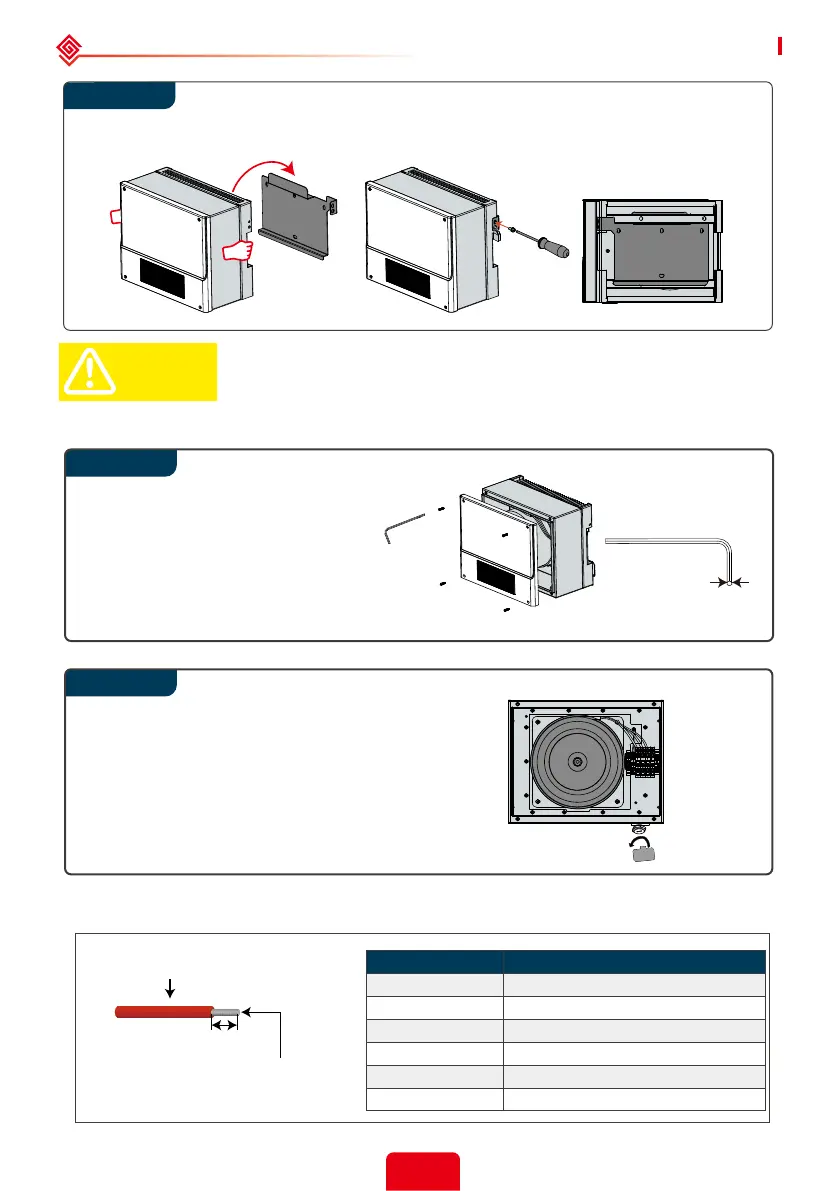
Step 1
Step 2
3mm
(0.12 in.)
Carry the auto-transformer by holding the heatsink on two sides and place the
equipment on the mounting bracket.
The auto-transformer is small in size, but very heavy. It is recommended
that two people carry it during installation.
L’auto-transformateur est de petite taille, mais très lourd. Il est
recommandé que deux personnes le portent pendant l’installation.
CAUTION!
Auto-transformer wiring connection
Using the included 3mm Allen
wrench, remove the 4 screws
of the auto-transformer and
remove the cover.
Remove the waterproof
conduit hole cover with the
included cap removal tool.
Please use 90℃, #8-10 AWG copper building wire.
Do not use aluminum cables .
10AWG
10AWG
8AWG
8AWG
8AWG
8AWG
Conductor Core Section
Maximum outside diameter
7.4mm(0.29in.)
18mm
0.71in.
Inverter Model
Conductor Core Section(Recommended)
Step 2
GW5000A-ES
GW6000A-ES
GW7000A-ES
GW7600A-ES
GW8600A-ES
GW9600A-ES



 To Next Page