21
Playback
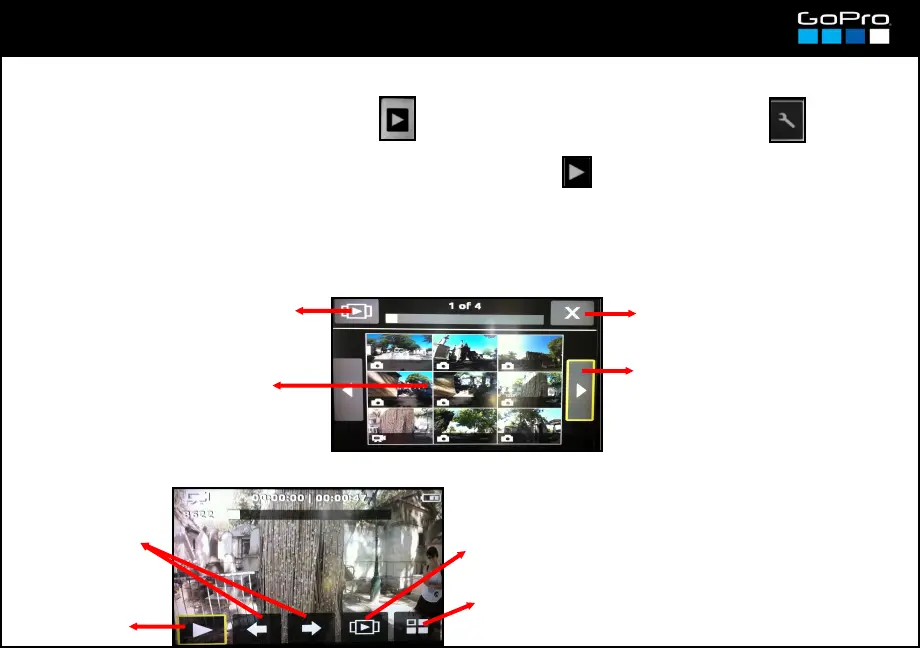
You can Playback connecting the optional Lcd Touch BacPac or a HDTV via HDMI or RCA cable.
Only in those cases the Playback screen will appear after the Settings screen
With the Lcd Touch BacPac press the physical PLAYBACK button in the right side of it.
If you connect a HDTV press POWER until you see the Playback screen and then press SHUTTER.
Either in the Touch Screen or in the TV what you see is similar. In the Touch Screen you must touch on it, in
the TV it is controlled by the POWER & SHUTTER camera buttons.
Exit
Next images
Continuous Playback
Thumbnails of the clips/
photos in the card
When you Playback a clip/photo the display changes:
Back to the
main screen
Continuous
Playback
Next / Previous
File
Play
NOTE: the photos took in Burst
Photo Mode appear in the
thumbnails as on single photo, you
must play it back to see them all.














 To Next Page