6
Wi-Fi Remote
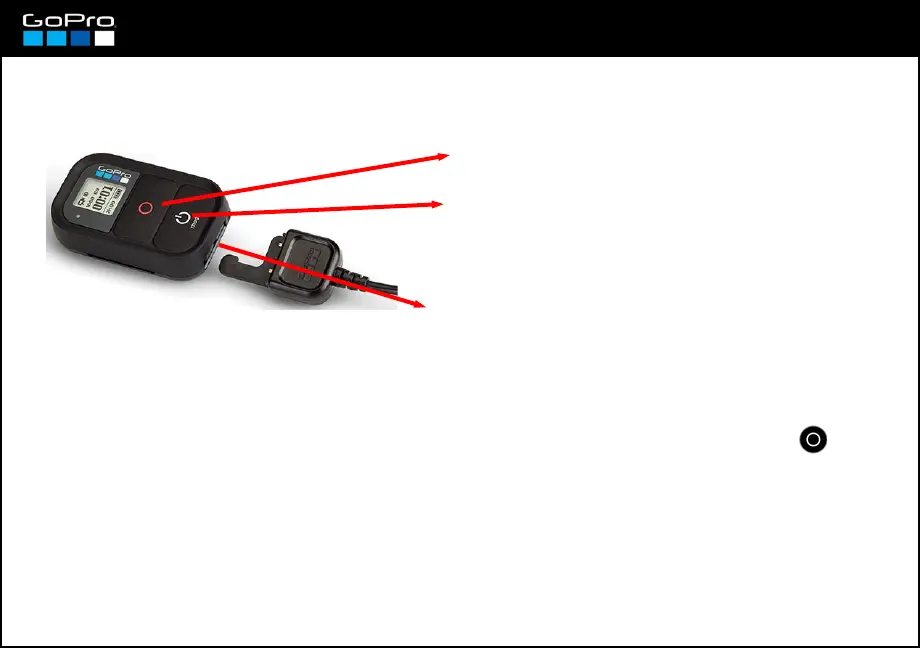
With the remote control you can operate the camera like you do in the camera body. It has two buttons,
like the camera, that work exactly like the ones there, and a screen that shows the same information.
SHUTTER button
POWER button: Press to turn On the remote, and if the
camera Wi-Fi is On and in Wi-fi Remote mode, the
camera will turn On too.
Charging port: connect the Usb charging cable,
as shown here, to charge the remote. To
disconnect the cable pull the small latch lever on
the back of the remote.
To link camera and remote for the first time:
1 – With the camera On, press Wi-Fi button twice to enter Wi-Fi menu directly, press SHUTTER and:
Select WIFI RC → select NEW
2 – Turn On the remote pressing its POWER button. The connexion will take place in seconds.
When the remote and the camera have been connected previously the process is similar, the only difference
is that in step 1 instead of NEW you should select CURRENT.
3 – In the remote you´ll read “CONNECT TO ANOTHER”, press NO for now (see next card).














 To Next Page