GORAVE AR5 AUDIO RECEIVER
Owner’s Installation and Operation Manual
V1.4 / 12-16-2014
5
2.3 Protection Circuitry
The AR5 features a thermal protection circuit that protects the amplier against potential damage in the event
of extreme or faulty operating conditions. The protection circuit is independent of the audio signal and has no
impact on sonic performance. The protection circuit monitors the temperature of the output devices and shuts
down the amplier if temperatures exceed safe limits. It is unlikely you will ever see this protection circuitry in
action. Should a faulty condition arise, the amplier will stop playing and the LED indicator on the AR5 unit will
ash quickly. The amplier will automatically resume normal operation when a fault condition is removed.
In most cases, the protection activates because of a fault condition such as shorted speaker wires or inad-
equate ventilation leading to an overheating condition. In very rare cases, highly re active or extremely low im-
pedance speaker loads could cause the protection circuit to engage. If the protection circuitry triggers repeat-
edly and you are unable to isolate and correct the faulty condition, contact your GoRave reseller for assistance
in troubleshooting.
2.4 Recommended: CAT6 Control Connection
Along with installing speaker wires, GoRave recommends running a CAT6 cable from your internet / telco /
electrical closet to the GoRave AR5 installation location. The CAT6 cable can serve future GoRave internet
remote control, home automation and television options.
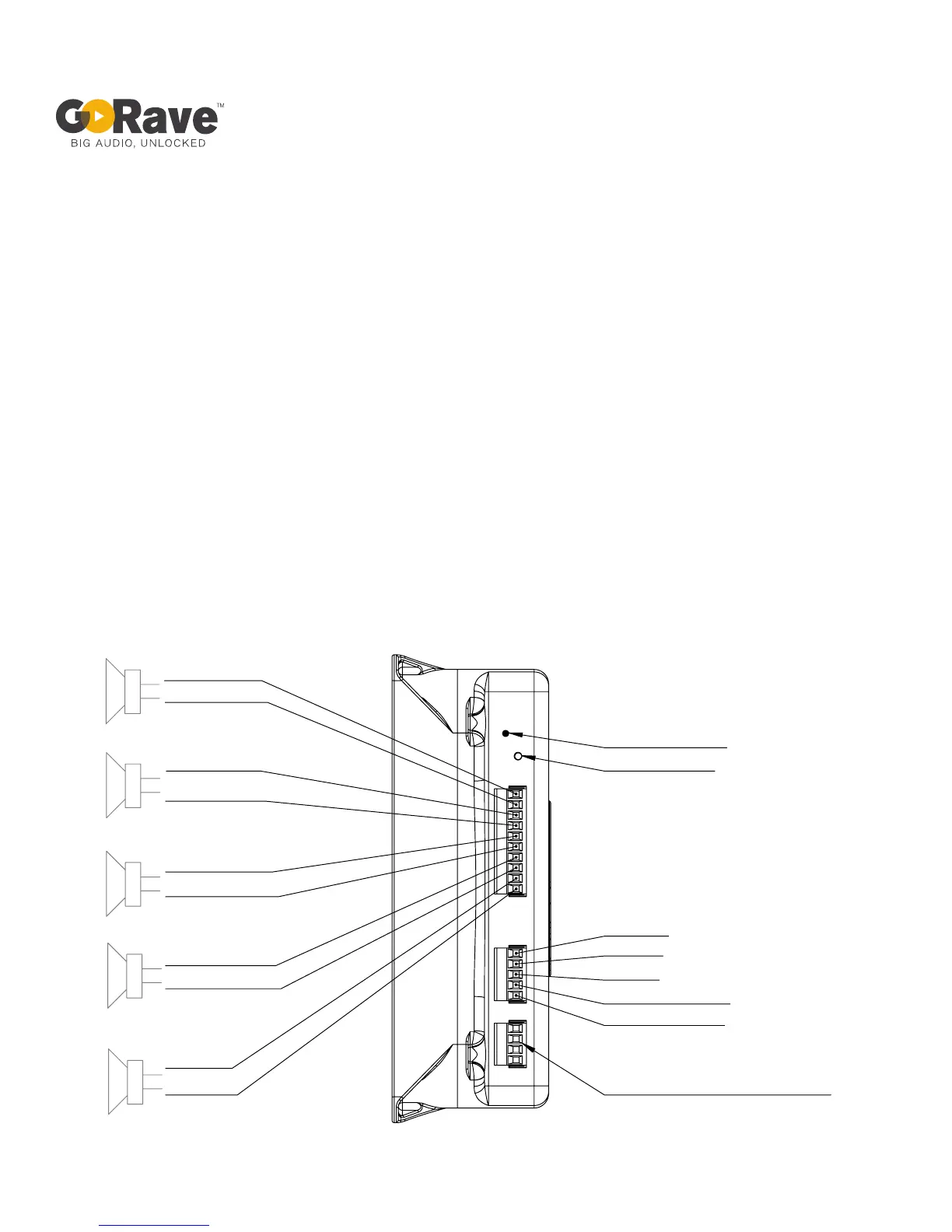
Fig 3: GoRave AR5 audio receiver speaker outputs and wired inputs.
speaker
speaker
speaker
speaker
Mono +
Mono -
Right Front +
Right Front -
Right Rear +
Right Rear -
Left Rear +
Left Rear -
Left Front +
Left Front -
Left (Mono) -
Left (Mono) +
Shield
Right -
Right +
LED indicator
Connect button
Serial programming port
Aux analog audio input
(wired interface):


 To Next Page