EasyManua.ls Logo

Graco 24L097 - User Manual

Graco 24L097
22 pages
Print Icon
To Next Page IconTo Next Page
Loading...
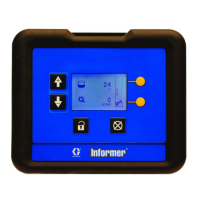
Instructions
DCM DCM
DCM
and and
and
ADCM ADCM
ADCM
332013E
EN
Display Display
Display
Control Control
Control
Module Module
Module
(DCM) (DCM)
(DCM)
and and
and
Advanced Advanced
Advanced
Display Display
Display
Control Control
Control
Module Module
Module
(ADCM), (ADCM),
(ADCM),
used used
used
to to
to
monitor monitor
monitor
and and
and
control control
control
󰘱ow 󰘱ow
󰘱ow
rate rate
rate
and and
and
track track
track
material material
material
use. use.
use.
For For
For
professional professional
professional
use use
use
only. only.
only.
Important Important
Important
Safety Safety
Safety
Instructions Instructions
Instructions
Readallwarningsandinstructionsinthismanual.Save Save
Save
these these
these
instructions. instructions.
instructions.
See See
See
page page
page
3 3
3
for for
for
kit kit
kit
information, information,
information,
including including
including
approvals. approvals.
approvals.
PROVENQUALITY.LEADINGTECHNOLOGY.


Other manuals for Graco 24L097

Questions and Answers

  • V
    Veronica AndersonSep 8, 2025
    Why is the display readout faulty on my Graco Measuring Instruments?
    • D
      david57Sep 8, 2025
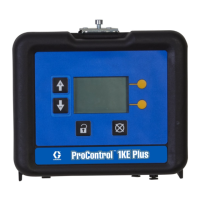
      A faulty display readout on your Graco Measuring Instruments could be due to excessive static discharge or an ambient temperature that is too high. Consider replacing the ProControl 1KE Plus or lowering the ambient temperature.
  • G
    gregorygonzalezSep 12, 2025
    Why is flow control over-driving to high flow rates in Graco Measuring Instruments?
    • I
      ismithSep 12, 2025
      If the flow control is over-driving to high flow rates in your Graco Measuring Instruments, verify the pressure switch electrical connection for automatic operation. Check that the switch closes when the gun fluid solenoid is activated. For manual operation, verify the air flow switch electrical connection and check that the switch closes when the gun trigger is activated. The flow control may activate when the atomizing air is flowing without any fluid flow.
  • J
    John SimpsonSep 12, 2025
    How to fix unstable flow with Coriolis meter in Graco Measuring Instruments?
    • J
      Jessica MckinneySep 12, 2025
      If you're experiencing unstable flow with a Coriolis meter in your Graco Measuring Instruments, check for the presence of bubbles or sediment. Look for upwards settling of air bubbles and downwards settling of solids, such as metallics.
  • S
    steve30Sep 14, 2025
    Why does Coriolis meter show flow when no fluid is flowing on Graco Measuring Instruments?
    • H
      Heather ClarkSep 14, 2025
      If the Coriolis meter shows flow when no fluid is flowing in your Graco Measuring Instruments, the low-flow cutoff may be set too low. Increase the low-flow cutoff to just above the highest false flow rate that was observed.
  • C
    Clifford BullockSep 16, 2025
    What causes regulator pilot to drive to high pressure in Graco Measuring Instruments?
    • J
      Jimmy SchmittSep 17, 2025
      If the regulator pilot drives to high pressure in your Graco Measuring Instruments, it could be due to inadequate fluid supply in pressure control or flow control mode. Check the pressure and flow capabilities of the fluid supply.

Summary

DCM and ADCM Introduction

Important Safety Instructions

Read all warnings and instructions in this manual and save them.

DCM and ADCM Models

Hazardous Location Approval

Details on hazardous location approval for North America and Europe.

Fire and Explosion Safety

Fire and Explosion Hazard

Precautions to prevent fire and explosion from flammable fumes.

Special Conditions for Safe Use

Conditions for safe use related to isolation and grounding.

Electrical Safety and Intrinsic Safety

Electric Shock Hazard

Instructions for grounding and preventing electric shock.

Intrinsic Safety Requirements

Guidelines for installing intrinsically safe equipment in hazardous locations.

Equipment Hazards and PPE

Pressurized Equipment Hazard

Risks associated with pressurized fluid and leaks.

Equipment Misuse Hazard

Consequences of operating equipment improperly or under influence.

Personal Protective Equipment

Recommended PPE for preventing injury in the work area.

Installation and Connections

Intrinsically Safe Installation

Guidelines for installing intrinsically safe components and systems.

Electrical Connections

Instructions for making electrical connections as per control drawing.

Equipment Grounding

Grounding Importance

Importance of grounding to reduce risks of static and electric shock.

Unit Connection Ports

DCM and ADCM Port Identification

Identification and description of ports on DCM and ADCM units.

Maintenance Procedures

Software Updates

Procedure for updating DCM or ADCM software using Manual 3A1244.

Battery Replacement

Procedure and precautions for replacing the unit's battery.

System Diagnostic Information

LED Signal Meanings

Interpreting LED signals for system status and errors.

DCM;ADCM Parts

Component Identification

List and visual identification of DCM and ADCM module and bracket parts.

Appendix A: Control Drawing

Notes and Installation Requirements

Important notes and requirements for installing intrinsically safe systems.

Appendix A: Entity Parameters (Fiber Optics, CAN Data)

Fiber Optics Connections

Entity parameters for Fiber Optic Receiver and Transmitter ports.

CAN Data;Power Entity Parameters

Entity parameters for CAN Data/Power input and output barriers.

Digital I;O A Output Barriers

Entity parameters for Digital I/O A output barriers.

Appendix A: Entity Parameters (Analog Input;Output A)

Differential Analog Input A Parameters

Entity parameters for Differential Analog Input A.

4-20 mA Output A Parameters

Entity parameters for 4-20 mA Output A.

Appendix A: Entity Parameters (Analog Output;Input B)

4-20 mA Output B Parameters

Entity parameters for 4-20 mA Output B.

Differential Analog Input B Parameters

Entity parameters for Differential Analog Input B.

Notes

Mounting Dimensions

Technical Data

Graco Product Warranty

Graco Information and Support

Contact information and website for Graco products and support.

Graco 24L097 Specifications

General IconGeneral
BrandGraco
Model24L097
CategoryControl Unit
LanguageEnglish

Related product manuals