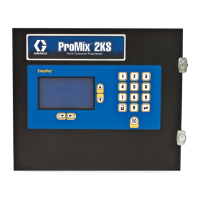
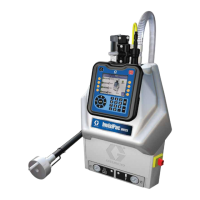
The Graco Xtreme Mix, Xtreme Mix 185, and ProMix Easy Data Download Kit is designed to facilitate the transfer of log and alarm data from Graco mixing units to a personal computer (PC). This kit is essential for monitoring the performance and operational history of these units, enabling users to analyze data for maintenance, troubleshooting, and process optimization.
Function Description
The primary function of this kit is to enable data download from Graco Xtreme Mix, Xtreme Mix 185, and ProMix Easy units. It includes software and necessary cables to establish a connection between the mixing unit and a PC. The software, provided on a CD, allows users to retrieve log files, which contain operational data, and alarm files, which record any system warnings or errors. This data can then be saved as text files or opened in spreadsheet programs like Microsoft Excel for further analysis.
The kit supports different configurations based on the operating environment of the mixing unit. For units located in non-hazardous areas, a standard RS-232 cable is provided. For units in hazardous locations (Class I, Div 1, Group D), a safety barrier is included with the RS-232 cable to ensure safe operation and prevent the risk of fire or explosion. The safety barrier ensures that the PC, which must always be in a non-hazardous location, is electrically isolated from the hazardous area equipment.
The data download process involves connecting the RS-232 cable to the unit's data port, turning on the unit, and then running the XtremeMX Log or ProMixEZ Log program on the PC. The software guides the user through naming and saving the log and alarm files.
Beyond data download, the kit also supports a "Setup Program" function. This program allows users to perform various configuration tasks on the mixing unit, including installing software updates, viewing log files directly (without downloading), setting the date and time, entering calibration information, and setting pump size. These setup capabilities are crucial for maintaining the accuracy and optimal performance of the mixing units.
Usage Features
The kit is designed for straightforward use, with clear instructions for installation and operation.
- Software Installation: The data download software is provided on a CD and is compatible with Microsoft Windows 98 and Windows XP operating systems. The installation process is guided by prompts, making it user-friendly.
- Unit Connection: Connecting the unit to the PC involves a simple RS-232 cable connection to the unit's data port. Specific instructions are provided for hazardous versus non-hazardous locations, emphasizing safety protocols.
- Serial/COM Port Configuration: The software automatically attempts to identify the COM port. However, if a serial port is unavailable, the kit supports the use of a USB-to-serial port adapter. Detailed steps are provided for configuring the COM port in the Tera Term software, including navigating through the Windows Device Manager to identify the correct port. This flexibility ensures compatibility with a wide range of PCs, including modern laptops that may lack dedicated serial ports.
- Data Logging and Alarm Retrieval: The XtremeMX Log or ProMixEZ Log program facilitates the retrieval of operational data and alarm events. Users are prompted to enter identifiable names for the log and alarm files, making data organization easier. The data is saved as text files, which can be easily opened and analyzed using common text editors or spreadsheet software.
- Setup Program for Unit Configuration: The Setup program offers a comprehensive interface for configuring various parameters of the mixing unit. This includes:
- Software Updates: Allows for the installation of new software versions to keep the unit's firmware current.
- Date and Time Setting: Essential for accurate timestamping of log and alarm data. The manual notes the importance of running the unit for a minimum of 8 hours after a long shutdown to recharge the clock battery and maintain accurate date information.
- Calibration Information Entry: Users can input calibration factors for pump sensors and flow meters, ensuring precise mixing ratios and material delivery.
- Pump Size and Length Settings: Allows for the configuration of pump-specific parameters, which are critical for accurate volume measurements and operational control.
- Pump Offset and Changeover Zone Settings: These parameters define the operational limits and transition points for the pump, influencing mixing quality and efficiency.
- Troubleshooting Guidance: The manual includes a dedicated section for software troubleshooting, addressing common issues such as power problems, cable connection issues, COM port conflicts with other software, and difficulties in displaying the main menu. This proactive guidance helps users resolve problems quickly and efficiently.
Maintenance Features
While the kit itself requires minimal maintenance, it plays a crucial role in the maintenance and longevity of the Graco mixing units.
- Preventive Maintenance through Data Analysis: By regularly downloading and analyzing log files, users can identify trends in unit performance, detect potential issues before they escalate into major failures, and optimize operational parameters. This data-driven approach supports a proactive maintenance strategy.
- Troubleshooting and Diagnostics: Alarm files provide critical diagnostic information, helping maintenance personnel quickly pinpoint the cause of system errors. The ability to retrieve historical alarm data is invaluable for understanding recurring issues and implementing effective corrective actions.
- Calibration and Configuration Management: The Setup program allows for the precise entry and adjustment of calibration factors and pump settings. This ensures that the mixing unit operates within specified tolerances, maintaining product quality and reducing material waste. Regular calibration, facilitated by this kit, is a key aspect of routine maintenance.
- Software Updates: The ability to install software updates via the Setup program ensures that the unit's control logic and features remain current, potentially improving performance, addressing bugs, and enhancing compatibility with other systems.
- Battery Maintenance for Date/Time Accuracy: The manual highlights the importance of running the unit continuously for at least 8 hours monthly to maintain the clock battery's charge. This detail, though related to the mixing unit itself, is crucial for the integrity of the data collected by the kit, as inaccurate date/time stamps can compromise data analysis.
- Safety Compliance: For hazardous location units, the safety barrier is a critical maintenance component. Regular verification of its correct installation and functionality, as outlined in the manual, is essential for maintaining safety compliance and protecting personnel and property.
In summary, the Graco Xtreme Mix, Xtreme Mix 185, and ProMix Easy Data Download Kit is a comprehensive tool that not only enables the retrieval of vital operational data but also provides the means to configure and maintain the mixing units effectively, contributing to their reliable and safe operation.



 To Next Page
 General