101
EN
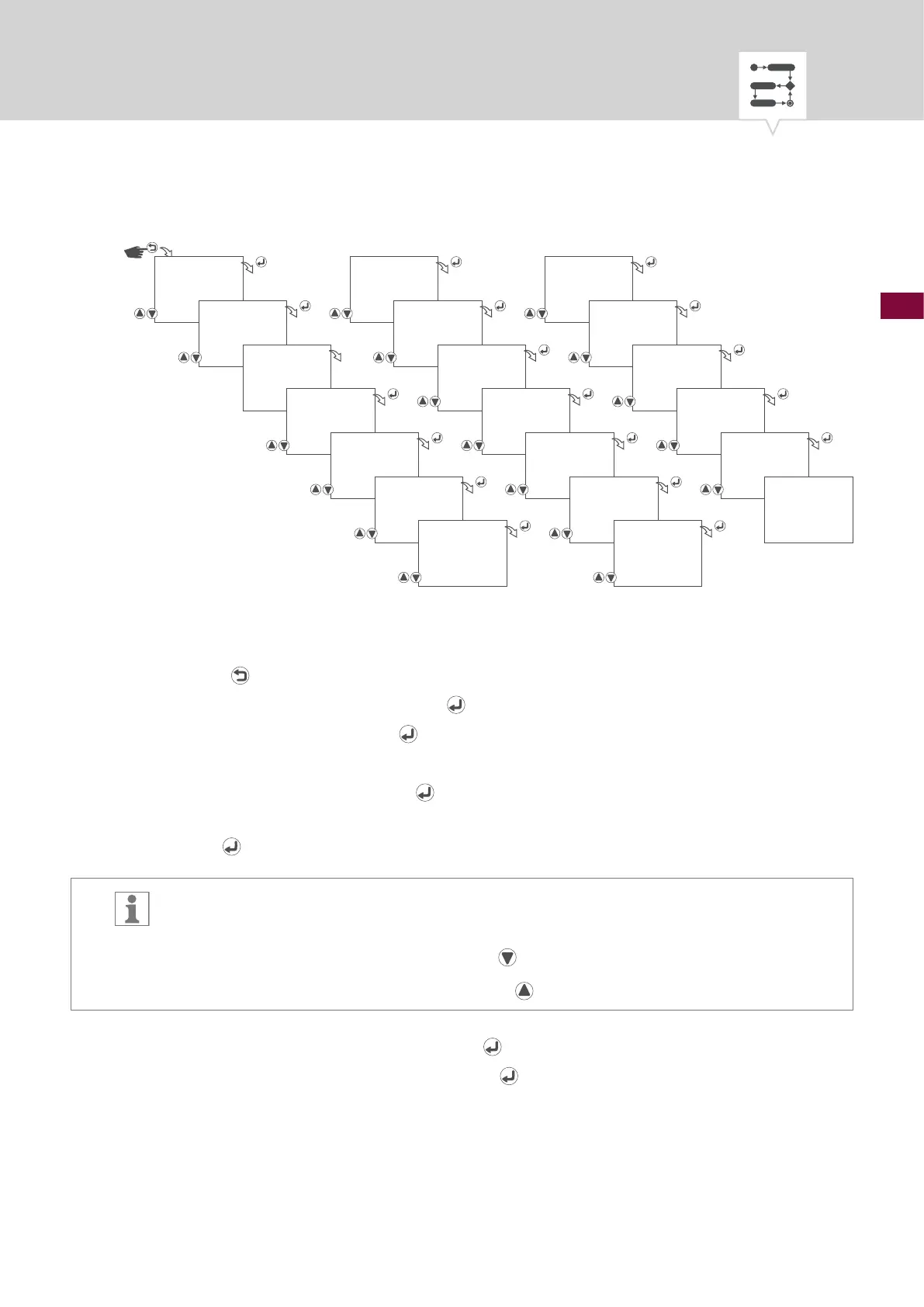
Fig. 29: Creating a new cycle switching program
1. Press the button.
2. Select
PROGRAM and conrm with the button.
3. Select
NEW and conrm with the button.
4. The automatically assigned program number will be displayed briey.
5. Select
CYCLE and conrm with the button.
6. Start - select day(s) of the week on which the switching program is to be carried out and conrm
with the
button.
The days of the week 1 – 7 are set by default. Individual days of the week can be set as
follows:
Days of the week can be selected with the
button.
Days of the week can be deselected with the
button.
7. Start time – select hours and conrm with the
button.
8. Start time – select minutes and conrm with the
button.
PROGRAM
NEW
PRG NO
01
CYCLE
SUNDAY
START
_23456_
START HOUR
09:00
START MINUTE
09:00
WITH DATE
NO/YES
START MONTH
06.--
START DAY
06.01
END MONTH
08.--
END DAY
09.30
SAVED
SUNDAY
END
_23456_
END HOUR
19:00
END MINUTE
19:00
CYCLE ON HOUR
00:00
CYCLE ON
MINUTE
00:10
CYCLE OFF HOUR
00:00
CYCLE OFF
MINUTE
00:30




 To Next Page