104
EN
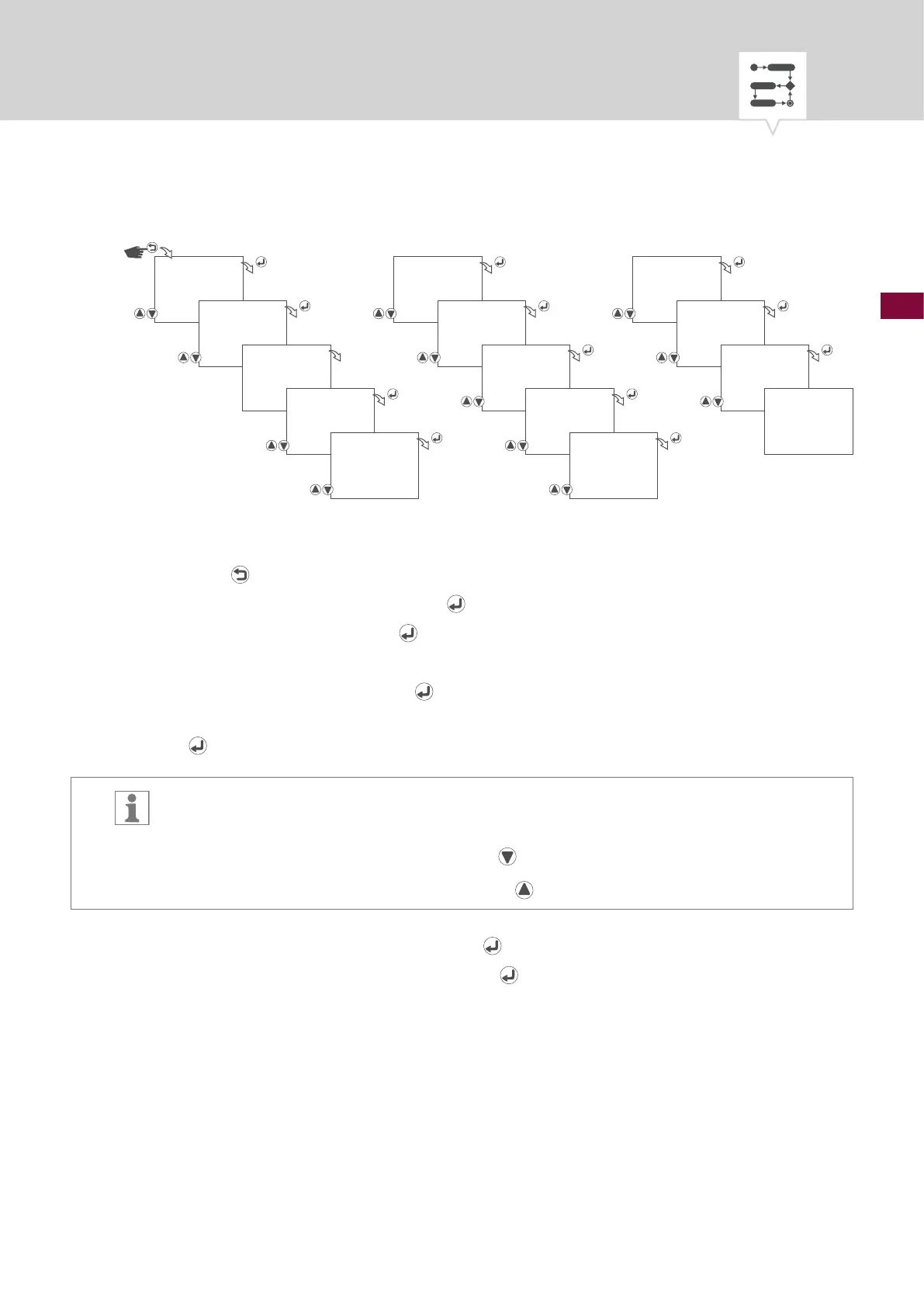
Fig. 31: Creating a new pulse switching program
1. Press the button.
2. Select
PROGRAM and conrm with the button.
3. Select
NEW and conrm with the button.
4. The automatically assigned program number will be displayed briey.
5. Select
PULSE and conrm with the button.
6. Select start day(s) of the week on which the switching program is to be carried out and conrm with
the
button.
The days of the week 1 – 7 are set by default. Individual days of the week can be set as
follows:
Days of the week can be selected with the
button.
Days of the week can be deselected with the
button.
7. Start time – select hours and conrm with the
button.
8. Start time – select minutes and conrm with the
button.
PROGRAM
NEW
PRG NO
01
CYCLE
SUNDAY
START
_23456_
START DAY
06.01
END MONTH
08.--
END DAY
09.30
SAVED
START HOUR
15:00
START MINUTE
15:00
PULSE ON
SECOND
30
WITH DATE
NO/YES
START MONTH
06.--











 To Next Page