EN - 31
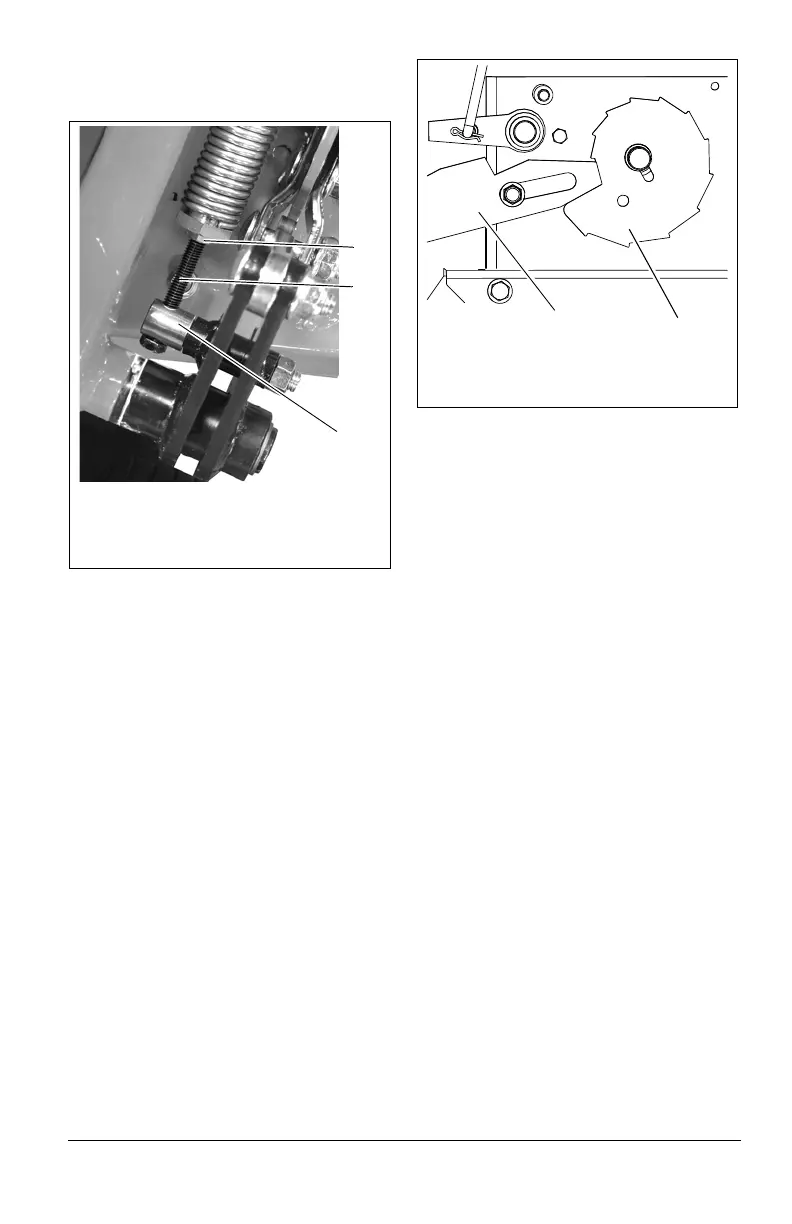
NOTICE: Lift springs must be adjusted to the
same tension on each side of the deck to
prevent cut quality issues.
HOC INDICATOR ADJUSTMENTS
For accurate cutting the height shown on the
HOC indicator dial must match the cutting
height.
Adjust Index Wheel
1. Release tension on HOC belt (see Adjust
HOC Belt Tension on page 31).
2. Move transport lock knob into off (up)
position.
3. Move deck to lowest position – 1.5"
(38 mm).
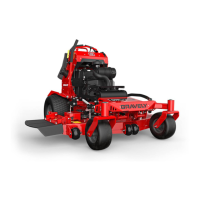
IMPORTANT: Deck is in lowest position when
deck lift contact arm is seated on the lowest
position of the HOC cam. See Figure 28.
4. Rotate HOC wheel so the lowest cutting
position (1.5 (38)) is indicated. Reset dial
position if necessary.
5. Tighten belt tensioner.
Adjust HOC Belt Tension
See Figure 29.
1. Loosen the outer lock nut on the HOC
belt tensioner.
2. Loosen the inner lock nut enough to allow
the tensioner to move.
3. Using a spring scale or similar tool,
position the tensioner to where 2.3 –
3.2 kg (5 – 7 lbs) of force is applied to
the HOC belt.
4. Tighten the inner lock nut.
5. Tighten the outer lock nut.
Figure 27
1. Jam Nut
2. Adjustable Spring Anchor
3. Trunnion
1
2
3
Figure 28
1. Deck Lift Contact Arm
2. HOC Cam
1
2


 To Next Page