User’s Manual of Remote Controller
3
(2).
Setting temperature
In unit on status, press button to increase setting temperature and press
button to decrease setting temperature. The range of temperature is from 16
℃
to 30
℃
.
Note: Under auto mode, manual adjustment of temperature is not needed.
(3).
Adjusting fan speed
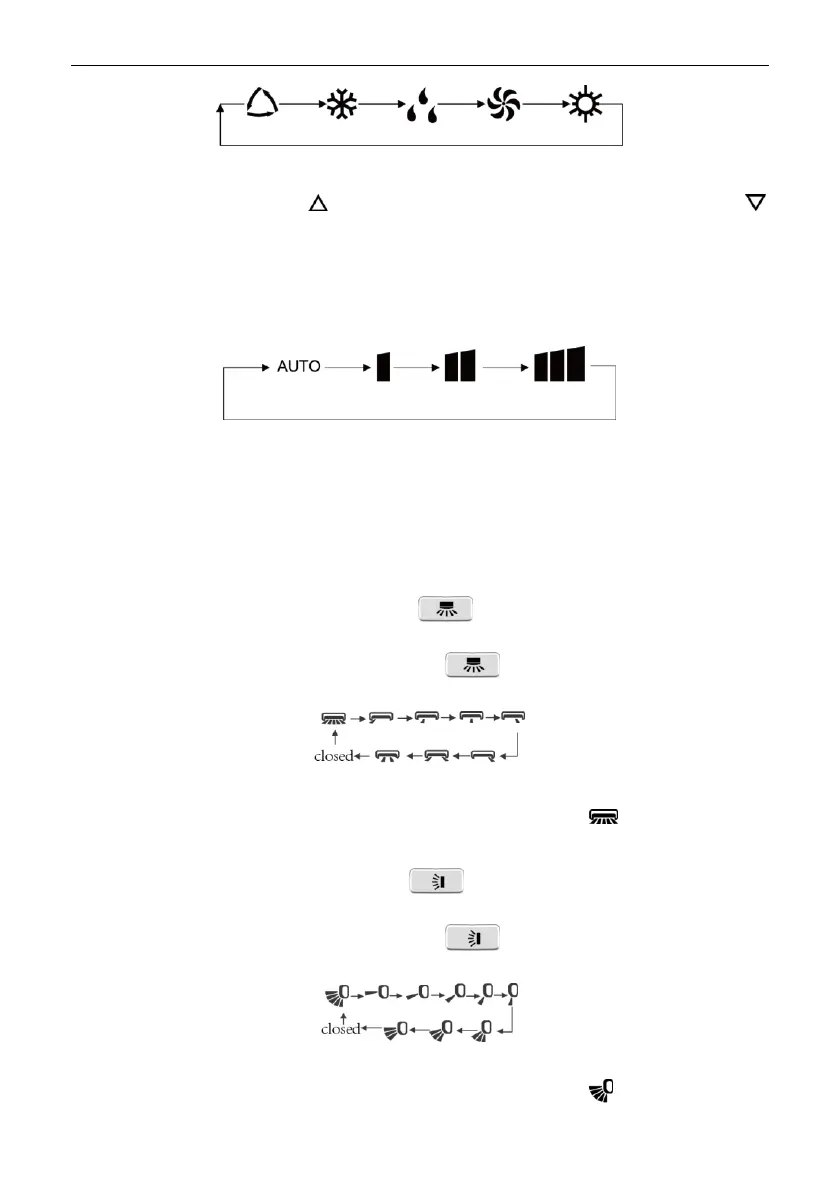
In unit on status, press FAN button to adjust fan speed in following sequence:
Notes:
①
.
When operation mode changes, fan speed is memoried;
②
.
Under dry mode, fan speed is low and can not be adjusted.
(4).
Setting swing function
Setting left&right swing
1).
Under simple swing status, press button to adjust left&right swing
status;
2).
Under fixed-angle swing status, press button to adjust left&right swing
angle circularly as below:
Note: operate continuously left&right swing in 2 seconds, swing states will change
according to above-mentioned order, or switch closed state and state.
Setting up&down swing
1).
Under simple swing status, press button to adjust up&down swing
status;
2).
Under fixed-angle swing status, press button to adjust up&down swing
angle circularly as below:
Note: operate continuously left&right swing in 2 seconds, swing states will change
according to above-mentioned order, or switch closed state and state;
Copyright 2018. This translation is property of GREE PRODUCTS SL. All rights reserved. Total or partial reproduction without its express authorization is prohibited.


 To Next Page