Instruction manual - MULTILINE NEXT DC
GREINER_multiline_next_dc_manual_EN_4225502_rev_2.docx
4.3.1 Unlocking and locking the hand control
The unlocking and locking of the hand control is shown here using the example of a MULTILINE NEXT DC with
5 adjustment drives (only 4225000/4225100).
Locking the hand control prevents the couch from moving accidentally or unintentionally.
After disconnecting the mains plug and then plugging it back in, the couch remains in its previous
operating status. This means, for example, that the hand control was locked before disconnecting
the mains supply, so the hand control remains locked even after the mains supply has been re-
stored.
The control unit remembers the current operating status, even without an existing battery for
emergency operation (see 4.5 Battery mode).
If the battery is available and the mains supply is disconnected, the control unit changes to stand-
by after 10 minutes. The corresponding operating control LED on the hand control turns off.
A couch in stand-by mode cannot be activated by the magnetic key. Press any button on the hand
control to activate.
Now the couch can be unlocked or locked.
Operating statuses
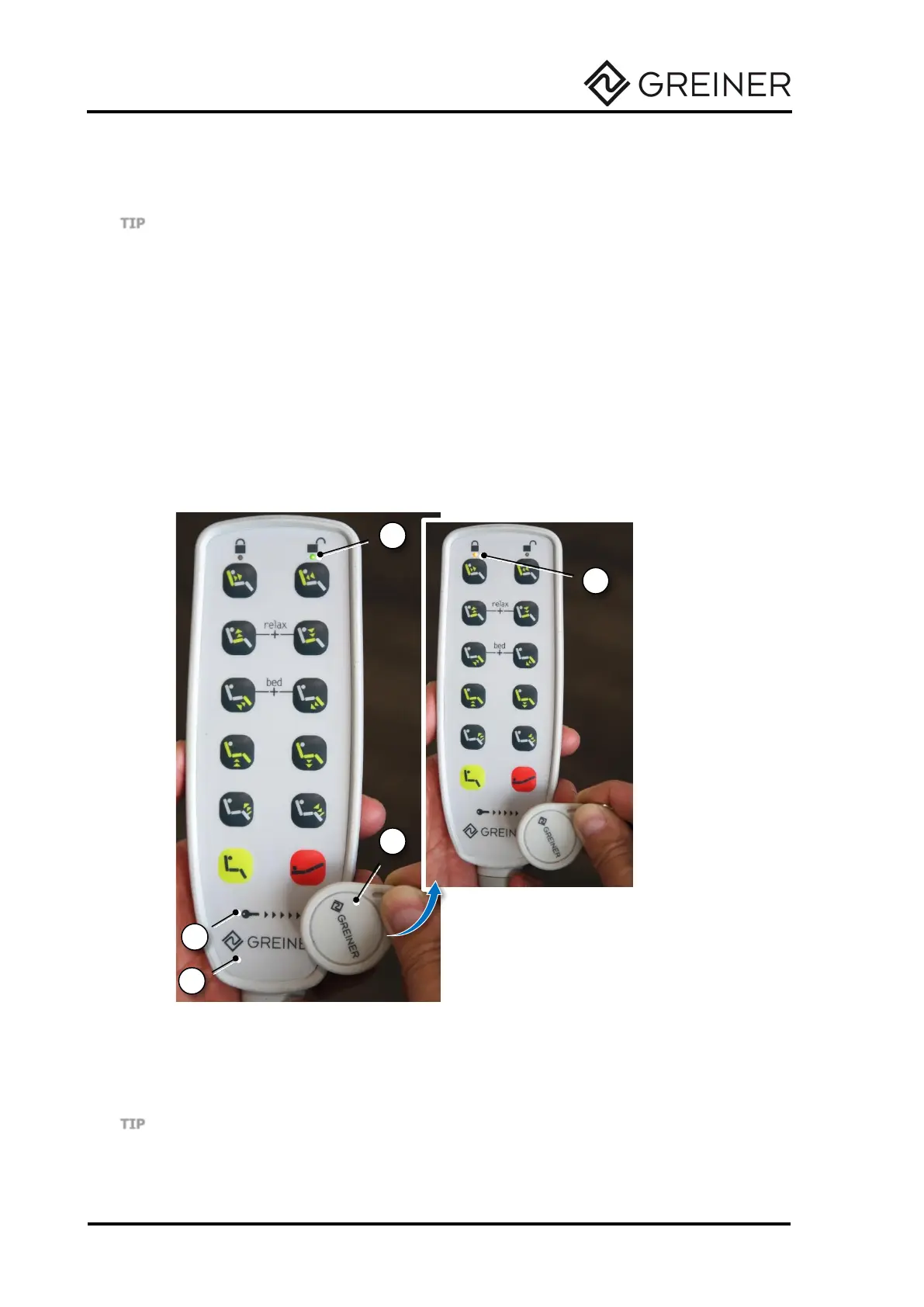
When the couch is connected to the mains and the hand control is disabled, the yellow operation
control LED (1) lights up.
When the couch is connected to the mains and the hand control is enabled with the magnetic key,
the green operation control LED (2) lights up to indicate that the couch is ready for operation.
1. Yellow operation control LED (hand control locked)
2. Green operating control LED (hand control unlocked)
3. Hand control
4. Magnetic key
5. Key symbol
Fig. 31 Unlocking and locking the hand control
Unlocking the hand control
To unlock the hand control (3), swipe the magnetic key (4) over the key symbol (5).
Locking the hand control
To lock the hand control, swipe the magnetic key over the key symbol again.
When the hand control is locked, any foot switch for moving to the shock position (Trendelenburg
position) is also locked (see 4.6 Foot switch).


 To Next Page