EasyManua.ls Logo

GROM Audio GROM-USB3 - User Manual

GROM Audio GROM-USB3
18 pages
Print Icon
To Next Page IconTo Next Page
Loading...
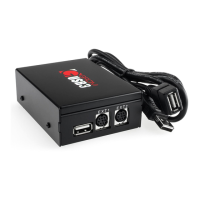
GROM-USB3 MP3 car stereo adapter kit
TABLE OF CONTENTS
Chapter 1 – Introduction
1.1 Subject p.2
1.2 Functionality Highlights p.2
1.3 Main Features in USB and Android® phone Mode p.2
1.4 Main Features in USB iPod®/iPhone® Mode p.2
1.5 Bluetooth Hands Free and Wireless, AUX-IN p.2
1.6 Precautions p.2
1.7 Disclaimer p.3
1.8 Completeness and connection of set p.3
1.9 Important Compatibility Notes p.3
1.10 EXT1/EXT2 ports p.4
Chapter 2 – General Installation
2.1 General Installation p.5
2.2 Tools needed p.5
2.3 Preparation and adapter installation p.5
2.4 Installation Troubleshooting p.7
Chapter 3 – Usage manual
3.1 Different MODES of GROM-USB p.8
3.2 Android Device Operation p.8
3.2.1 Android Setup and Operation p.8
3.2.2 Android Operation Troubleshooting p.10
3.3 Operation in USB Mode p.10
3.3.1 Supported USB Storage Devices p.10
3.3.2 Supported formats p.10
3.3.3 Directories Setup p.10
3.3.4 Basic Features p.11
3.3.5 Detailed operation instructions p.12
3.3.6 USB Operation Troubleshooting p.12
3.4 USB iPod/iPhone Mode Operation p.13
3.4.1 Simple Mode p.13
3.4.2 Advanced Mode p.14
3.4.3 Playlist set up for advanced mode p.14
3.4.4 When car ignition is OFF p.15
3.4.5 Troubleshooting p.15
3.5 AUX Mode -- AUX-IN or Bluetooth Operation p.15
3.5.1 AUX-IN input p.15
3.5.2 Bluetooth Dongle p.16
Chapter 4 – Support p.16
Chapter 5 – Warranty, license and disclaimer p.17
V.1.0.0 1

Questions and Answers

  • D
    deanpatrickAug 1, 2025
    What to do if my car stereo isn't recognizing the GROM Audio USB Adapter?
    • J
      Jennifer SimmonsAug 1, 2025
      If your car stereo isn't recognizing the GROM Audio USB Adapter, there might be a few reasons. Some car stereos need a restart to catch the signal. Try turning the stereo and ignition off, then back on after connecting the adapter. Also, disconnect any external CD changers. Finally, check the cable connections to ensure they are secure and that there are no bent pins.
  • S
    Shane ChapmanAug 7, 2025
    What to do if there is no sound from GROM Audio Adapter for BMWS (dash install)?
    • K
      kimberly71Aug 7, 2025
      If you're experiencing sound issues with your GROM Audio Adapter in a BMWS (dash install), the bus wire may be loose. Ensure it's securely attached, possibly tightening the Posi-Tap connector or using a multimeter. Also, check that the 10-pin audio cable on the BMWS harness is correctly inserted with the white stripe or arrow facing up. If your radio has a 12-pin connector, skip the first column of pins when connecting the 10-pin GROM connector. Verify the 10-pin sound connector on the vehicle cable is correctly aligned.
  • M
    Mario LeeAug 14, 2025
    Why is my VAG stereo not recognizing the GROM Audio USB adapter?
    • B
      brianna14Aug 14, 2025
      If your VAG stereo isn't recognizing the GROM Audio USB adapter, the single black wire on the vehicle-specific harness might not be properly grounded. Make sure the black cable is correctly grounded.
  • J
    Jenna GutierrezAug 19, 2025
    What to do if I can't hear music from the MP3 player using the GROM Audio GROM-USB3?
    • R
      Randy GreenAug 19, 2025
      If you can't hear music from the MP3 player when using the GROM Audio Adapter, the CD changer input might not be selected. Make sure CD changer, SAT mode, or AUX is selected on your stereo. The correct key depends on your stereo.
  • N
    Nicole GarnerAug 26, 2025
    How to troubleshoot a GROM Audio GROM-USB3 Adapter with no power?
    • A
      Amanda WattsAug 26, 2025
      If your GROM Audio Adapter has no power, check the cable connections to ensure they are properly connected.

Summary

General Installation

Preparation and Adapter Installation

Provides step-by-step instructions for installing the adapter.

Installation Troubleshooting

Offers solutions for common installation problems.

Usage Manual

USB MODE - Android Operation

Details how to use the adapter with Android devices.

Android Operation Troubleshooting

Solves common issues encountered with Android operation.

Operation in USB MODE

Explains how to use the adapter in USB mode.

Detailed Operation Instructions

Provides detailed instructions for operating the GROM USB adapter.

USB Operation Troubleshooting

Addresses and resolves common USB playback issues.

USB iPod;iPhone;iPad MODE Operation

Explains how to use the adapter with iPod, iPhone, and iPad devices.

IPOD;IPHONE;IPAD OPERATION TROOUBLESHOOTING

Solves common issues with iPod/iPhone/iPad operation.

AUX Mode - AUX-IN or Bluetooth Operation

Covers usage of AUX-IN and Bluetooth modes.

AUX-IN Input

Details how to connect and use the AUX-IN audio input.

GROM Audio GROM-USB3 Specifications

General IconGeneral
BrandGROM Audio
ModelGROM-USB3
CategoryAdapter
LanguageEnglish

Related product manuals