2.2.2 Serial Number and Check Code
The ShineMaster Serial number (S/N) and check code (CC) are stuck on the ShineMaster’s
package box, which have mixed up with letters and numbers. the serial number and
check code for each device are unique, to identify each ShineMaster. When you want to
upload the data of ShineMaster to the server, you will need both serial number and
‘check code’ to register on the server
ShineMaster supports network communication, which can be communicated via wired
WLAN, 4G and cloud server. Upload the monitored data to the server of Growatt, and
then access the server's domain name. with the industrial common communication mode
RS485 and wireless RF communication, ShineMaster can also supports wired and wireless
communication to monitor and control devices and perform online upgrades on follower
devices. By accessing ShineMaster's internal IP address, you can enter the built-in page
for parameter setting, device adding and inspections. (please refer to section 4.4 below).
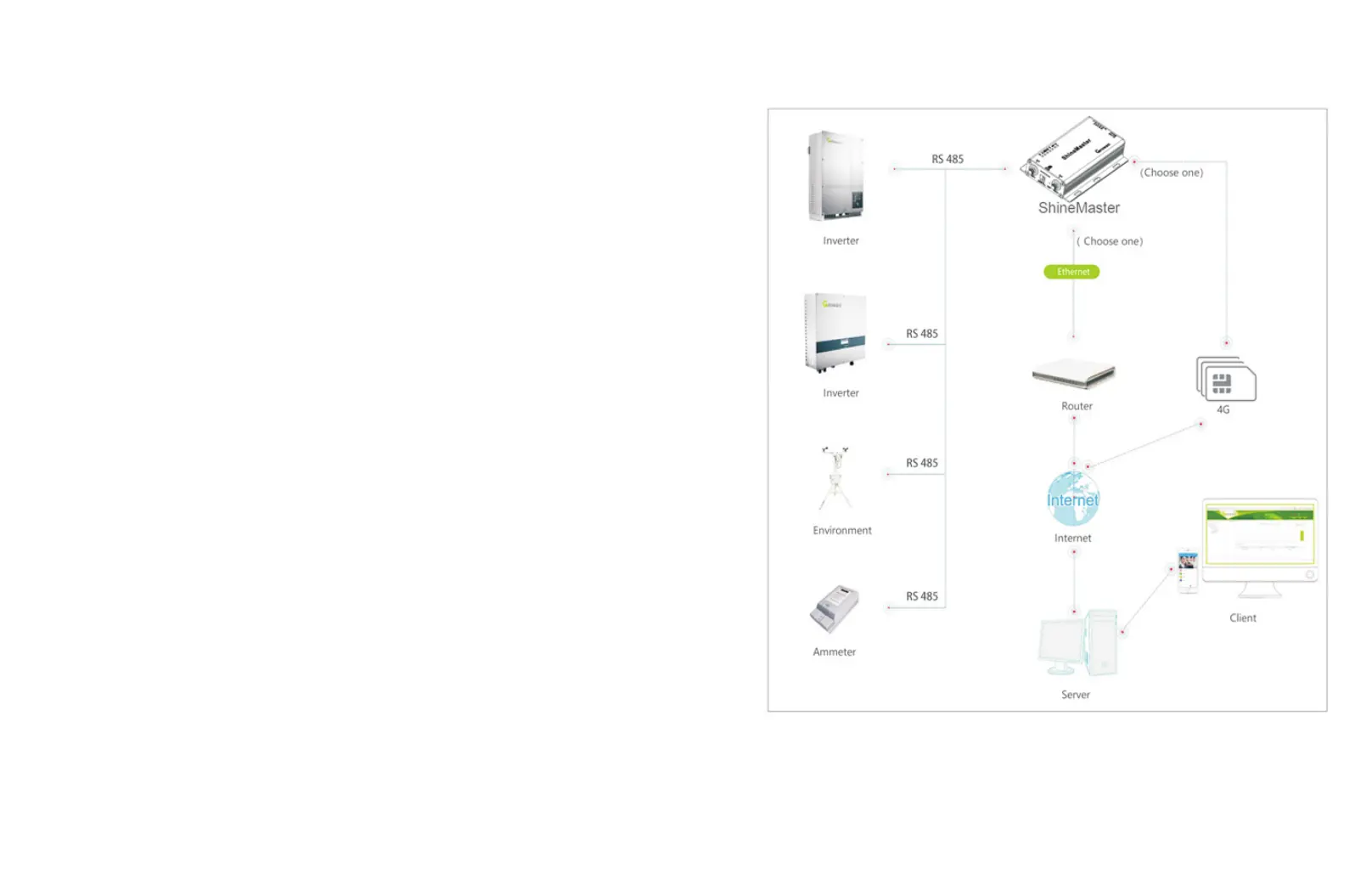
ShineMaster monitors the photovoltaic devices through RS485 and RF(temporarily not
supported). The diagram below shows the schematic diagram of network monitoring
through wired RS485.
Fig 2-5
6
7
2.3 ShineMaster Network Introduction



 To Next Page