4.6 Server Settings
4.6.1 ShineMaster networking Settings
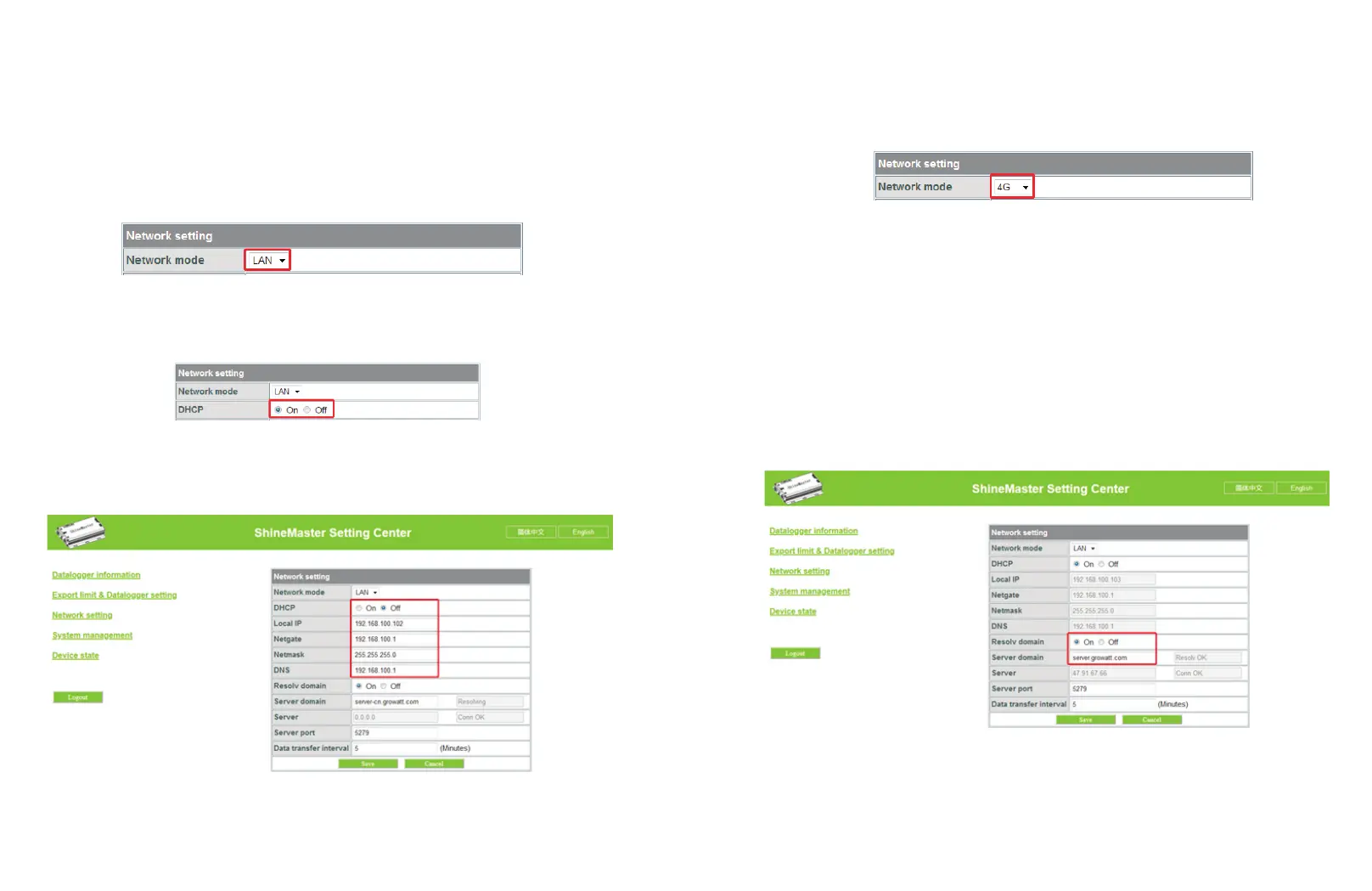
(2) ShineMaster’s Default setting of the DHCP function is “ON” it will automatically get IP
address.ShineMaster
(3) If you need a fixed IP address you need following steps
(3.1) Turn off the “Dynamic IP” to shut down the DHCP function
(3.2) Put in the fixed IP, network management, net mask and DNS then click “Save”
4.6.2 Server Address Setting
The Server Address will choose two methods, one is IP and one is domain name, you can
only use one at a time.
when you are using the domain name to connect server you can choose on at “Domain
Name Analysis Function” set the server as server.growatt.com
(1)
18
19
Fig 4-12
Fig 4-13
Fig 4-15
1:The standard version:LAN communication
In the configuration page click " Network setting" column, select
the net way for LAN, can be saved.
(1)
Fig 4-11
2:The 4 g version:
In the configuration page click " Network setting" column, select the
net way for 4G, can be saved.
Fig 4-14
Note: ShineMaster 4 g version can also choose to LAN way to communicate with the server.



 To Next Page