Note:Server port name and data upgrade interval are fixed cannot be changed.
Caustion:
1)If you add a device, after saving there is no refreshment, please disconnect the data
logger and restart it.
2)when setting related function in the configuration parameters, only follow the above
method, other parameters remain unchanged.
5 ShineMaster data uploading to ShineServer
5.1 Registration and login
(1) Enter the address of the server on the computer browser to enter the ShineServer
login page. If you are logging in for the first time, register the user name first. Enter the
domain name access page, as shown in Figure 5-1.
The Chinese user server domain name is: http://server-cn.growatt.com
The overseas user server domain name is: http://server.growatt.com
20 21
If needed to the datalogger and all monitoring devices for data display, monitoring, and
set up parameters by the server, you need to first add datalogger to the server, when
Shinemaster added to the server, if the subsequent need to modify some parameters of
The datalogger or enable, disable a function can be done through the server.
Fig 4-16
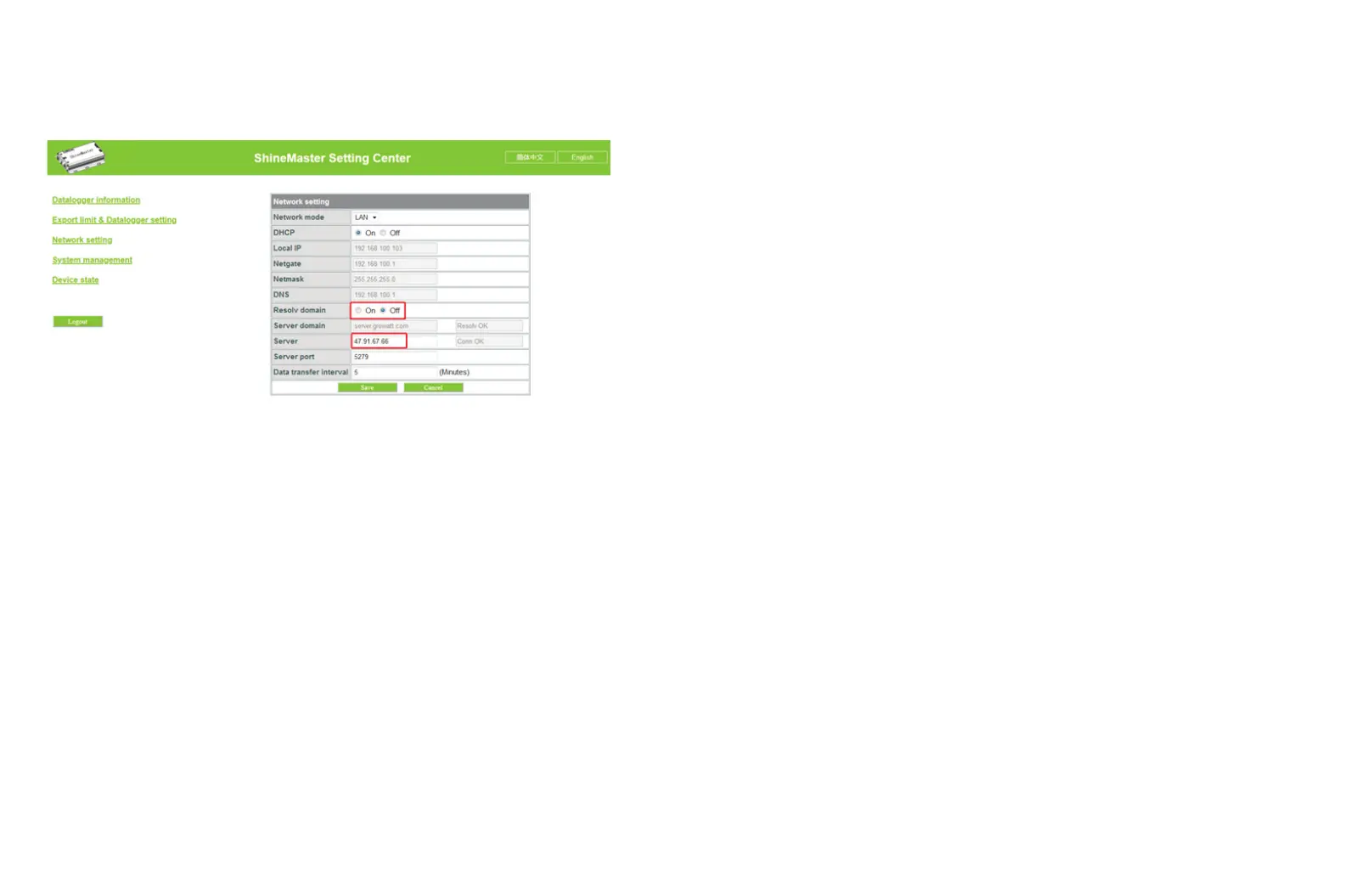
(2) When you are using Server IP to connect the server please turn off the “domain name
analysis function”, set the server as 47.91.67.66



 To Next Page