Mini-X Installation, Setup & User Manual GRT Avionics
Revision A9 14
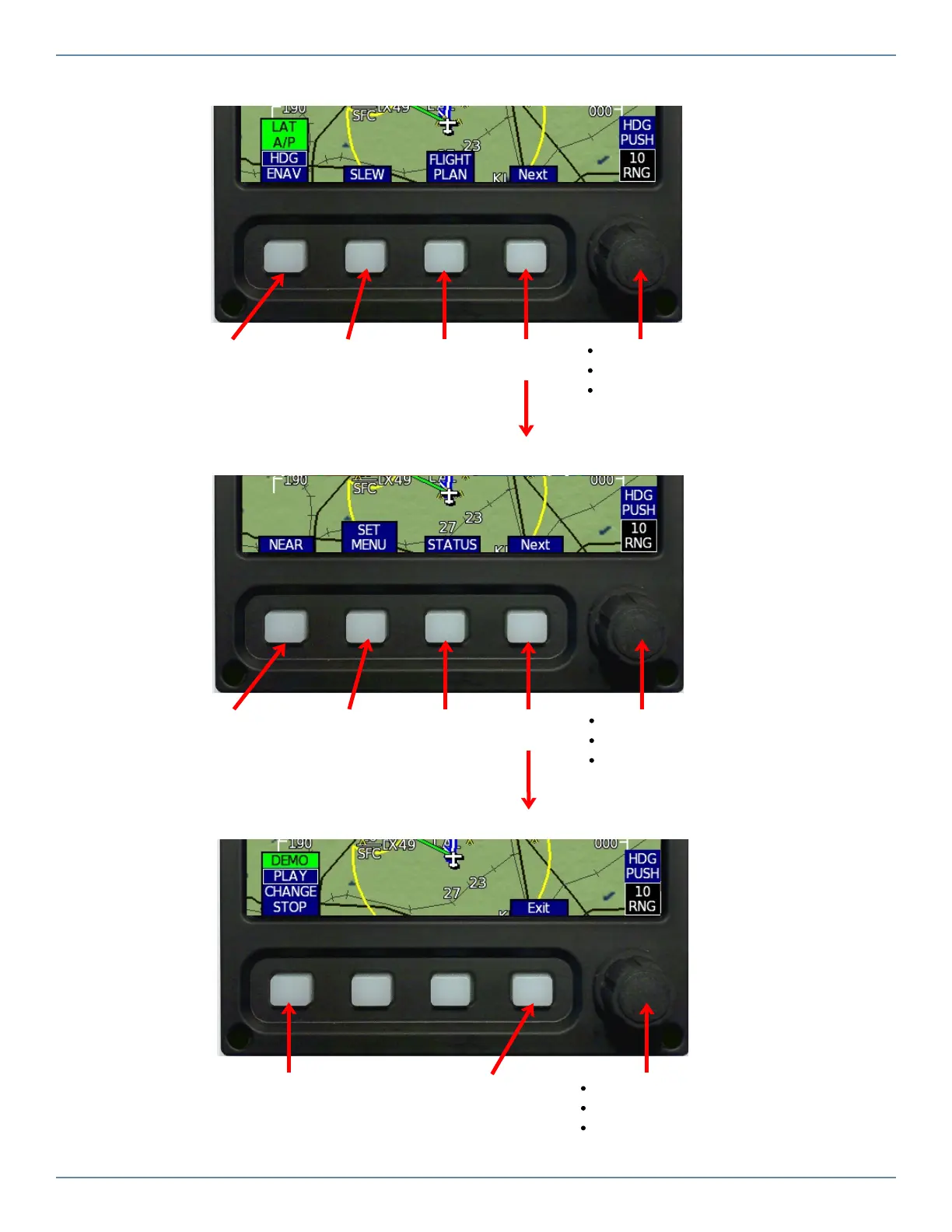
Map Level 3 Softkeys (typical)
Choose Lateral
Autopilot
Source
See objects
off the edge
of the map
View,
Create, Edit
Flight Plan
Nearest
Airport,
Weather Freq,
or Navaid
Settings
Main Menu
Turn to adjust map range
Press once for Heading Bug
Press again for Map Selection Tool
cursor and Nearest selection softkeys
Error or
Warning
Details
More
items…
Turn to adjust map range
Press once for Heading Bug
Press again for Map Selection Tool
cursor and Nearest selection softkeys
More
items…
Map Level 4 Softkeys (typical)
Map Level 5 Softkeys (typical)
Manually play
or record
demo file
Press when
finished with
sofkteys
Turn to adjust map range
Press once for Heading Bug
Press again for Map Selection Tool
cursor and Nearest selection softkeys


 To Next Page