Selecting ‘TAPE’
• Press the ON/OFF button to switch the unit on.
•
Press the
TAPE
button on the unit or on the remote control.
– The TAPE 6 indicator lights up.
Cassette playback
• Press 9// STOP/EJECT to open the cassette holder.
•
Insert a recorded
cassette.
•
Adjust the sound using the VOLUME and UBS controls.
• Press B PLAY and playback will start.
• For brief interruptions, press
; PAUSE.
• To restart playback, press this button once more.
– When the end of the tape is reached the B PLAY
button is released.
• To stop, press 9// STOP/EJECT.
On pressing again, the cassette holder will open.
Winding the tape
• Press R F.FWD to search forward to the end of
the tape.
• Press Q REW to search backward to the
beginning of the tape.
Copyright:
Recording is permissible insofar as
copyright or other rights of third parties
are not infringed.
CASSETTE DECK
24
CDM 700 page 24
GB
Compact cassettes
• For recording, use a NORMAL (IEC type I)
cassette on
which the tabs are not broken out.
–
This deck is not suited for recording on CHROME (IEC II)
or METAL (IEC IV) cassettes.
• For playback, any cassette type may be inserted.
• At the very beginning and end of the tape, no
recording will take place during the few seconds
when the leader tape passes the recorder heads.
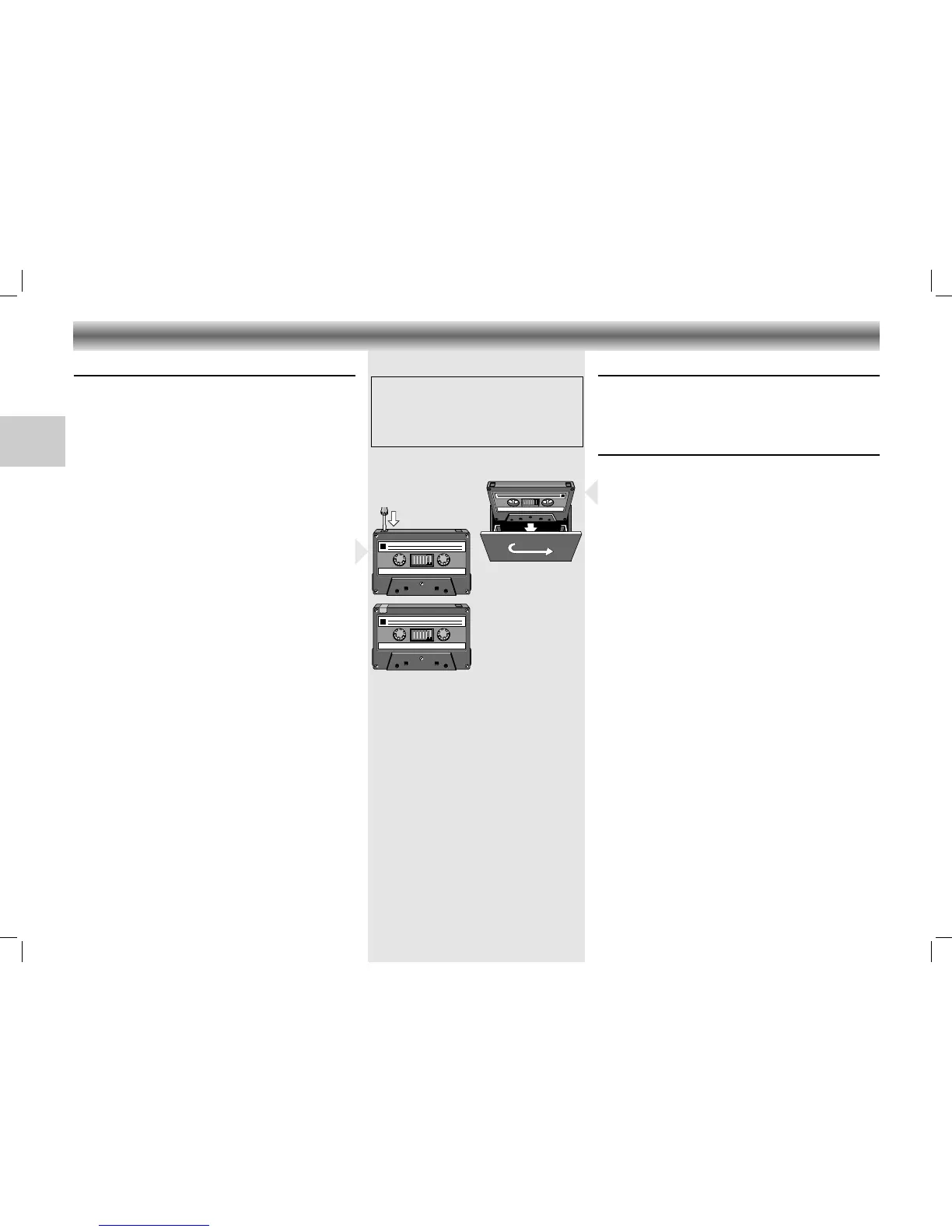
• To prevent the accidental erasure of a recording,
keep the cassette side to be safeguarded in front of
you and break out the left tab.
Now, recording on this side is no longer possible.
• To render this safeguard ineffective, cover the hole
with a piece of adhesive tape.
• Before use, check and tighten slack tape with a
pencil to avoid jamming the deck mechanism or
snapping the tape.
• The tape of a C-120 cassette is extremely thin and
can be easily damaged. C-120
cassettes are not
recommended for this unit.
• Do not expose the cassettes to rain, moisture, sand,
or to excessive heat. (E.g. from heating equipment
or in motor cars parked in the sun).
• Do not store cassettes near strong magnetic fields
(for example, TV sets, speakers, engines, etc.).





 To Next Page