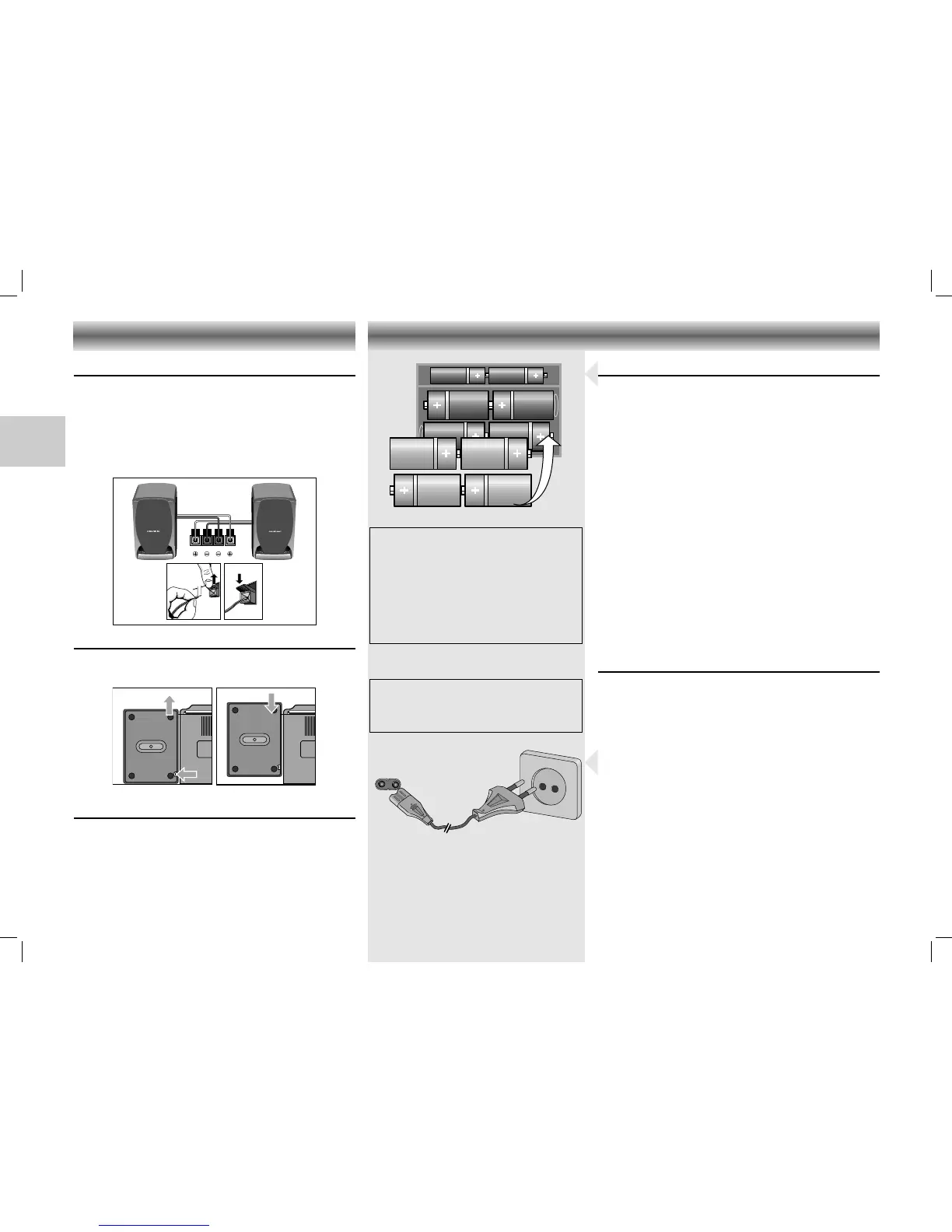
Loudspeaker terminals
For connecting the supplied loudspeakers (or others
having an impedance of 8 Ohms).
Always switch off the unit before you remove or
connect the speaker cables.
• Connect the coloured (or marked) wire to the red
terminal as shown.
Speakers
• To take off and attach the loudspeakers, please see
diagrams below as indicated.
Stereo headphone socket p
• You may connect stereo headphones having a
3.5 mm plug to the jack p.
– Inserting the plug will disconnect the speakers.
Battery Supply
• Open the battery compartment (on the bottom of the
set) and insert as shown 8 batteries, type R14,
UM2 or C-cells.
• Remove the batteries if exhausted or if they will not
be used again for a long period.
– The battery supply is switched off when the set is
connected to the mains.
• To change over to battery supply, pull out the plug
from the AC INPUT socket.
Back-up batteries for preset memory
In order to keep the presets stored in the memory
during the time that the unit is switched off, it is
necessary to insert two additional batteries.
• Place these batteries size LR06, AA, alkaline type in
the battery compartment.
• These batteries should always be inserted,
regardless of the power supply (mains voltage or
batteries).
Mains supply
• Check if the mains voltage as shown on the type
plate (at the rear of the set) corresponds to your
local mains voltage. If it does not, consult your
dealer or service organisation.
• Connect the mains lead to the AC INPUT socket and
the wall socket.
– The mains supply is switched on.
• When you insert the power supply cable plug into
the mains socket, the unit automatically switches to
stand by.
– The Stand by indicator
6 lights up.
• To disconnect the set from the mains completely,
withdraw the mains plug from the wall socket.
Important note for users in the U.K.
When fitting a mains plug,
follow the
instructions on page 2.
Note on Environmental
Protection
Do not throw exhausted batteries in the
household refuse.
Hand over the old batteries to your
dealer or public collecting points when
buying new ones.
CONNECTIONS POWER SUPPLY
18
CDM 700 page 18
GB






 To Next Page