35
ENGLISH
Dear Customer,
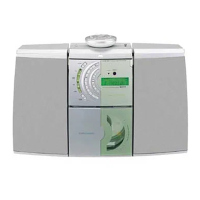
Congratulations on the purchase of your new
GRUNDIG Micro HIFI System CMS 4200.
Please read the following user notes carefully to
ensure full enjoyment of your quality GRUNDIG
product for many years to come.
A responsible approach!
GRUNDIG focuses on contractually
agreed social working conditions
with fair wages for both internal
employees and suppliers. We also
attach great importance to the
efficient use of raw materials with continuous
waste reduction of several tonnes of plastic every
year. Furthermore, all our accessories are available
for at least 5 years.
For a future worth living.
Grundig.
Controls and parts
See the figure on page 3.
A
Main-Unit
1. (Headphone) Socket
Connect to Headphone.
2. (ON/OFF) Button
Switch the unit between ON and STANDBY mode.
3. (Stop play) Button
In Disc/USB mode, stop play.
4. MODE (Source) Button
Select the play function.
5. Display Window
6. USB Socket
Insert the USB device to play music.
7. Disc Compartment
8. Button
Open and close the disc compartment.
9. / Buttons
In Disc/USB/BT mode, press to skip to previous/
next track.
In FM mode, short press for 0.05MHz frequency
change, long press will scan to previous/next
available station.
In DAB mode, short press select a previous/next
available station.
Button
Play/pause/resume playback.
In standby mode, press the button repeatedly to
activate or deactivate the alarm timer.
10. EQ Button
Select Equalizer (EQ) Effect: POP - CLASSIC -
ROCK - JAZZ - FLAT.
11. BASS Button
Press “BASS” then rotate VOL+/- knob to adjust
the bass level.
12 TREBLE Button
Press “TREBLE” then rotate VOL+/- knob to
adjust the treble level.
13. VOL+/- knob
Increase/decrease the volume level.
14. Speakers (R/L) Sockets
15. AUX IN (R/L) Socket
16. LINE IN Socket
17. ANT. Socket
18. AC~ Socket
19. Speakers (R/L) Sockets
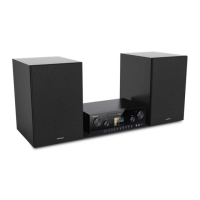
What’s in the Box
1
Main Unit x1
2
Speakers (Left / Right) x2
3
Remote Control x1
AAA Batteries x2
4
AC Power Cord x1
5
Speaker Cable x2
6
FM/DAB Aerial x1
7
RCA to 3.5mm Audio Cable x1
AT A GLANCE _______________________________











 To Next Page