EasyManua.ls Logo

Grundig MCD 30 - Page 3

Grundig MCD 30
9 pages
Print Icon
To Next Page IconTo Next Page
To Previous Page IconTo Previous Page
Loading...
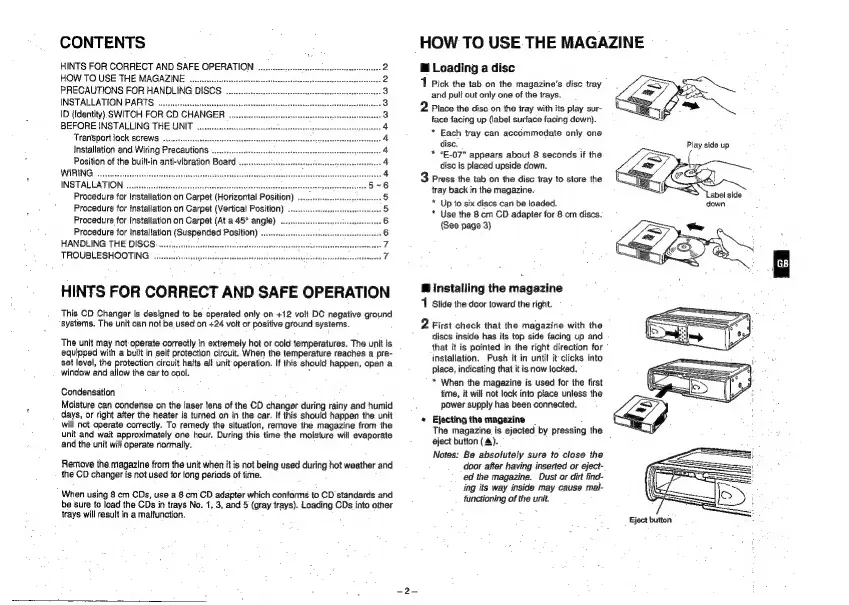
CONTENTS
HINTS
FOR
CORRECT
AND
SAFE
OPERATION
.
HOW
TO
USE
THE
MAGAZINE
.....
PRECAUTIONS
FOR
HANDLING
DISCS
INSTALLATION
PARTS
..,.
ID
(Identity)
SWITCH
FOR
CD
CHANGER
BEFORE
INSTALLING
THE
UNIT
Transport
jock
screws
....
Installation
and
Wiring
Precautions
Position
of
the
built-in
anti-vibration
Board
WIRING
...
INSTALLATION
Procedure
for
Installation
on
Carpet
(Horizontal
Position)
Procedure
for
installation
on
Carpet
(Vertical
Position)
Procedure
for
Installation
on
Carpet
(At
a
45°
angle)
...
Procedure
for
Installation
(Suspended
Position)
HANDLING
THE
DISCS
TROUBLESHOOTING
.
a
2
NNOBRUABDEAAAAHRWOWANNAD
HINTS
FOR
CORRECT
AND
SAFE
OPERATION
This
CD
Changer
is
designed
to
be
operated
only
on
+12
volt
DC
negative
ground
systems.
The
unit
can
not
be
used
on
+24
volt
or
positive
ground
systems.
The
unit
may
not
operate
correctly
in
extremely
hot
or
cold
temperatures.
The
unit
is
equipped
with
a
built
in
self
protection
circuit.
When
the
temperature
reaches
a
pre-
set
level,
the
protection
circuit
halts
all
unit
operation.
If
this
should
happen,
open
a
window
and
allow
the
car
to
cool.
Condensation
Moisture
can
condense
on
the
laser
fens
of
the
CD
changer
during
rainy
and
humid
days,
or
right
after
the
heater
is
turned
on
in
the
car.
If
this
should
happen
the
unit
will
not
operate
correctly.
To
remedy
the
situation,
remave
the
magazine
from
the
unit
and
wait
approximately
one
hour.
During
this
time
the
moisture
will
evaporate
and
the
unit
will
operate
normally.
Remove
the
magazine
from
the
unit
when
it
is
not
being
used
during
hot
weather
and
the
CD
changer
is
not
used
for
long
periods
of
tine.
When
using
8
cm
CDs,
use
a
8
cm
CD
adapter
which
conforms
to
CD
standards
and
be
sure
to
load
the
CDs
in
trays
No.
1,
3,
and
5
(gray
trays).
Loading
CDs
into
other
trays
will
result
in
a
malfunction.
HOW
TO
USE
THE
MAGAZINE
@
Loading
a
disc
1
Pick
the
tab
on
the
magazine's
disc
tray
and
pulf
out
only
one
of
the
trays.
2
Place
the
disc
on
the
tray
with
its
play
sur-
face
facing
up
(label
surface
facing
down).
*
Each
tray
can
accommodate
only
one
disc.
*
*E-07"
appears
about
8
seconds
if
the
disc
is
placed upside
down.
3
Press
the tab
on
the
disc
tray
to
store
the
tray
back
in
the
magazine.
*
Up
to
six
discs
can
be
loaded.
*
Use
the
8
cm
CD
adapter
for
8
cm
discs.
(See
page
3)
B
installing
the
magazine
1
Slide
the
door
toward
the
right.
2
First
check
that
the
magazine
with
the
discs
inside
has
its
top
side
facing
up
and
that
it
is
pointed
in
the
right
direction
for
installation,
Push
it
in
until
it
clicks
into
place,
indicating
that
it
is
now
locked.
*
When
the
magazine
is
used
for
the
first
time,
it
will
not
lock
into
place
unless
the
power
supply
has
been
connected.
«
Ejecting
the
magazine
The
magazine
is
ejected.
by
pressing
the
eject
button
(4).
Notes:
Be
absolutely
sure
to
close
the
door
after
having
inserted
or
eject-
ed
the
magazine.
Dust
or
dirt
find-
ing
its
way
inside
may
cause
mal-
functioning
of
the
unit.
Eject
button

Other manuals for Grundig MCD 30

Related product manuals