EasyManua.ls Logo

Grundig MCD 36 - HANDLING THE DISCS; TROUBLESHOOTING

Grundig MCD 36
9 pages
Print Icon
To Next Page IconTo Next Page
To Previous Page IconTo Previous Page
Loading...
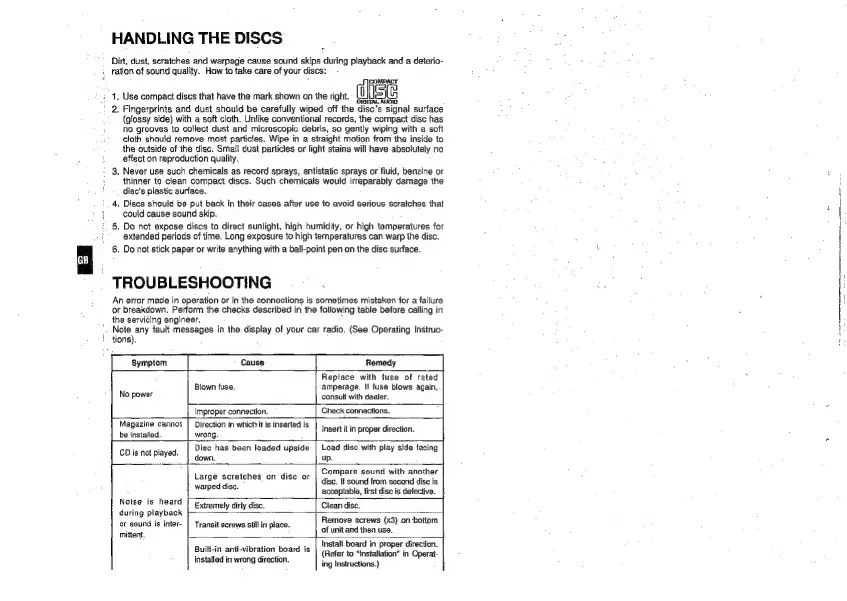
HANDLING
THE
DISCS
Dirt,
dust,
scratches
and
warpage
cause
sound
skips
during
playback
and
a
deterio-
ration
of
sound
quality.
Haw
to
take
care
of
your
discs:
Wise
1.
Use
compact
discs
that
have
the
mark
shown
on
the
right.
2.
Fingerprints
and
dust
should
be
carefully
wiped
off
the
disc’s signal
surface
(glossy
side)
with
a
soft
cloth.
Unlike
conventional
records,
the
compact
disc
has
No
grooves
to
collect
dust
and
microscopic
debris,
so
gently
wiping
with
a
soft
cloth
should
remove
most
particles.
Wipe
in
a
straight
motion
from
the
inside
to
the
outside
of
the
disc,
Smali
dust
particles
or
light
stains
will
have
absolutely
no
effect
on
reproduction
quality.
:
9.
Never
use
such
chemicals
as
record
sprays,
antistatic
sprays
or
fluid,
benzine
or
thinner
to
clean
compact
discs.
Such
chemicals
would
irreparably
damage
the
disc’s
plastic
surface,
4,
Discs
should
be
put
back
in
their
cases
after
use
to
avoid
serious
scratches
that
could
cause
sound
skip.
5,
Do
not
expose
discs
to
direct
sunlight,
high
humidity,
or
high
temperatures
for
extended
periods
of
time.
Long
exposure
to
high
temperatures
can
warp
the
disc.
6.
Do
not
stick
paper
or
write
anything
with
a
ball-point
pen
on
the
disc
surface.
TROUBLESHOOTING
An
error
made
in
operation
or
in
the
connections
is
sometimes
mistaken
for
a
failure
or
breakdown.
Perform
the
checks
described
in
the
following
table
before
calling
in
the
servicing
engineer,
Note
any
fault
messages
in
the.
display
of
your
car
radio.
(See
Operating
Instruc-
tions).
Symptom
Remedy
Replace
with
fuse
of
rated
Blown
fuse.
amperage.
If
fuse
blows
again,
No
power
consult
with
dealer.
Improper
connection.
Check
connections.
Magazine
cannot
|
Direction
in
whichit
is
inserted
is
an
be
installed.
wrong.
eer
Un
proper
Greater.
CD
is
not
played.
Disc
has
been
loaded
upside
down.
Load
disc
with
play
side
facing
up.
Noise
is
heard
during
playback
or
sound
is
inter-
mittent.
Large
scratches
on
disc
or
warped
disc.
Compare
sound
with
another
disc.
If
sound
from
second
disc
is
accepiabia,
first
disc
is
detective.
Extremely
dirty
disc.
Clean
disc.
Transit
screws
still
in
place.
|
of
unit
and
then
use.
Remove
screws
(x3)
.on
bottom
Built-in
anti-vibration
board
is
installed
in
wrong
direction.
Install
board
in
proper
direction.
(Refer
to
“installation”
in
Operat-
ing
Instructions.)

Other manuals for Grundig MCD 36

Related product manuals