ENGLISH
20
CONNECTION AND PREPARATION
---------------------------------------
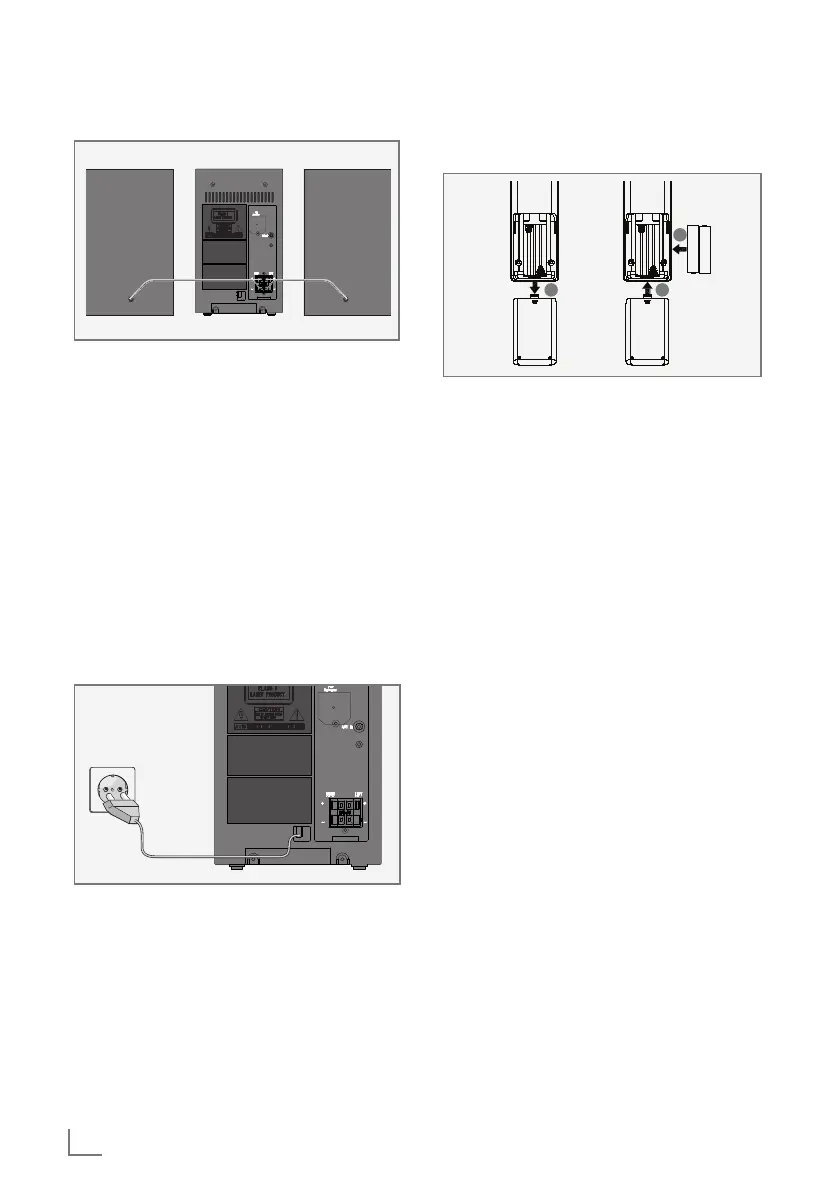
Connecting the loudspeakers
1 Insert the wires of the loudspeaker cable into
the terminals »RIGHT+/–« and »LEFT+/–«.
– Connect the cables marked in red to the red
terminals.
Connecting to the mains supply
Notes:
7
Check that the mains voltage on the type
plate (on the back of the hi-fi system) cor-
responds to your local mains supply. If this is
not the case, contact your specialist dealer.
7
Before connecting the AC power cord to the
wall socket, ensure that all other connec-
tions have been made.
1 Plug the power cord into the wall socket.
Caution:
7
The hi-fi system is connected to the mains
with the power cord. Pull out the power plug
if you want to completely disconnect the hi-fi
system from the mains.
7
Make sure the power plug is easily acces-
sible during operation and not hindered by
other objects.
Putting batteries in the remote
control
1
2
3
1 Open the battery compartment by pressing
down on the catch and then remove the lid.
2 Observe the polarity marked on the base of
the battery compartment when inserting the
batteries (micro batteries, 2 x 1.5 V, R 03 /
UM 4/AAA).
3 Close the lid of the battery compartment.
Notes:
7
Do not expose the batteries to extreme heat,
caused for example by direct sunlight, heat-
ers or fire.
7
Remove the batteries when they are flat or
when you know that the hi-fi system will not
be used for a long period of time. The man-
ufacturer accepts no liability for damage
caused by leaking batteries.
Environmental note:
7
Batteries, including those which do not con-
tain heavy metal, should not be disposed
of with household waste. Always dispose
of used batteries in accordance with local
environmental regulations.


 To Next Page