Using Camcorder/Game Console
1. Turn on the LCD TV and press on the remote controller.
2. Use to move to "Composite 1/2".
· If S-Video has been connected, select "S-Video 1/2".
3. Turn on the Camcorder or video game and Set to Video mode.
(Please refer to the User's manual of Camcorder/ Video game for more information)
4. Insert tape into Camcorder and press play button or insert disc into the Video game console.
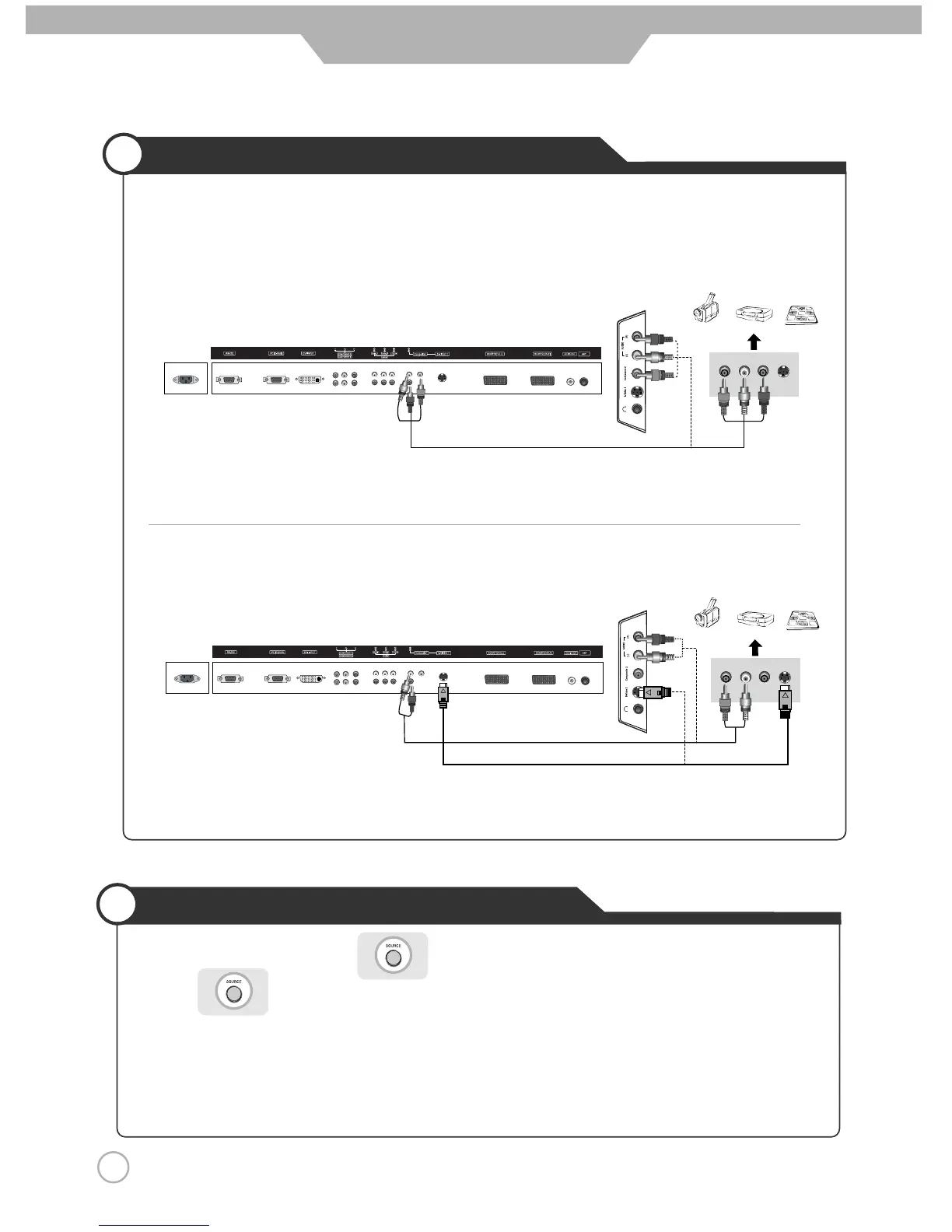
Camcorder/Game Console Connections
18
Connection
※ Connection terminals of other appliances differ by manufacture and model.
< LCD TV Back view >
< LCD TV Back view >
Composite Cable
·Connect the LCD TV's Composite In terminal to the camcorder/game console's Composite Out terminal with the
Composite cable. (Make sure the colour of the terminals and the colour of cable are the same)
※ S-Video cable can be used if there is an S-Video terminal.
● Connecting to the composite terminal
● Connecting to S-Video terminal
(R)
(L)
(R)
(L)
< Camcorder/ Game machine >
< Camcorder/ Game machine >
S-Video Cable
Audio Cable


 To Next Page
 Loading...