helpline 01905 345891 email support@greytechnology.co.uk web www.gtechonline.co.uk
13
Starting and Stopping
The handle of this product is designed for 2 handed operation as a safety measure to prevent
accidental starting.
WARNING: make sure all moving parts ie blades are at a safe distance from all body parts
and bystanders.
Fully charge the battery as described in the section Battery Charging and Recharging.
Push the battery connector onto the battery pack until it securely locates into place.
To start the trimmer:
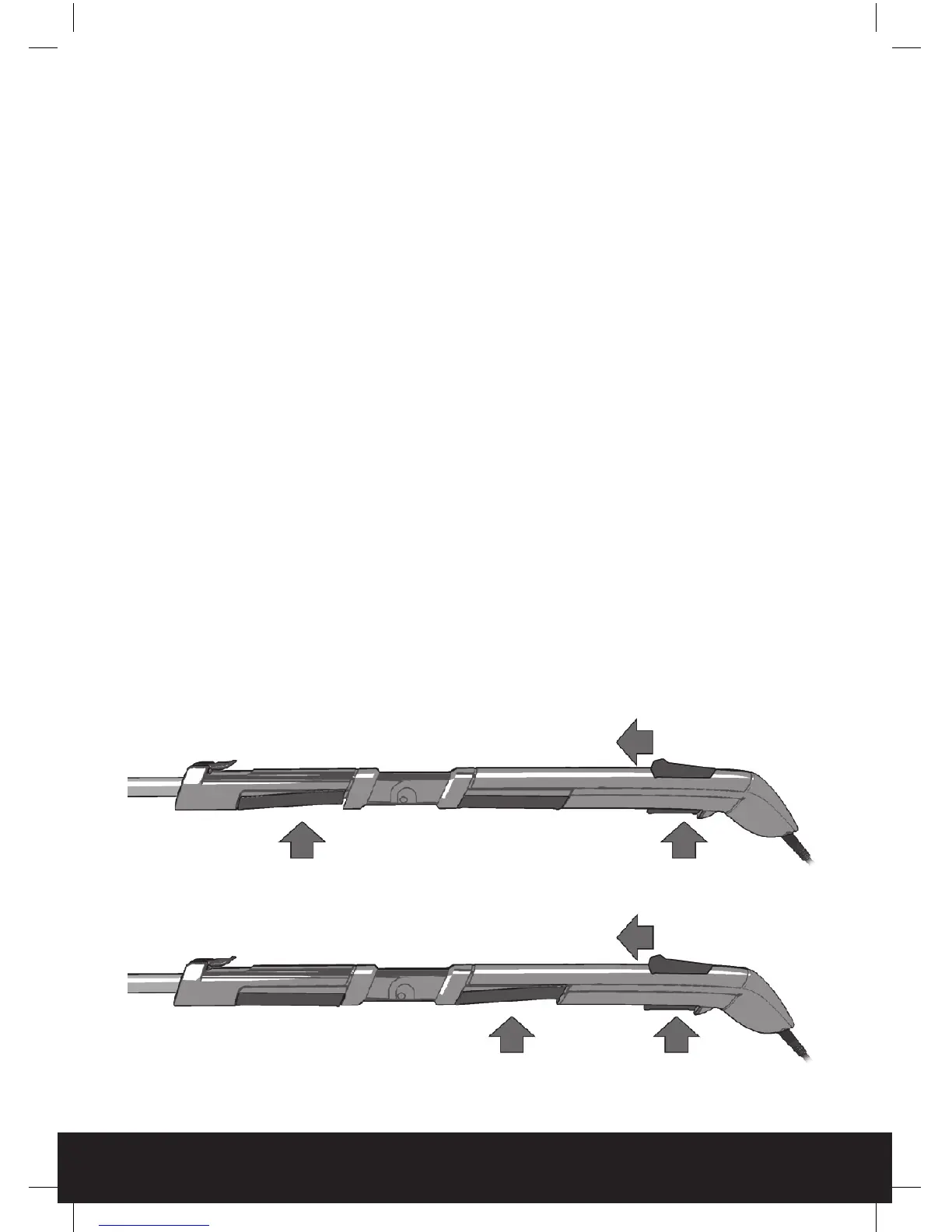
Push the interlock switch forward and hold in position.
Press and hold the rear on/off switch.
Press and hold either the middle on/off switch OR the front on/off switch.
Either the front or middle on/off switch may be used, whichever is the most comfortable or convenient.
Once the trimmer is started the interlock switch can be released.
To stop the trimmer:
Release the switches to stop the tool.
WARNING: the blades will continue to move for a fraction of a second after releasing
the trigger. When releasing the start/stop trigger wait for the blades to stop
completely before removing hands from handle.
START option 1
START option 2
1. Interlock switch
1. Interlock switch
2. Rear switch
3. Front switch
2. Rear switch
3. Middle switch
HT04 GenericManual09QVC.indd 13 23/12/2009 11:26


 To Next Page