14
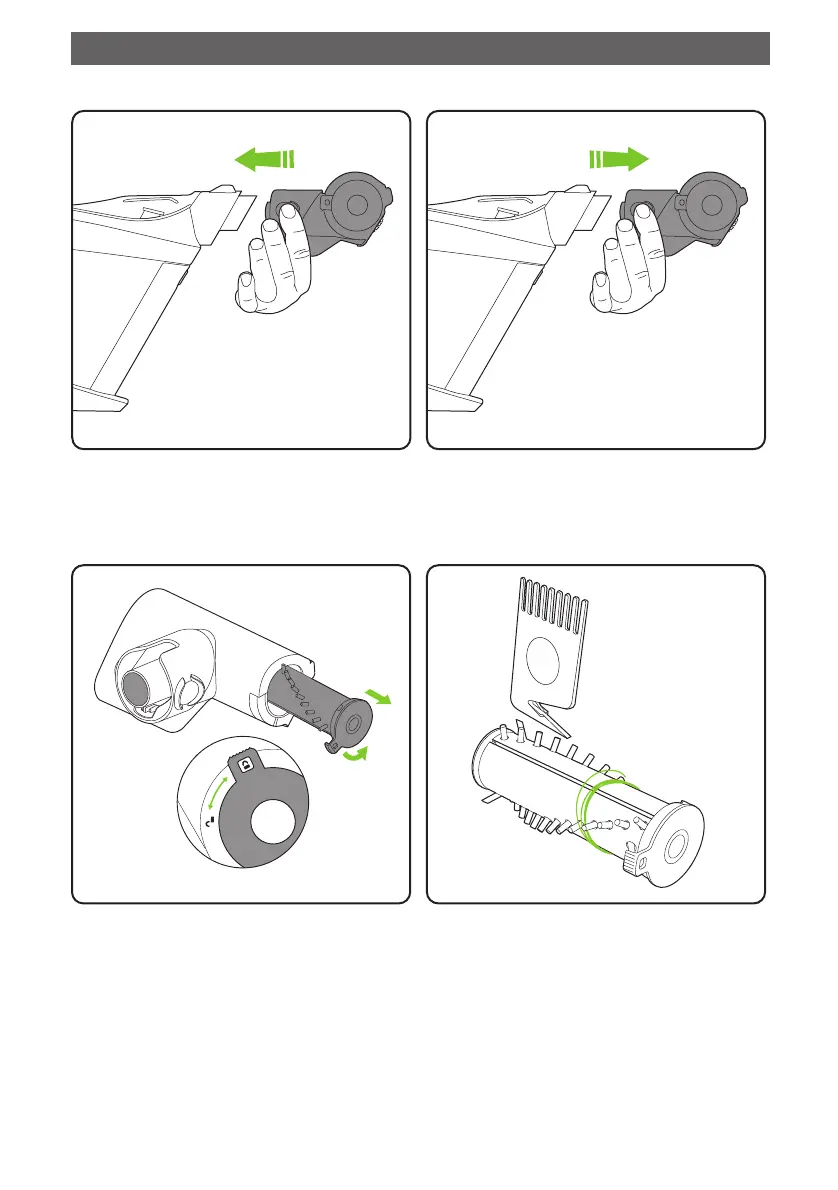
To attach the power brush, slot it over the
standard nozzle. The power must be off while
changing nozzles. The power button will now
power the brush as well as the suction.
To clean the brush bar, first remove the power
brush. Rotate the latch from the ‘lock’ to the
‘unlock’ position and pull out the brush bar.
To remove the power brush, press the buttons
on the sides of the attachment and pull it away
from the main unit.
To remove hair from the brush bar, run the hair
removal tool down the groove to cut the hair,
then pull it out. Never operate the power head
without the brush bar in.
Power brush
Optional extras
3977_Gtech_Pro_ATF307_Manual_aw.indd 143977_Gtech_Pro_ATF307_Manual_aw.indd 14 14/07/2020 09:5314/07/2020 09:53













 To Next Page