Battery Charging & Recharging
helpline 01905 345891 email support@greytechnology.co.uk web www.gtechonline.co.uk
6
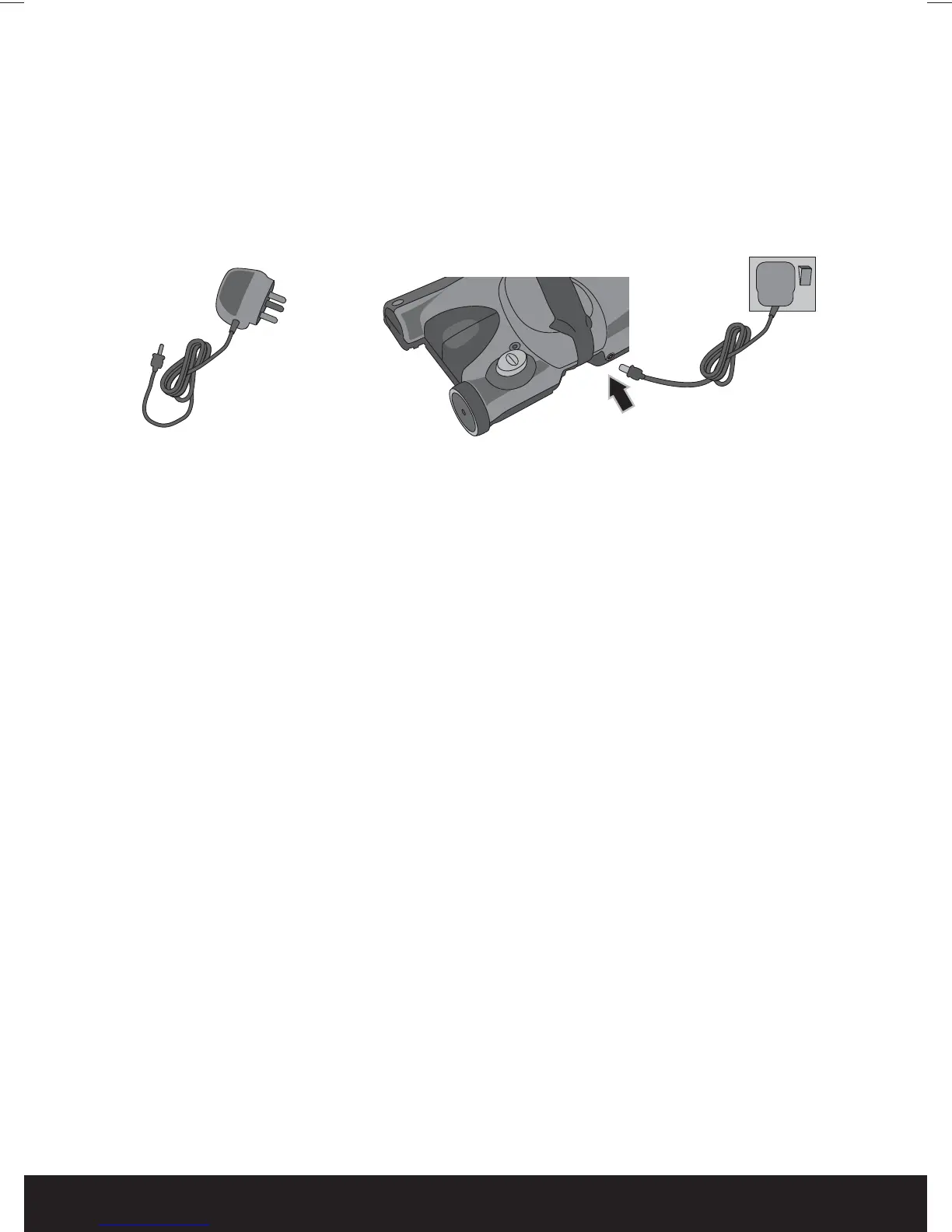
1 Connect the Charging Adaptor to the Charging Jack on the rear of the Main
Unit, and then plug into an electrical outlet. The LED illuminates GREEN when
the charger is connected.
The LED does not flash or change colour when the unit is fully charged.
The unit will only re-charge when the unit is switched off.
2 Charge the unit for at least 16 hours. Do not charge the product for longer
than 16 hours.
WARNING: Only use the charger provided with the product. Using another charger
may damage the product and battery.
WARNING: Never run the battery empty and then put the product away without
switching it off - deep discharge can damage the battery.
Do not attempt to use the charger with any other product nor attempt
to charge this product with any other charger as this will invalidate your
guarantee.
To maintain peak performance of your cordless sweeper, it is
recommended that the unit be fully discharged, then completely recharged
at least once a month.
6:0DQXDOLQGG


 To Next Page