11
1
4
5
2
3
7
8
9
10
11
MODE MENU BACK COOL
CCT/SPD
OFF
ON
DC IN
DMX IN DMX OUT
PUSH
INT/SELECTOR
6
DESCRIPTION OF
PRODUCT CONTROL KEYS
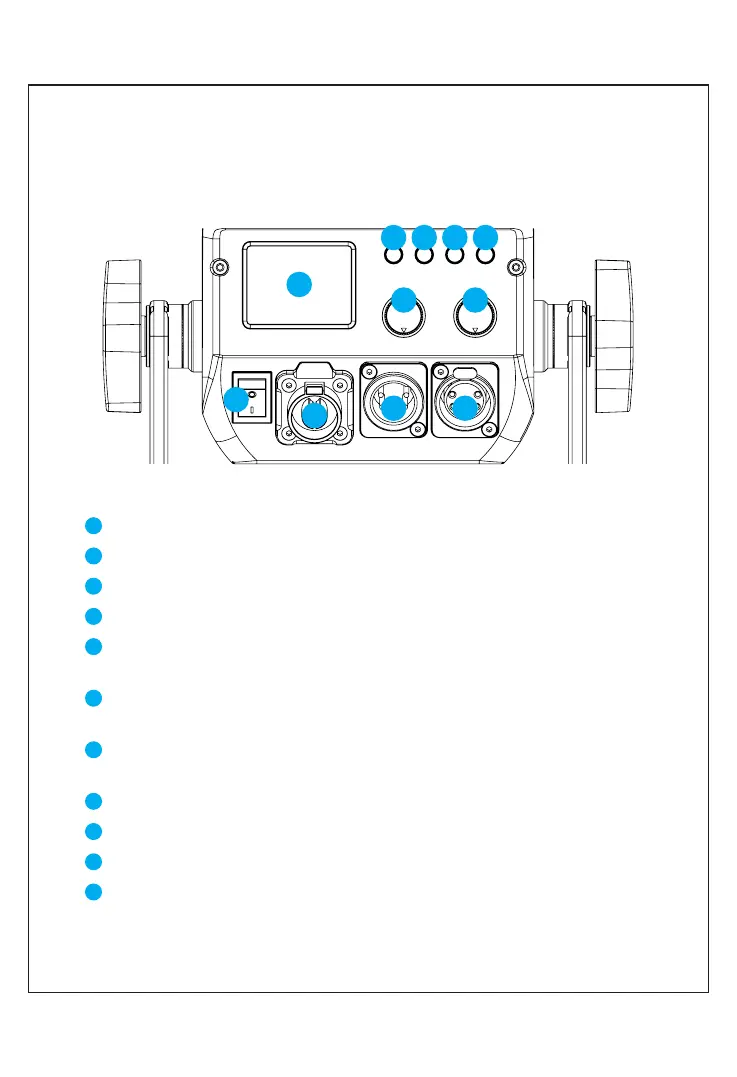
Display: Display current settings, modes and parameters.
Mode key: light mode switch button.
Menu key: press this key to enter the settings menu.
Return key: Press this key to return to the previous level menu.
Cooling key: start a large air volume cooling until the temperature is reduced to
a touchable temperature.
Knob ①: INT/SELECTOR multi-functional coding knob, by pressing or rotating
can be”Select/Brightness" adjustment.
Knob ②: CCT/SPEED adjustment, by rotating it, you can make the adjustment of
color temperature and light effect change rate.
Power ON/OFF button.
Power input interface: connect to power supply.
DMX input interface: connected to the DMX controller.
DMX output interface: connect to the DMX controller.
4
5
7
1
8
2
3
9
10
11
6



 To Next Page