12
① Menu key (MENU):
Press the MENU button to enter the menu setting screen → Rotate [Knob 1] to
select the item → Press [Knob 1] to enter the item setting screen → Set the
parameters of the item by pressing or rotating [Knob 1] → Press [BACK] to go up the
menu.
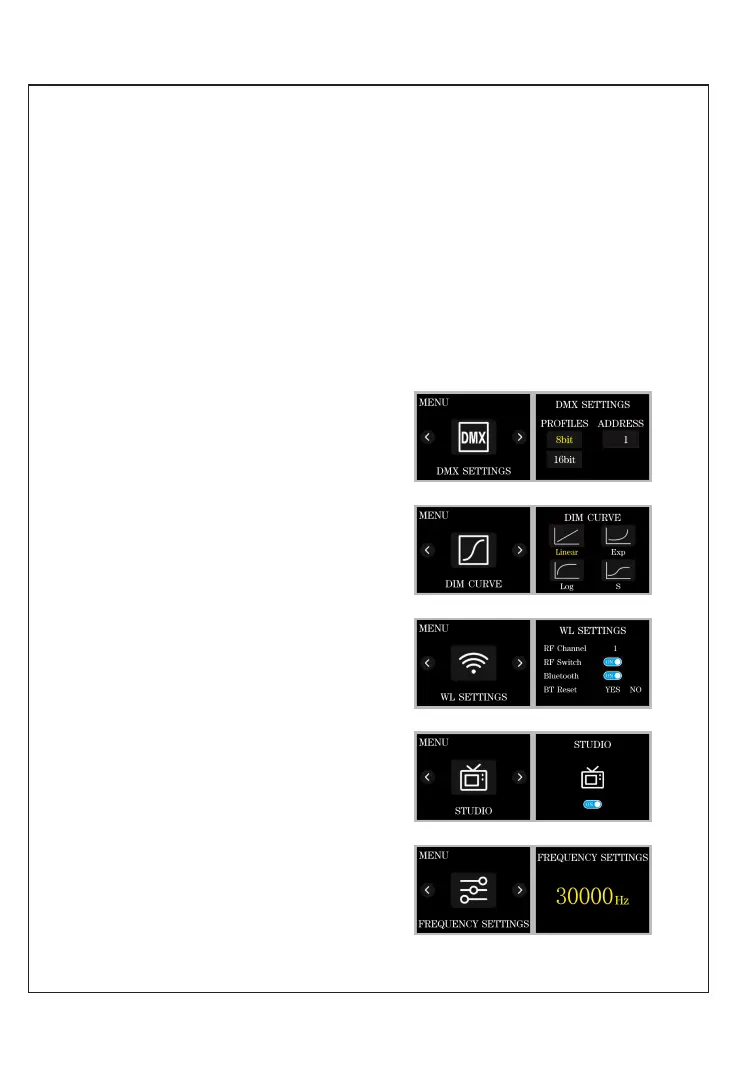
DMX SETTINGS (Figure 1): Set the DMX
parameters, [address (001-512)] and
configure the mo mode [(8bit/16bit)].
DIM CURVE (Figure 2): Set the dimming
curve, [ linear / logarithmic / Figure2
exponential / S curve ].
WL SETTINGS (Figure 3): RF channel
settings, RF switch, Bluetooth switch,
Bluetooth reset.
STUDIO (Figure 4): Set the studio mode
and non-studio mode.
Studio mode: power off and turn the light
back on, restore the lighting mode and
parameters before the
power failure.
Non-Studio mode: power off and turn the
light back on, restore. Factory set the
default lighting mode
and parameters.
FREQUENCY SETTINGS (Figure5): Set the
dimming frequency.
FUNCTION INTRODUCTION &
INSTRUCTIONS FOR USE
Figure1
Figure2
Figure3
Figure4
Figure5
Press the MENU button to enter the menu setting screen → Rotate [Knob 1] to
select the item → Press [Knob 1] to enter the item setting screen → Set the
parameters of the item by pressing or rotating [Knob 1] → Press [BACK] to go up the
menu.
DMX SETTINGS (Figure 1):
Set the DMX parameters, [address (001-
512)] and configure the mode [(8bit/16bit)].
DIM CURVE (Figure 2):
Set the dimming curve, [ linear / logarithmic
/ exponential / S curve ].
WL SETTINGS (Figure 3):
RF channel settings, RF switch, Bluetooth
switch, Bluetooth reset.
STUDIO (Figure 4):
Set the studio mode and non-studio mode.
Studio mode: power off and turn the light
back on, restore the lighting mode and
parameters before the power failure.
Non-Studio mode: power off and turn the
light back on, restore. Factory set the
default lighting mode and parameters.
FREQUENCY SETTINGS (Figure5):
Set the dimming frequency.



 To Next Page