Home
GVM
Lighting Equipment
GVM-PRO-SD200B
Page 17 (Equipment Management)
GVM GVM-PRO-SD200B - Equipment Management
22 pages
Manual
Save Page as PDF
To Next Page
To Next Page
To Previous Page
To Previous Page
Loading...
1
5
E
qu
i
pm
e
nt ma
n
ag
e
me
n
t
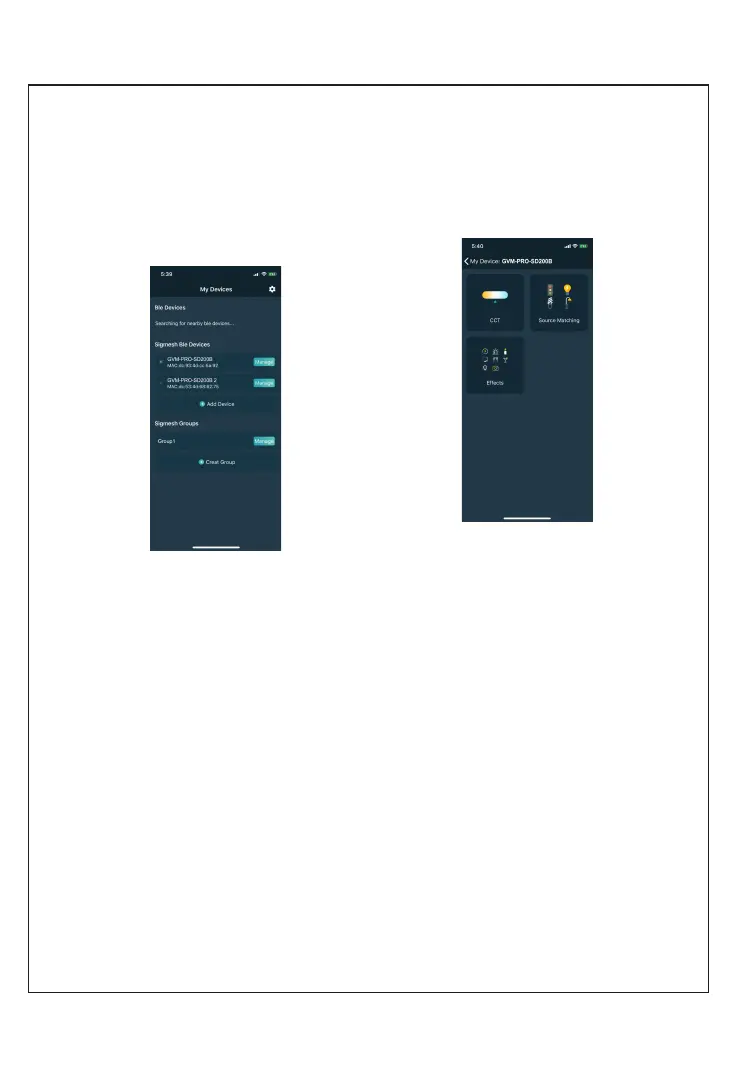
1.After successfully
adding your
lighting
device,
your
device
will
be
displayed
in
the
“My
Devices" list; (Figure 3)
2.Click
the
device
bar
to
enter
the device control. (Figur
e 4)
Figure
3
Figure
4
16
18
Table of Contents
Main Page
Table of Contents
2
Important Safety Instructions
3
Product Introduction
5
Warning
5
Use and Save
6
Disclaimers
6
GVM-PRO-SD200B Product Parameter
7
GVM-PRO-SD300B Product Parameter
8
Product Structure Diagram
9
Installation Method
10
Description of Product Control Keys
13
Function Introduction & Instructions for Use
14
APP Control
16
Simple Faults and Troubleshooting
18
Packing List
19
Precautions
19
Product Warranty
20
Related product manuals
GVM GVM-PRO-SD650B
22 pages
GVM GVM-PRO-SD400B
22 pages
GVM GVM-50RS
16 pages
GVM GVM-P80S
6 pages
GVM GVM-480LS
15 pages
GVM GVM-680RS
21 pages
GVM GVM-B200C
23 pages
GVM GVM-Y30D160
18 pages
GVM GVM-PRO-YU150R
18 pages
GVM SD200D
16 pages
GVM 800D-RGB
12 pages



 To Next Page