13
② MODE :
Three lighting modes included: CCT mode, Light Source
mode, Light Effects mode.
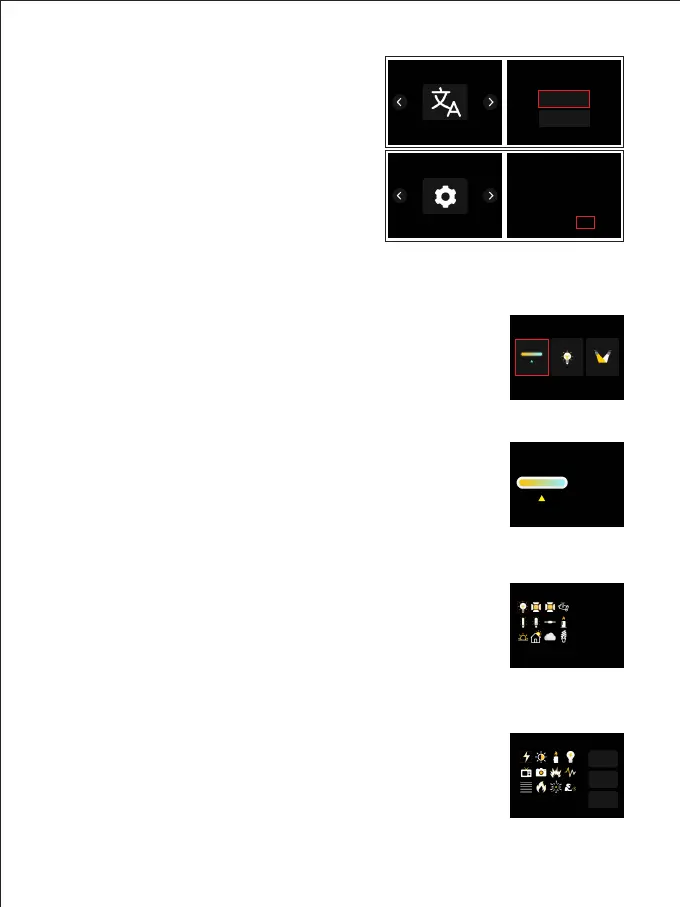
Press MODE button ,enter the main page of mode selection
(Figure 9) → rotate [knob ①] to select the mode → Press
[knob ① ] to enter the corresponding mode interface → set
the parameter of the item by pressing or rotating [knob ①] →
press [BACK] to go up one level.
CCT mode (Figure 10):
White light mode, adjustable light intensity and color
temperature. [Knob 1] can be used to adjust the brightness,
and [Knob 2] can be used to adjust the color temperature.
Light source mode (Figure 11):
This mode provides 12 different types of light sources to
choose from, which can save a lot of adjustment time when
you need a specific light source.
Rotate and short-press the [SELECTOR] key to select Source
mode to select the desired light source effect.
Light Effect Mode (Figure 12):
This mode provides 12 light effects: lightning, CCT cycle,
candle, bad bulb, TV, paparazzi, explosion, breathing light,
strobe, flame, firework, welding.
Rotate and short-press the [SELECTOR] button to select FX
mode, you can choose a variety of light effects.
Figure 9
Figure 10
Figure 11
Figure 12
Figure 8
Figure 7
LANGUAGE (Figure 7):
Set the system language.
SYSTEM SETTINGS (Figure 8):
View system information and restore
Factory Settings.
CCT
INT
CCT
5600
K
10.0
%
Effect
INT
10.0%
CCT
6500K
SPD
5
Lightning
简体中文
ENGLISH
MENU
LANGUAGE
MENU
SYSTEM SETTINGS
LANGUAGE
SYSTEM SETTINGS
Contrl Ver
Factory Reset YES NO
Lamp Ver
UID: GPR0650B-0F6888410
1.02
1.27
CCT Source Effect
Source
Tungsten
INT
10.0
%



 To Next Page