12
FUNCTION INTRODUCTION &
INSTRUCTIONS FOR USE
MENU
DMX SETTINGS
DMX SETTINGS
PROFILES
8bit
16bit
ADDRESS
1
Linear Exp
Log S
30000Hz
Smart High Silent
ON
MENU
DIM CURVE
DIM CURVE
MENU
STUDIO
STUDIO
MENU
FREQUENCY SETTINGS
FREQUENCY SETTINGS
MENU
FAN SETTINGS
FAN SETTINGS
RF Switch
BT Reset YES NO
MENU
WL SETTINGS
WL SETTINGS
Bluetooth
RF Channel
OFF
1
ON
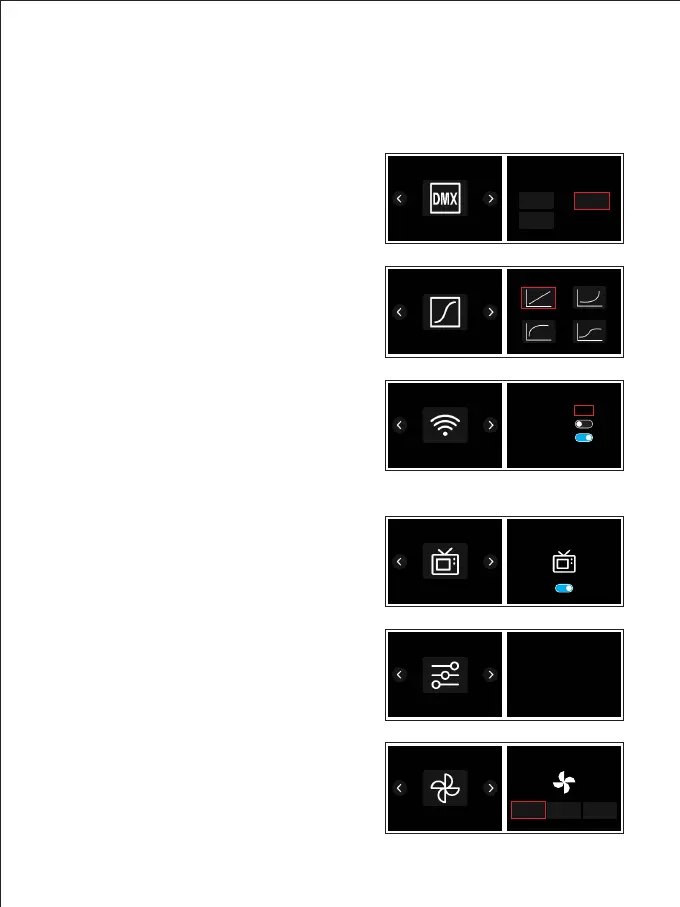
① MENU :
Figure 1
Figure 2
Figure 3
Figure 4
Figure 5
Figure 6
DMX SETTINGS (Figure 1):
Set the DMX parameters, [address (001-512)]
and configure the mode [(8bit/16bit)].
DIM CURVE (Figure 2):
Set the dimming curve, [linear / logarithmic /
exponential / S curve].
WL SETTINGS (Figure 3):
RF channel settings, RF switch, Bluetooth
switch, Bluetooth reset.
STUDIO (Figure 4):
Set the studio mode and non-studio mode.
Studio mode:Brightness remains the same
of last setting after power-on.
Non-Studio mode: Brightness reset to default
setting after power-on.
FREQUENCY SETTINGS (Figure 5):
Set the dimming frequency.
FAN SETTINGS (Figure 6):
Set the cooling fan mode.



 To Next Page