
 Need help?
Do you have a question about the GW Security GWSW1602G and is the answer not in the manual?
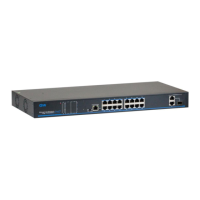
Provides a general overview of the 16/24 Ports PoE switch.
Lists the key features and capabilities of the PoE switch.
Illustrates the front and back panels of the PoE switch.
Details the technical specifications of the PoE switch.
Lists the items included in the product package.
Provides general and safety precautions for installation.
Outlines environmental and physical requirements for installation.
Describes methods for installing the switch (rack, bench, wall).
Guides on connecting network and power cables.
Prerequisites and network configuration for web management access.
Guides on starting, logging in, and navigating the web interface.
Covers changing IP, password, language, and restoring defaults.
Manages PoE settings, power status, and individual port controls.
Solutions for issues, typical use cases, and environmental notes.
 General
| Ports | 16 |
|---|---|
| Switch Type | Managed |
| Speed | 10/100/1000 Mbps |
| PoE | Yes |
| PoE Standard | IEEE 802.3af/at |
| Switching Capacity | 32 Gbps |
| Forwarding Rate | 23.8 Mpps |
| MAC Address Table | 8K |
| Jumbo Frame Support | 9KB |
| Operating Temperature | 0°C to 50°C |
| Storage Temperature | -40°C to 70°C |
| Power Supply | Internal |
| Input Voltage | 100-240V AC |
| Form Factor | Rackmount |
| Humidity | 10% to 90% (non-condensing) |

 To Next Page