EasyManua.ls Logo

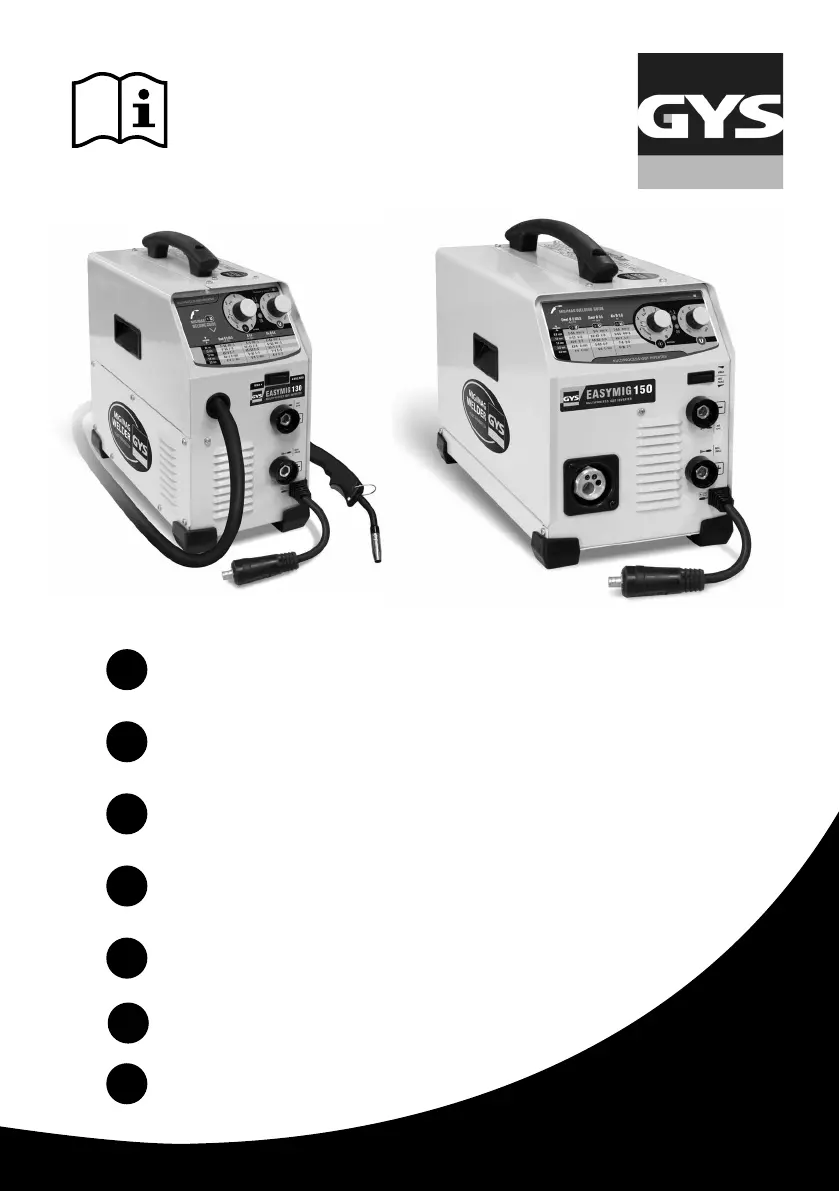
GYS EASYMIG 110 - User Manual

GYS EASYMIG 110
80 pages
Go to English
Print Icon
To Next Page IconTo Next Page
Loading...
FR
EN
DE
ES
RU
NL
IT
2-10 / 65-80
11-19 / 65-80
20-28 / 65-80
29-37 / 65-80
38-46 / 65-80
47-55 / 65-80
56-64 / 65-80
EASYMIG 110
EASYMIG 130
EASYMIG 140
EASYMIG 150
Poste à souder MIG
MIG/MAG Welding
Schutzgasschweißgerät
Soldadura MIG
Аппараты MIG
MIG Lasapparaat
Machina di saldatura MIG
www.gys.fr
C51348ind7_21/01/2019

Other manuals for GYS EASYMIG 110

Questions and Answers

  • A
    Amanda BakerSep 23, 2025
    What to do if the wire-feeder motor doesn’t operate in GYS EASYMIG 110?
    • T
      Tyler SimmonsSep 23, 2025
      If the wire-feeder motor isn’t operating, it could be due to: * The reel or roller brake being too tight; release the brake and rollers. * An electrical supply problem; check that the power switch is in the "On" position.
  • A
    angelajonesAug 23, 2025
    Why is the welding bead porous when using my GYS Welding System?
    • E
      Elizabeth HartmanAug 23, 2025
      If the welding bead is porous when using your GYS Welding System, several factors could be at play. Ensure the gas flow rate is adequate, adjusting it to a range of 15 to 20 L / min. Check if the gas bottle is empty and replace it if needed. The gas quality might be unsatisfactory, so consider replacing it. Air flow or wind can also affect the weld, so prevent drafts and protect the welding area. A dirty gas nozzle can cause porosity, so clean or replace it. Make sure you are using suitable wire for MIG-MAG welding. Lastly, a surface to weld in bad condition (rust, etc…) can cause porosity, so clean the metal before welding.
  • A
    amillerAug 25, 2025
    What to do if there is bad wire feeding with my GYS Welding System?
    • A
      Andrew BushAug 25, 2025
      If you're experiencing bad wire feeding with your GYS Welding System, start by checking the covering wire guide for dirt or damage; clean or replace it if necessary. Also, make sure the drive roller isn't too loose by tightening the drive roller knob. Finally, check if the reel brake is too tight and release the brake.
  • E
    Elizabeth RamosAug 26, 2025
    How to troubleshoot inconsistent welding wire speed on a GYS EASYMIG 110?
    • B
      Brian HessAug 27, 2025
      If the welding wire speed is not constant on your GYS Welding System, it could be due to debris blocking the opening; clean out the contact batch or change it and replace the anti-adherence product Ref.041806. Alternatively, the wire might be skidding in the rollers. In this case, control the roller pressure or replace it. Also, check if the wire diameter is non-compatible with the roller or the covering wire guide in the torch is non-compatible.
  • H
    heidi35Aug 27, 2025
    Why is there no welding current in my GYS Welding System?
    • B
      Bobby BarkerAug 27, 2025
      If your GYS Welding System has no welding current, there are several things to check. First, ensure there isn't a bad connection to the main supply. Check the mains connection and verify the plug is fed by a 230 V (1PH) power socket. Second, inspect the earth cable for a bad earth connection, checking both the connection and clamp condition. Finally, check if the torch trigger is inoperative; if so, check the torch trigger and replace the torch if needed.
  • D
    Dennis ReyesSep 18, 2025
    What causes no gas flow at the end of the torch in GYS Welding System?
    • J
      Jennifer ShieldsSep 18, 2025
      No gas flow at the torch end might be due to a bad gas connection. Check the gas connection at the welding machine, the gas regulator, and the solenoid valves.
  • F
    fernandohammondSep 15, 2025
    How to fix the welding wire speed if it is not constant in GYS Welding System?
    • C
      chase80Sep 15, 2025
      Inconsistent welding wire speed can be due to: * Debris blocking the opening; clean or change the contact batch and replace the anti-adherence product (Ref. 041806). * The wire skidding in the rollers. To resolve this, control or replace the roller, ensure the wire diameter is compatible with the roller, and check that the covering wire guide in the torch is compatible.
  • C
    Courtney AndersonSep 16, 2025
    What causes the wire to jam after the rollers in my GYS EASYMIG 110?
    • T
      tcabreraSep 16, 2025
      Wire jamming after the rollers can occur because: * The guide wire sheath is crushed; check the sheath and torch body. * The wire is jammed in the torch; clean or replace it. * There is no capillary tube; check for the presence of a capillary tube. * The wire speed is too fast; reduce the wire speed.
  • B
    Brandon RuizSep 6, 2025
    How to fix the welding wire speed if it is not constant in my GYS Welding System?
    • J
      Jason AnthonySep 6, 2025
      Inconsistent welding wire speed can be caused by: * Debris blocking the opening; clean out or change the contact batch and replace the anti-adherence product (Ref.041806). * The wire skidding in the rollers. To resolve this: * Control or replace the roller. * Ensure the wire diameter is compatible with the roller. * Verify the covering wire guide in the torch is compatible.
  • D
    davidhallSep 3, 2025
    How to troubleshoot bad wire feeding on my GYS EASYMIG 110 Welding System?
    • A
      ann82Sep 4, 2025
      If you're experiencing bad wire feeding, consider these possible causes and solutions: * The covering wire guide might be dirty or damaged; clean or replace it. * The drive roller may be too loose; tighten the drive roller knob. * The reel brake might be too tight; release the brake. * There could be a bad connection to the main supply; check the mains connection and ensure the plug is fed by a 230 V (1PH) power socket. * A bad earth connection could be the issue; check the earth cable (connection and clamp condition).

GYS EASYMIG 110 Specifications

General IconGeneral
Input Voltage230 V
Welding ProcessMIG/MAG
Max Output Current110 A
Welding Current Range30 - 110 A
Wire Diameter0.6 - 0.8 mm
Steel Wire Spool Diameter100 mm
Rated Input Current13 A
No-Load Voltage50 V
Protection ClassIP21S

Related product manuals