32
Operation
4.3.3 Setting the Time and Date
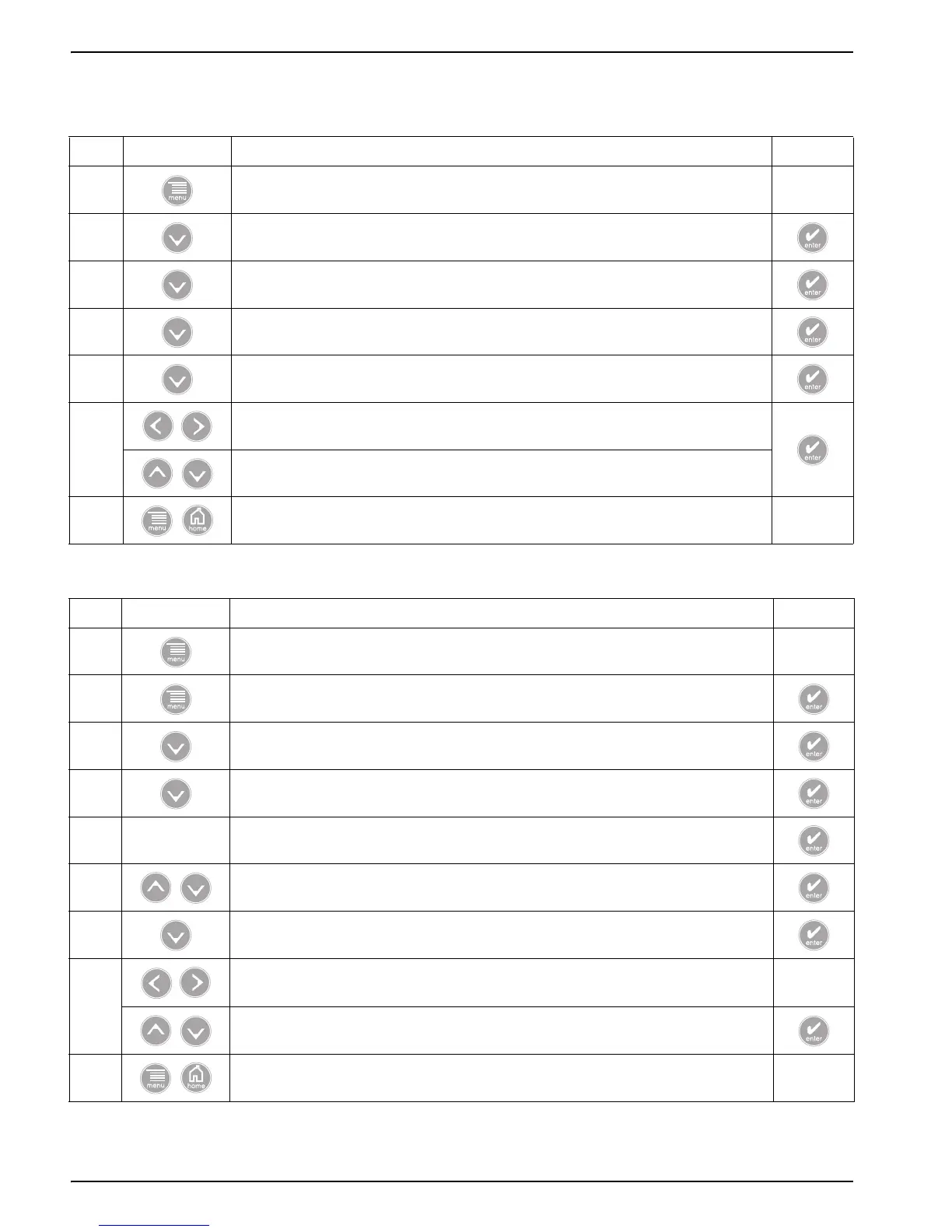
4.3.3.1 Setting the Time (24-hr format)
Step Select Menu Level/Instructions Confirm
1 MAIN MENU —
2 SYSTEM SETUP
3 DISPLAY SETUP
4 SET DATE/TIME
5 Highlight TIME
6
Select the character to edit.
Scroll to appropriate number.
7 Main Menu or Main Measurement Screen —
4.3.3.2 Setting the Date Format and Date
Step Select Menu Level/Instructions Confirm
1 MAIN MENU —
2 SYSTEM SETUP
3 DISPLAY SETUP
4 SET DATE/TIME
5 — Highlight DATE FORMAT
6 Choose the appropriate date format from the displayed options.
7 Highlight DATE
8
Select the character to edit. —
Scroll to the appropriate number.
9 Main Menu or Main Measurement Screen —



 To Next Page