34
Operation
4.5 Output Options
Refer to the System Setup on page 31 for more information on the output options menu.
The analyzer provides two isolated analog outputs (Output 1 and Output 2).
4.5.2 Hold/Transfer Outputs
During normal measurement operation, the analog outputs can be held at the
last measured value or transferred to a preset value.
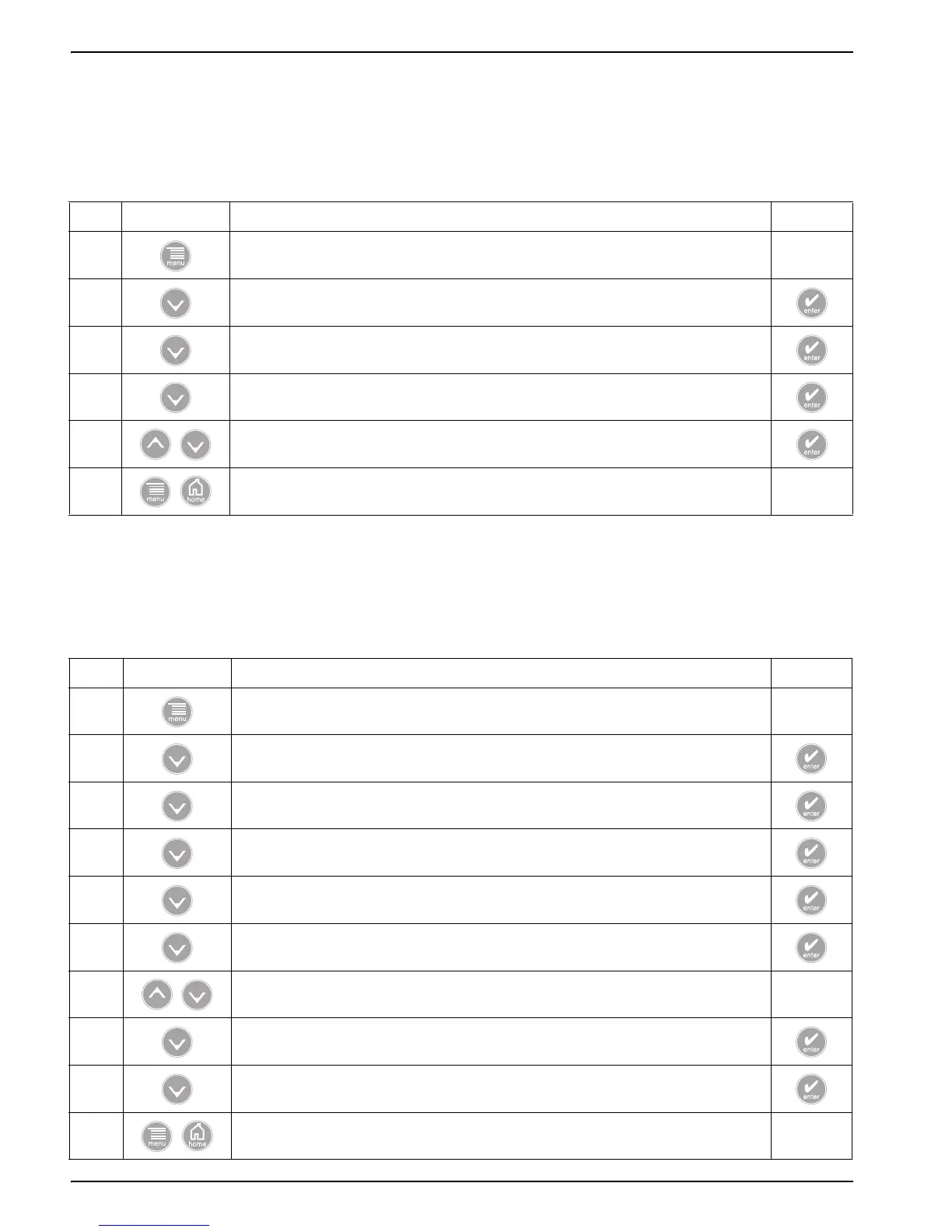
4.5.1 Navigating to the Output Options Menu
Step Select Menu Level/Instructions Confirm
1 MAIN MENU —
2 SYSTEM SETUP
3 OUTPUT SETUP
4 SELECT OUTPUT
5 Customize the options, refer to System Setup on page 31.
6 Main Menu or Main Measurement Screen when Output options are configured. —
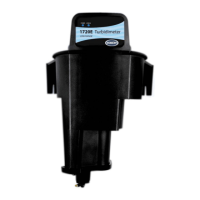
4.5.2.1 Hold/Transfer Outputs until Release
Step Select Menu Level/Instructions Confirm
1 MAIN MENU —
2 TEST/MAINT
3 HOLD OUTPUTS
4 SET OUTMODE
5 Select HOLD OUTPUTS or XFER OUTPUTS
6 SET CHANNELS
7 Select ALL or one of the connected sensors. —
8 ACTIVATION
9 Select LAUNCH
10 Main Menu or Main Measurement Screen
reading
will flash



 To Next Page