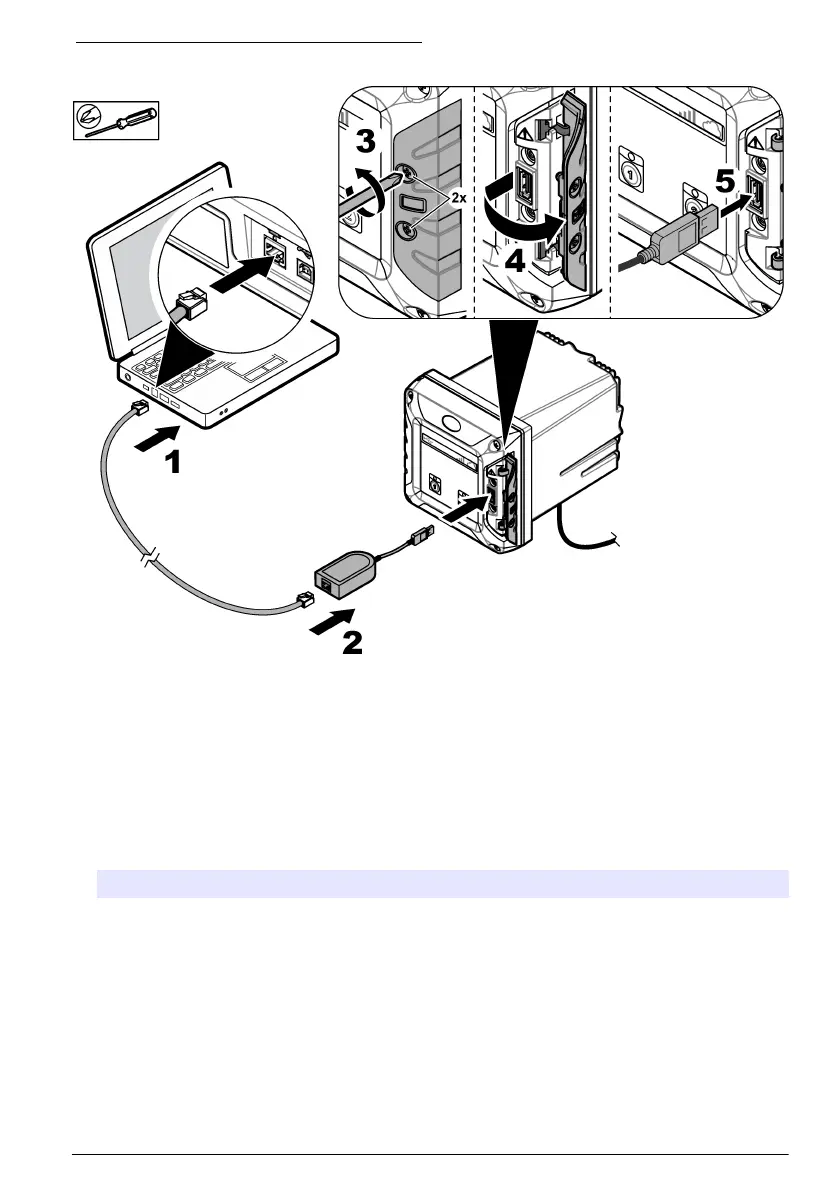
Figure 14 Connect the USB Ethernet adapter
Configure the IP address of the PC
Do the steps that follow to change the IP address in Microsoft Windows on your PC or laptop.
Note: The user must have Windows administrator rights on the computer to change the Windows settings.
1. Go to Control Panel > Network and Internet > Network and Sharing center, then select Change
adapter settings.
2. Right-click Local Area Connection, then select Properties.
3. Highlight Internet Protocol Version 4 (TCP/IPv4), then select Properties.
4. Select Use the following IP address. Enter the settings that follow.
Option Description
IP address 192 . 168 . 165 . 1
Subnet mask 255 . 255 . 255 . 0
Default gateway blank
Note: Record the initial values to change the values back after the configuration.
5. Select OK to confirm the settings.
Note: Change the settings to the initial values when the configuration is completed.
6. Open the web browser on the PC. Enter the IP address that follows to connect to the SC4200c
Controller.
"http://192.168.165.30"
English
23



 To Next Page