Page 49 of 62
Brushless DC Controller HST-350
Orginal operating manual Rev1.3
4.7 Operating the controller with the GUI and settings in the software
The following is required for commissioning the controller:
• A Windows computer with the GUI installed.
• You will receive the installation package from us upon request.
• A USB to CAN adapter (order #10107621)
• (Driver can be requested via his@hacker-motor.com)
• The controller must be connected and powered as shown above.
• The motor should be able to rotate freely for the test
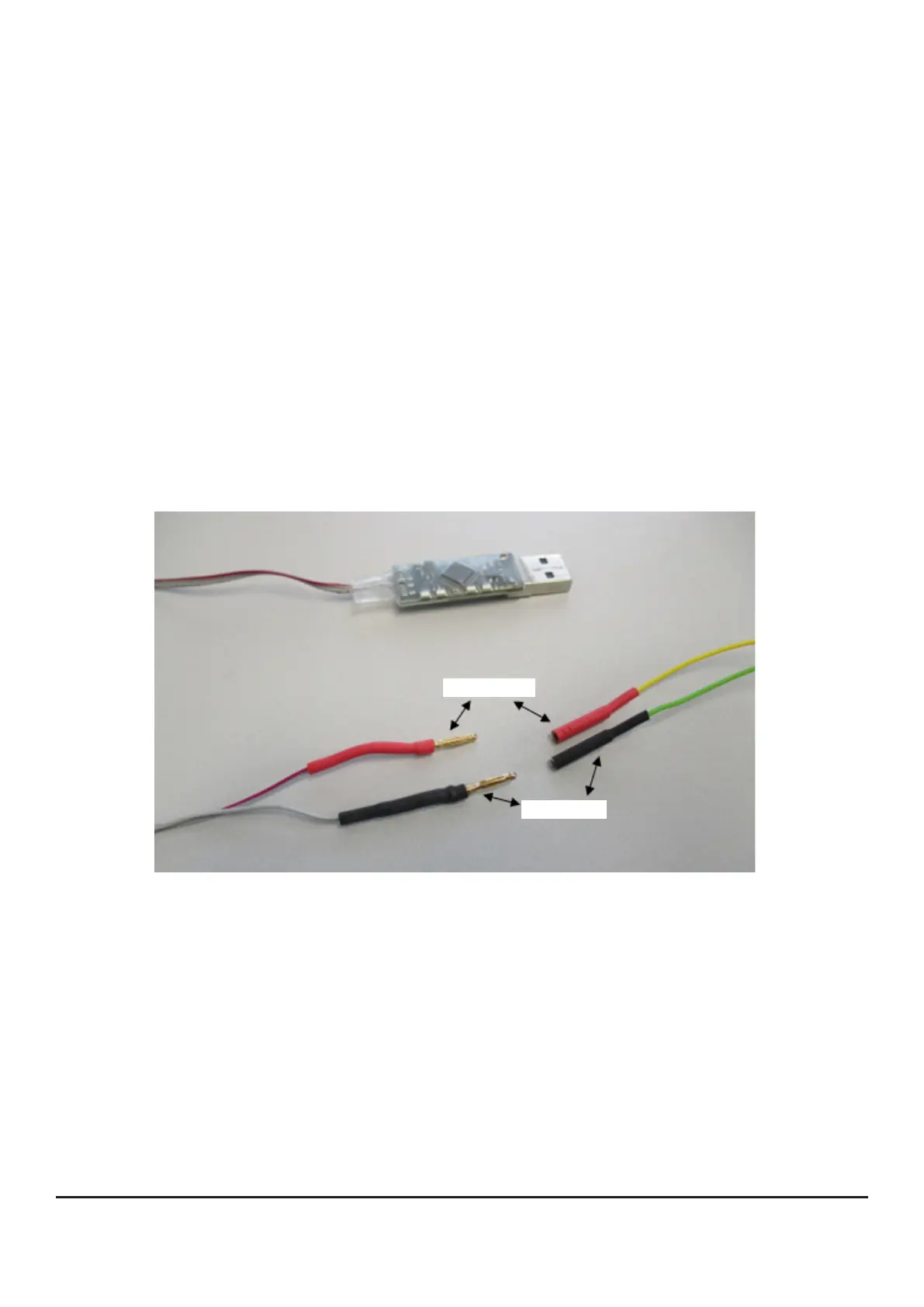
Connect the CAN bus lines of the 12-pin Molex connector:
• Yellow / CAN High [Pin 10]
• Green / CAN Low [Pin 9]
with the CAN adapter. Solder on corresponding contacts (In the example: Ø2 mm gold contacts).
Mounting and commissioning
CAN High
CAN Low
• Plug the CAN adapter into a free USB slot.
As a rule, the driver installs automatically. If everything is installed correctly, a green LED on
the adapter lights up.
• Start the drive system by switching on terminal 15 (Ignition key / Pin 2).
• Now open the graphical user interface of the bootloader „BL_V40“ which you have downloaded
before in the software package (see above). You should see the user interface shown below:


 To Next Page