Page 59 of 62
Brushless DC Controller HST-350
Orginal operating manual Rev1.3
Mounting and commissioning
Schieberegler
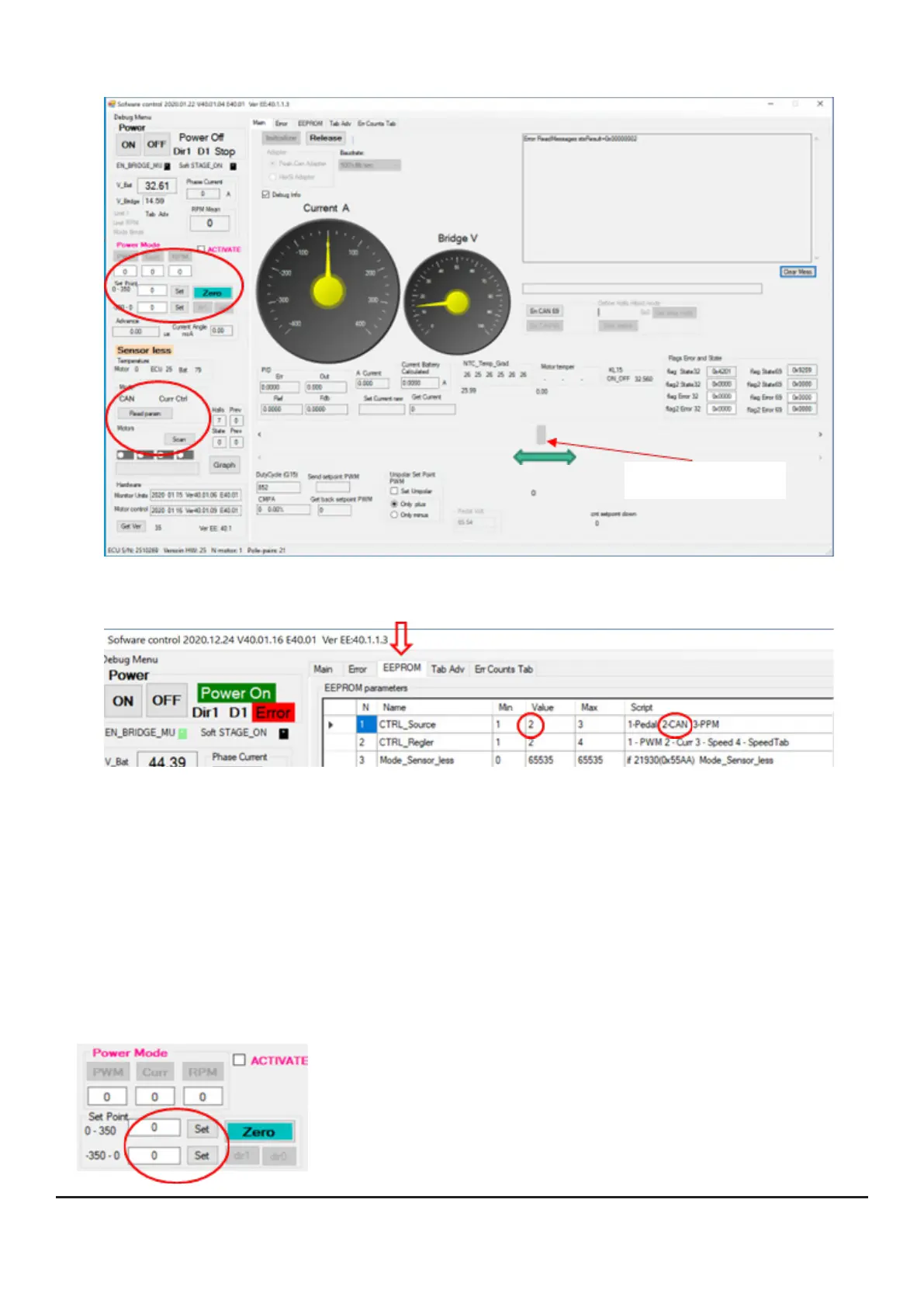
• Set the controller to „CAN“ mode (see EEPROM, line 1 -> „Value“=2, with the arrow
keys left/right you can switch through the menus („Main“/“Error“/“EEPROM“/...).
This enables you to make setpoint entries directly via the user interface and to test the
intended operation.
• Start with the power mode „Current Control“ ([EEPROM], line 2 -> Value: 2); this is
particularly suitable for checking the correct function.
• You can now enter direct values for the current on the left side (back to [Main])
of the GUI in the „Set Point“ area; start with small values between 5 and 10A
atrst.Checkthedirectionofrotationofthedrive;youcansetthisinthebootloader
in line 4. Negative values act as a brake (recuperation). Enter a value within the
speciedlimits(hereintheexample:0-350/-350-0)andthenconrmwith[Set].
The slider jumps to the corresponding position.


 To Next Page