9
MAKING CONNECTIONS
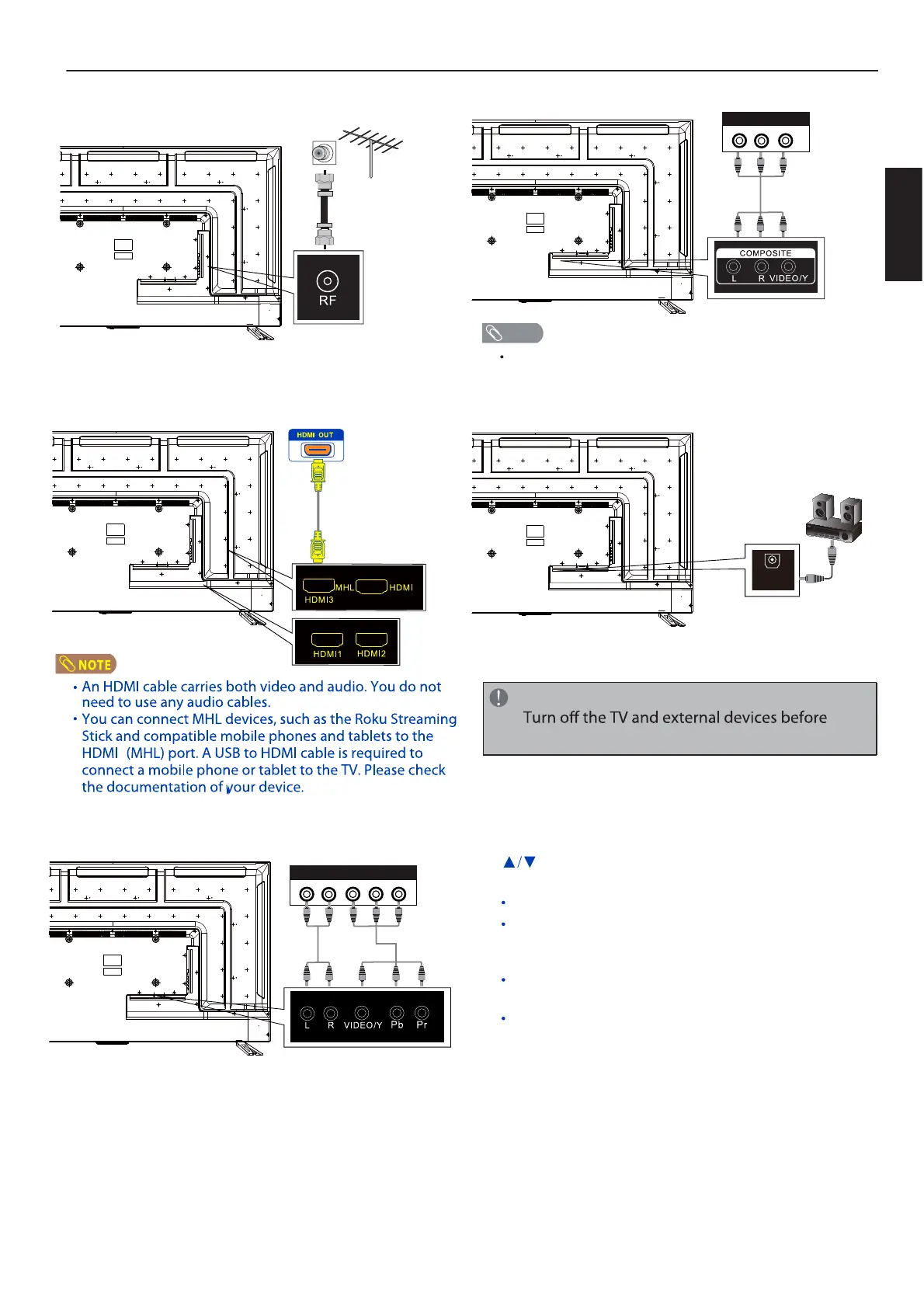
CONNECTING TO AN ANTENNA/CABLE WALL
JACK
Using component cables (better)
Using composite cable (good)
Cables are often color-coded to match color-coded jacks.
CONNECTING OPTICAL OUT
NOTE
NOTE
making connections.
English
COMPONENT OUT
L R Y P
B
P
R
OPTICAL
COMPOSITE OUT
L R VIDEO
CONNECTING EXTERNAL AUDIO/VIDEO DEVICE
Using HDMI cable (best)
4
4
To play from the external device:
1. Turn on the TV and the connected device.
2. Press INPUT to open the input source list, then press
to highlight the input to which the device was
connected and press OK to switch.
Select TV to watch TV from the RF input.
Select HDMI1, HDMI2,HDMI3,HDMI4(MHL)
to play
from a device connected to the HDMI1,
HDMI2,HDMI3,HDMI4(MHL)
input.
Select Composite to play from the device
connected to the COMPOSITE input.
Select Component to play from the device
connected to the COMPONENT input.


 To Next Page