10
OPERATING INSTRUCTIONS
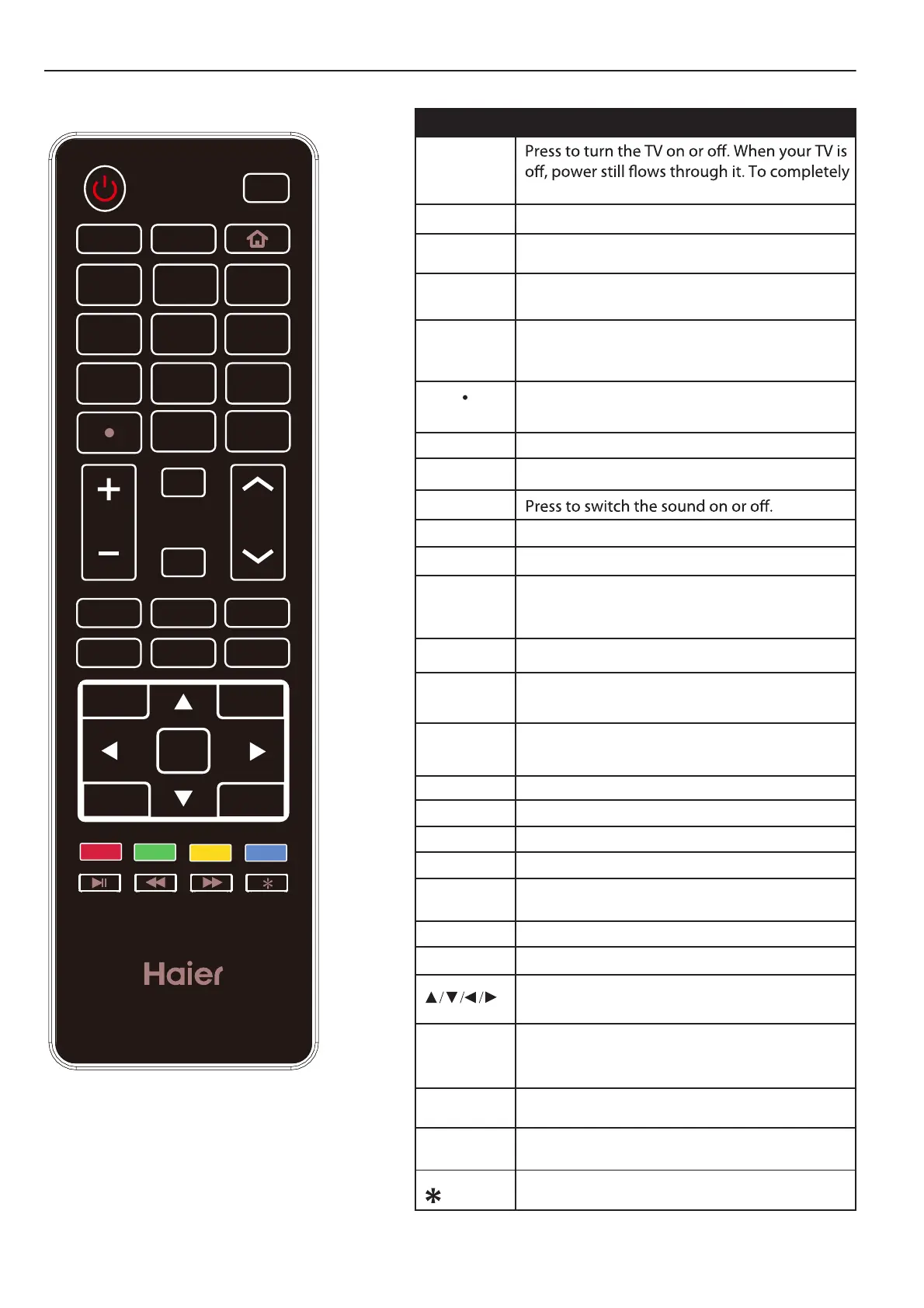
USING THE REMOTE CONTROL
USB CC
INPUT
1 2
3
4
5
6
7
8 9
0
RECALL
MUTE
MENU
VOL CH
BACK DISPLAY
EXIT
SAP SLEEP
WIDE
AUDIO
PICTURE
CH.LIST
FAVORITE
OK
Item Descriptions
Power
PICTURE
OK
Press to switch the picture mode.
Enter the selected option or perform the
selected operation.
AUDIO
Press to switch the audio mode.
SAP Press to switch sounds: SAP, Stereo, Mono for
ATV, or switch audio language for DTV.
SLEEP
WIDE
Press to set the sleep timer.
Press to adjust the picture aspect ratio.
0~9 /
number
Press to enter a TV channel number
(Press "
.
" to choose the sub-channel).
INPUT Press to open the input source list.
MENU
Press to open or close the on-screen menu.
MUTE
CH+/CH -
BACK
Press CH+ or CH- to change TV channels.
VOL+/VOL-
Press VOL+ or VOL- to adjust volume level.
EXIT
Press to exit the menu or on screen display
(OSD).
RECALL Press to switch to last viewed channel.
DISPLAY
Press to display the information window.
FAVORITE Press to display the Favorite List.
Use the arrow buttons to move around in
menus.
Press to start playing the MEDIA, or to pause
playing.(Used for models with MEDIA function
only).
Press to fast reverse MP3 playback in Music
mode.
Press to fast forward MP3 playback in Music
mode.
Enter electronic program guide.
CH.LIST Press to display the Channel List.
USB
CC
HOME
Press to switch to USB input (USB multimedia
mode).
Press this key to select the CC ,ON or OFF
mode and CC on Mute.
*This mode does not have the function.
Return to the previous menu.
PLAY
REV
FWD
disconnect power, unplug the power cord.


 To Next Page