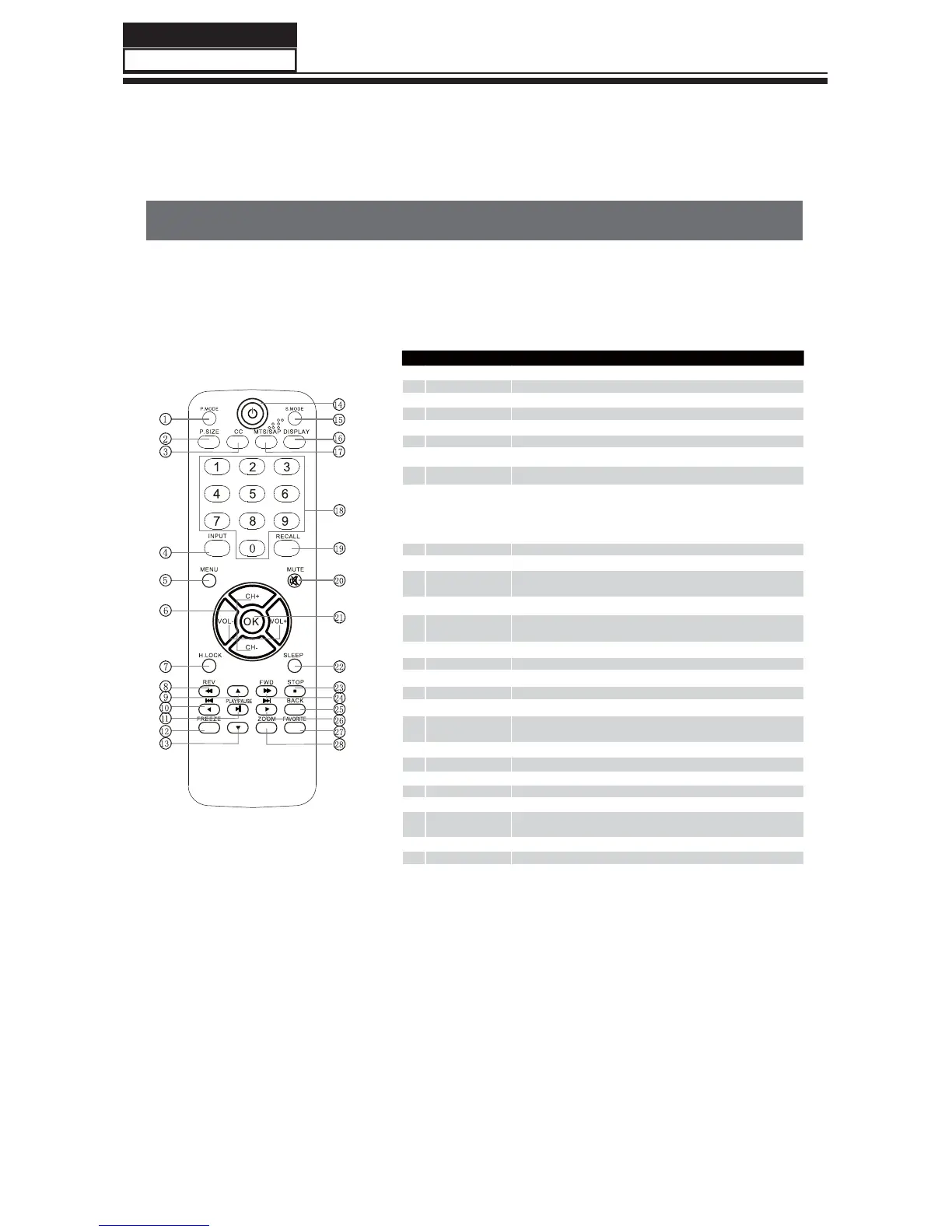
6-2. Get to know your remote control
- The remote control cannot be operated unless the batteries are properly loaded.
- When using the remote control, aim it at the remote control sensor on the TV.
Function introduction
1
Picture Mode Press this key continuously to select the picture mode.
2
P.SIZE Press to change the aspect ratio.
3
CC Select a closed caption option.
4
INPUT Press this key to open/close signal source option menu.
5
MENU Press this key to display or exit the main menu.
6
CH+/-,VOL+/-
Volume/Channel Selection.
7
H.LOCK
Hotel Lock button.
8
REV
Fast Reverse in USB function.
9
0
C
P
THUMBSTICK(Up/
Down/Left/Right)
Allows you to navigate the on-screen and
0
for Previous,
P
for Next
in USB function.
A
PLAY/PAUSE
Press this key to play or pause in USB function.
B
Freeze
Press once to display a frozen image of the current program, but audio continus.
Press again to return to the program.
D
POWER
Press this key to start TV from standby mode, press it again to return to standby
mode.
E
Sound Mode Press this key continuously to select the sound mode.
F
Display Press to display the TV status information on the top of the TV screen.
G
MTS/SAP Select MONE,STEREO,SAP .
H
0-9 This keys are used to select a channel.
I
Recall
Press to jump back and forth between two channels.
J
MUTE
Press this key to mute the sound, press it again to activate the sound. The sound may
be activated by turning the TV on again or increasing the volume.
K
OK
Press this key to conrm the selection.
L
SLEEP
Displaying the sleep time.
M
STOP
Allows you to stop playing a music in USB function.
N
FWD
Fast forward in USB function.
O
BACK
Press to return to the previous menu.
Q
Favorite Open the favorite channel list in TV.
R
Zoom Picture zoom function.
Remote Control Function
LWHPV
THUMBSTICK
(Up/
Down/Left/Right)
Service Manual
Model No.:
/)
40



 To Next Page