
 Need help?
Do you have a question about the Haier YR-E16b and is the answer not in the manual?
Essential safety guidelines for installing and operating the system to prevent hazards.
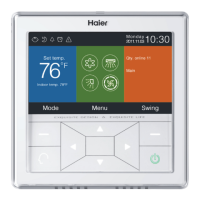
Introduces the main display elements and describes the function of various keys and icons.
Explains the specific functions of each button and navigation control on the wired controller.
Describes special functions like Quiet, Turbo, Child Lock, Forced Defrost, Ventilation, and Health modes.
Covers error code display, schedule status, filter status, and Temp. ECO function indicators.
Details the information displayed in key areas like set temperature, indoor temperature, date, and time.
Explains mode selection, fan speed control, quantity of online units, and status indicators like defrost and standby.
Describes the display of outdoor temperature and humidity, noting model dependency.
Guides users on how to navigate to the operation and settings menu using the MENU key.
Details how to configure segmented timing schedules for cooling or heating modes, including time and temperature adjustments.
Explains the process for setting up random timing schedules, viewing defaults, and managing entries.
Describes how to handle conflicting schedule settings and default parameter configurations during setup.
Covers confirming settings, navigating schedule displays, editing, and deleting schedule entries.
Explains how to set the current time, date, and preferred format for display on the controller.
Details how to configure extra functions, manage conflicts between functions, and understand model-specific availability.
Describes specific functions like Electrical heating, Health airflow (up/down), and Night quiet modes.
Explains how to view current and past error codes and provides methods to clear the error history.
Covers password functions including setting, recovery, and accessing general help topics.
Details how to set swing type (Up/Down, Left/Right, Four-way cassette) and angle control for air deflectors.
Explains adjusting deflector angles, swing control modes, and specific angle definitions for Up/Down swing.
Lists the default swing angles for Up/Down and Left/Right swing across different operating modes.
Configures screen saving time options and display brightness levels for the controller interface.
Allows selection of display language, temperature unit (°C/°F), and schedule display type.
Controls the display of indoor/outdoor temperature, humidity, and PM2.5 readings on the main interface.
Allows viewing unit details like mode, speed, address, and central/communication addresses.
Explains setting wired controller communication addresses and central addresses for unit management.
Configures fan speed settings and customizes mode combinations for various applications.
Covers protocol selection, power off memory, main/sub controller setup, and ambient temperature revision.
Allows selection of the source for indoor temperature and humidity readings, and Wi-Fi module availability status.
Configures the ECO function's temperature limits for heating and cooling/dry modes, and manages overrun settings.
Records and allows clearing of continuous and total running times for the unit.
Allows setting ESP grade and adjusting various EEV (Electronic Expansion Valve) parameters for system optimization.
Details parameters for heating mode, including EEV opening angles, target temperature, and anti-cold air settings.
Details cooling mode parameters like EEV angles and target overheat degree, and configuration for motion sensing functions.
Configures motion sensing activation (follow, evade, function) and related parameters like group selection.
Provides step-by-step instructions for physically wiring the wired controller to the air conditioning unit.
Explains methods for connecting one wired controller to one or up to 16 indoor units.
Describes the setup where two wired controllers (main and sub) are used to control a single indoor unit.
Information regarding compliance with FCC and Industry Canada regulations for digital devices.
 General
| Accuracy | ±1°C |
|---|---|
| Control Method | ON/OFF Control |
| Display | LED |
| Operating Temperature | 0°C to 50°C |
| Input Type | Thermocouple |
| Output Type | Relay |
| Power Supply | 220V AC |

 To Next Page
