12
Starting Up
2.4 Prior to starting up
Carry out the following checks before
starting the machin
e:
1. Check the charge status of the bat-
teries.
2. Mount Lint filter for carpet, see chap-
ter 5.7.3.
3. Check the levels of wear on the rota-
ry brush and side brush.
4. Check the fill level of the sweepings
co
ntainer.
2.5 Operation
Please read the Safety Information in
Ch
apter 1. Before switching the ma-
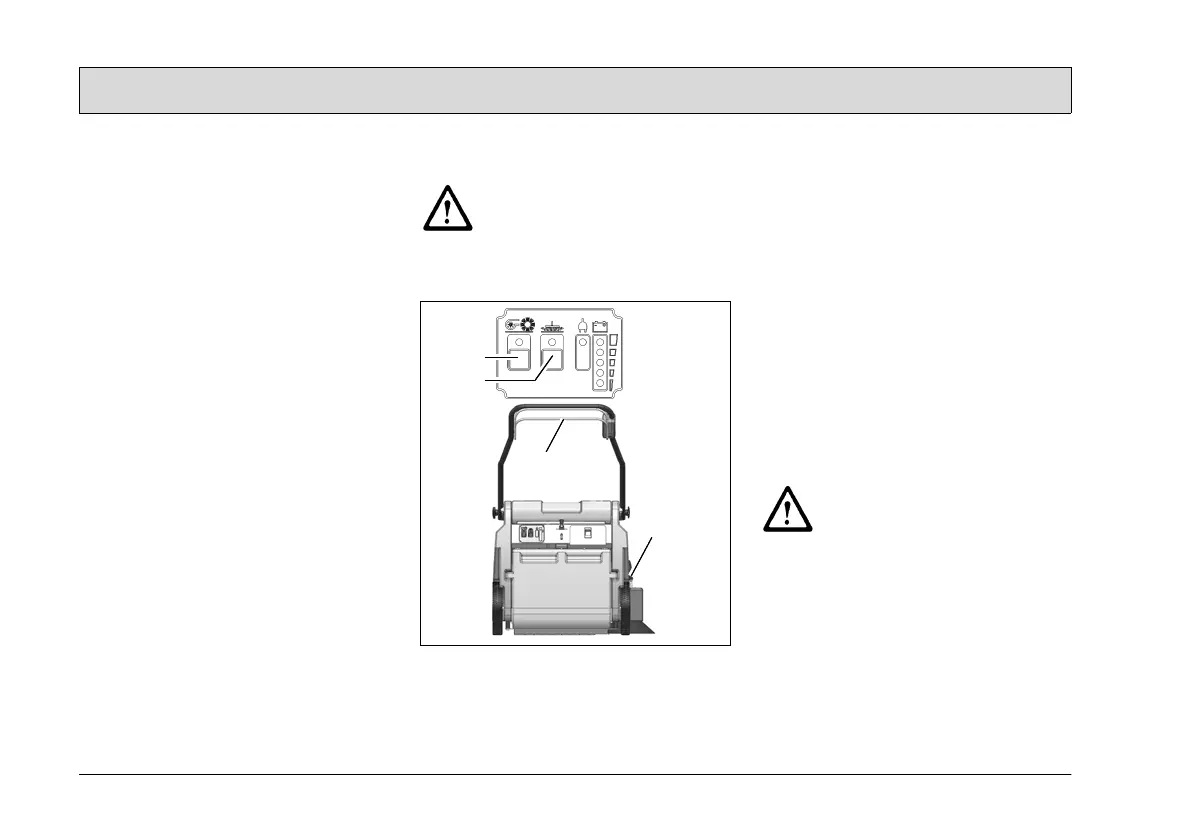
chine on, ensure that the drive bar (Fig.
3/3) on the handle has not been actuat-
ed.
1. Switch the machine on using the
(Fig. 3/1) button: rotary brush drive,
dust vacuum and side brush drive
are
ready to operate.
2. Lower the side brush to its working
po
sition using the lever (Fig. 3/4).
When working without the side
brush: do not lower the side brush
and press the button (Fig. 3/2) for the
side brush once. The green control
la
mp goes out.
3. Actuate the drive bar (Fig. 3/3) on the
handle: the machine starts to work.
Start work immediately after
actuating the drive bar, other-
wise imprints could be pro-
duced on the floor. Release the
drive
bar when driving over
thresholds.
Fig.3
2.6 Stopping the machine
When the drive bar is released, the ro-
tary brush drive, dust vacuum and side
brush drive switch off automatically.
2.7 After completing work
1. Drive to an appropriate maintenance
area.
2. Stop the machine. Raise the side
brush to its idle position and switch
the machine off.
3. Actuate the filter shaker.
4. Empty the sweepings container.
5. Check the brush space for accumu-
lations of dirt.
6. Check the charge status of
the bat-
teries.
It is not permitted to
clean the
machine with a pressure wash-
er or steam blaster.



 To Next Page