10
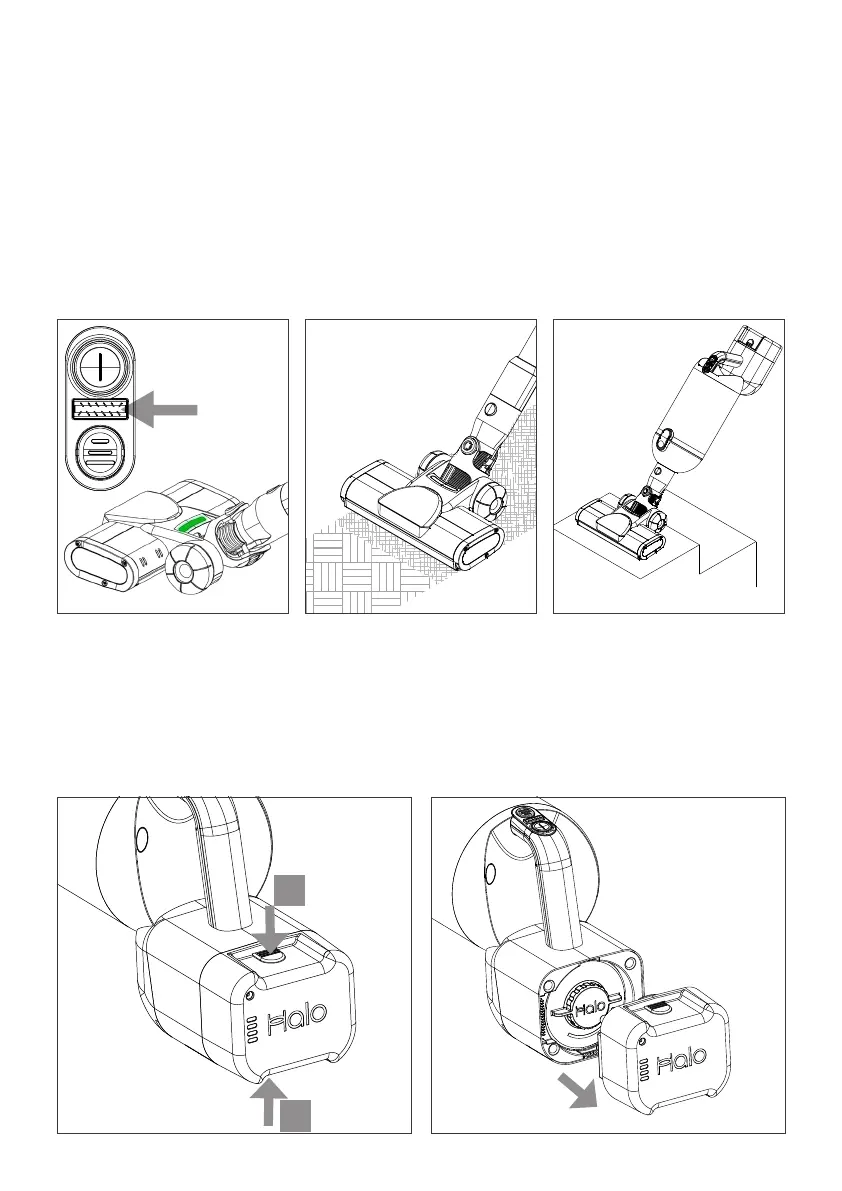
Motor Brush Head
Press the Motor Brush
button to start the
brushes turning. A green
light will appear while in
operation.
Brush usage
The Motor Brush Head
can be used for cleaning
carpets and rugs. The
brush should be switched
off for hard floor
surfaces.*
Cleaning Stairs
For stability and
convenience the Motor
Brush Head or Mini Power
Brush can be connected
directly to the Capsule X
main unit.
1. Press top and bottom Battery release
buttons (A and B) together.
2. Withdraw Battery from Capsule X
main unit.
The Battery can be charged whilst
removed.
Removing the Battery
B
A
*Note: For the very best cleaning performance on Hard Floor Halo recommend
using the available Hard Floor Roller.


 To Next Page