EasyManua.ls Logo

Halo CapsuleX - Getting Started; Fitting the Battery

Halo CapsuleX
20 pages
Print Icon
To Next Page IconTo Next Page
To Previous Page IconTo Previous Page
Loading...
6
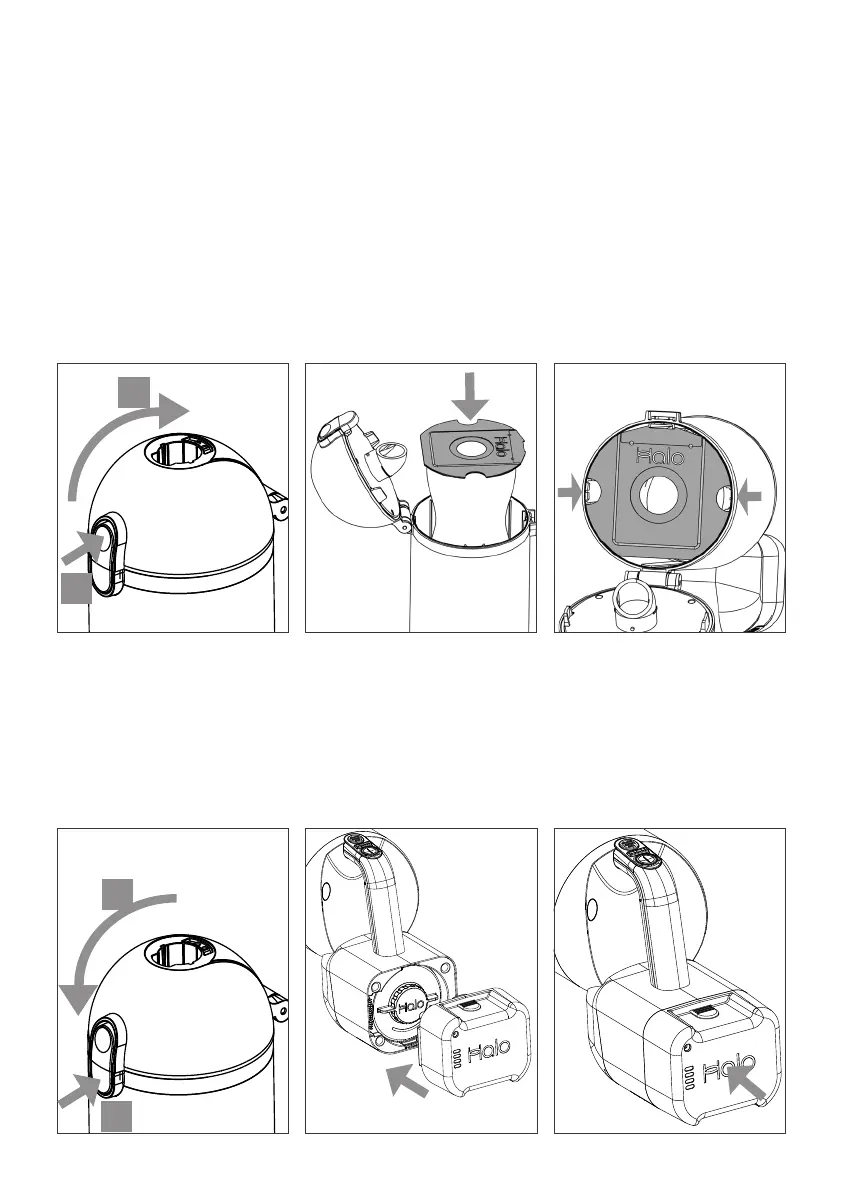
Fitting the Dust Pouch
.
2. Simply drop the Dust
Pouch into the cavity,
with the circular card
outermost.
Getting started
1. Align Battery with rear
of the Capsule X Main
Unit, with the Halo logo
upright.
2. Push the Battery into
place until a audible click
is heard.
Check Battery is secure
both at the top and
bottom before use.
Fitting the Battery
CLICK!
1. Open Capsule X by
pressing latch A and
opening the cover B.
Always remove the
Extension Tube and any
accessories first.
3. Check alignment and
that the Dust Pouch
card is sitting flat.
Reclose.
If the cover does not
close easily check Dust
Pouch allignment.
Do not force closed.
B
A
4. Swing closed the cover
B, if necessary pushing
the latch at position C
until an audible click is
heard.
C
B
CLICK!

Related product manuals