12
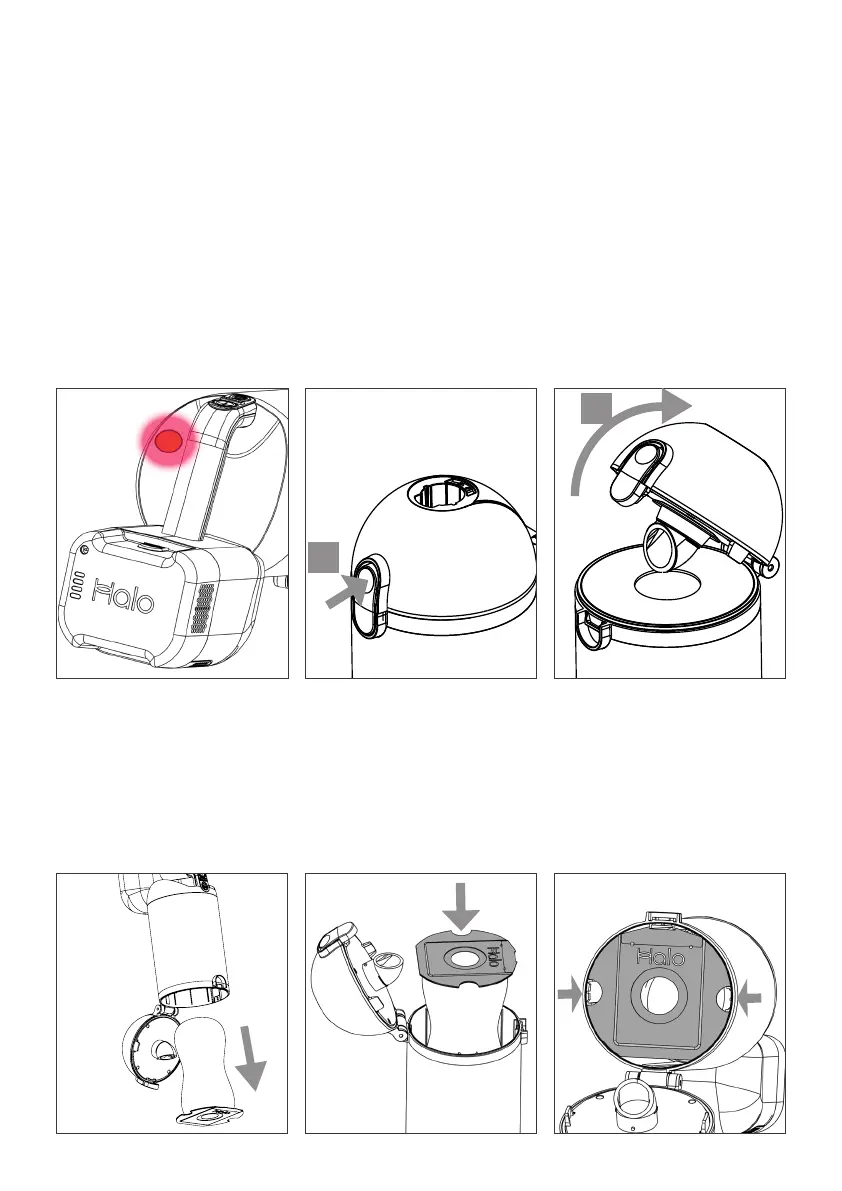
2. Lift the Dust Pouch
clear or let it drop under
its own weight. Always
dispose of Dust Pouches
responsibly.
3. Simply drop the new
Dust Pouch into the
cavity, with the circular
card outermost. .
Changing the Dust Pouch
Dust Pouch indicator
When the Dust Pouch is full and Capsule
X is running in Boost mode the indicator
will constantly light red.
To maximise dirt capacity Halo
recommend occasionally gently shaking
the Capsule X Main Unit between uses
to evenly distribute the dirt in the dust
pouch.
1. Remove the Extension Tube and any
accessories.
Open Capsule X by pressing the latch
A, then swinging open the cover B.
B
A
4. Check alignment and
that the Dust Pouch
card is sitting flat.
Reclose.
If the cover does not
close easily check Dust
Pouch allignment.
Do not force closed.
Use Boost mode periodically to check
the indicator. The light is an indicator
only and Halo recommend intermittent
visual checks inside the dust pouch.


 To Next Page