SET UP VOICETEMPOCLICK
SET UP VOICETEMPOCLICK
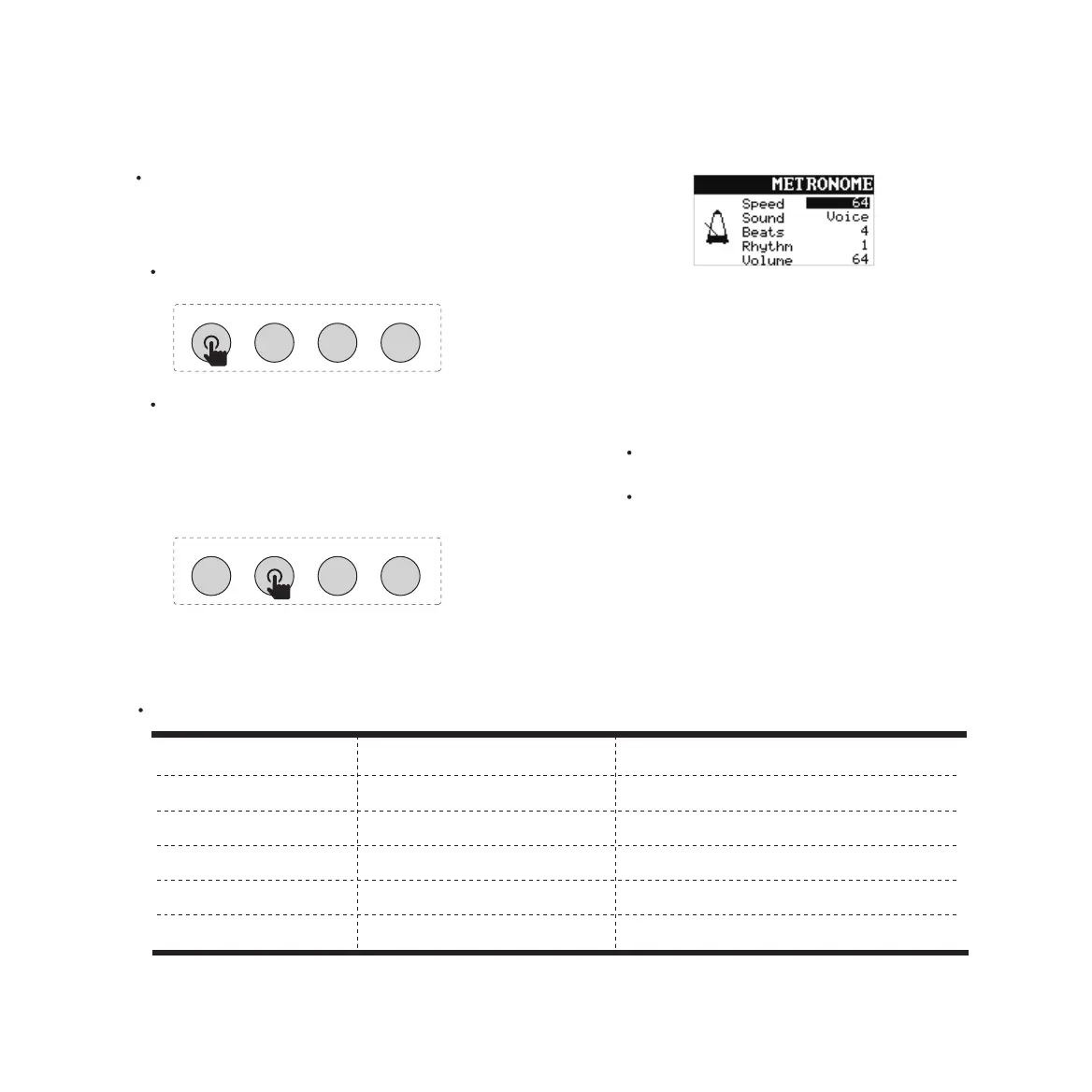
Enter metronome interface.
4. Using the Metronome
4.1 Using the Metronome
Press [CLICK] button, the metronome starts.
4.2 Setting the Metronome
1. Press [TEMPO] button,
Press [CLICK] button again to stop it .
Metronome interface
Metronome parameter
6
1 1/2 1/4 1/8 1/16
Volume
Sound
0-127
6
The volume of metronome
The sound of tempo
Parameter Value Description
Speed 20-260
The speed of tempo, beats per minute(BPM).
Beats
1-9
Rhythm of each beat
Rhythm
Notes for a beat, beats for a measure.
Use [+][-] buttons or [EDITOR] rotary to select
parameter.
Press [RETURN] button.
Use [+][-] buttons or [EDITOR] rotary to edit
value.
Press [RETURN] button again to save the
modified value.
2.
3.
4.
During the metronome on, the pointer in left
icon would swing according to the setting
speed.
Practicing with built-in metronome will help your
perfect your tempo skill.


 To Next Page