11
Lowes.com/harborbreeze
CLOSEMOUNT INSTRUCTIONS
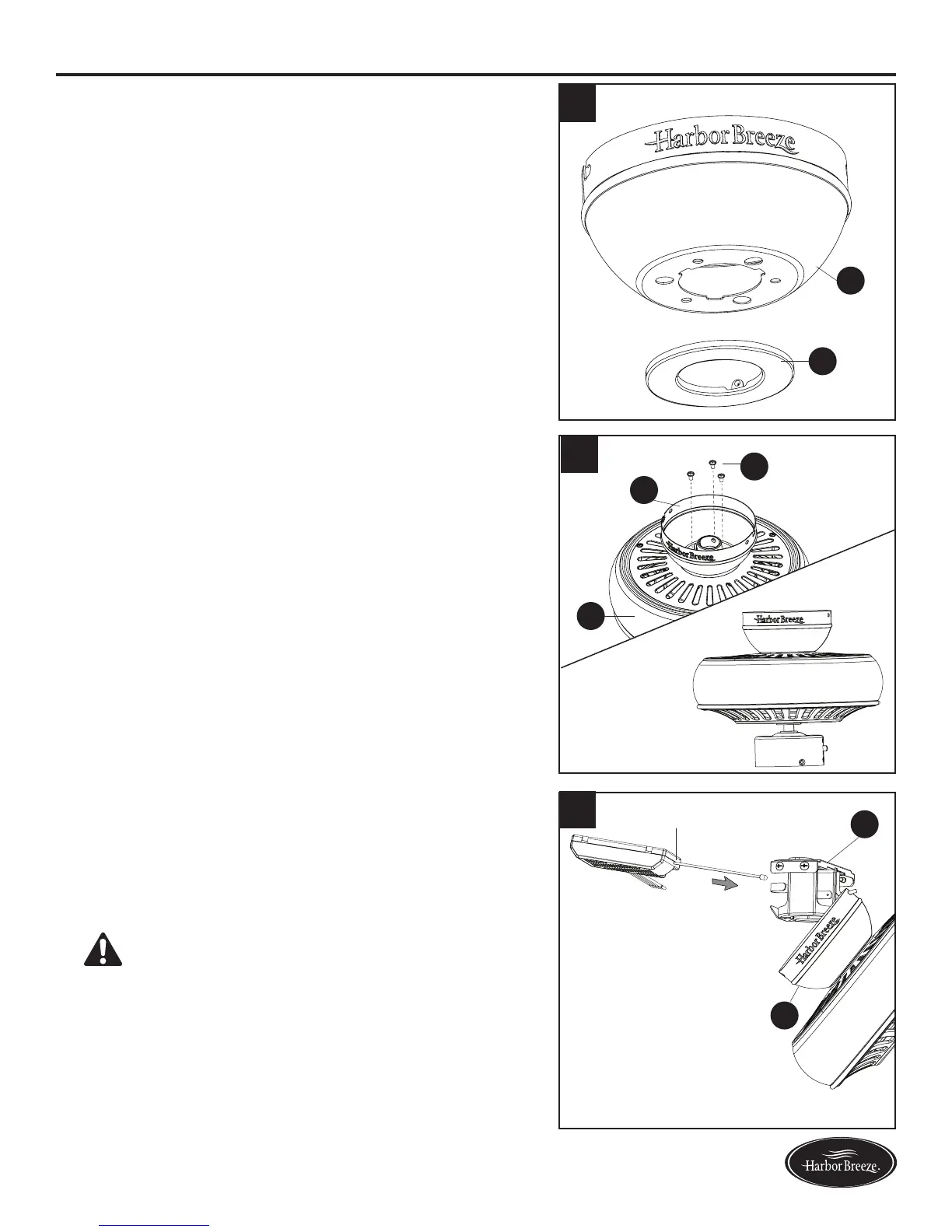
1. Remove and discard the canopy cover (F) from the
bottom of the canopy (D).
Note: The downrod (A) and canopy cover (F) are not
used in this type of installation.
1. Remove the three Phillips-head closemount screws
(Y) from the top of the motor assembly (G). Align
the canopy (D) with the holes in the top of motor
assembly (G), then re-install the Phillips-head
closemount screws (Y) to secure the canopy (D) to
the top of the motor assembly (G).
2. Raise the fan and place the canopy (D) on the hook
on the mounting bracket (E). Then, place the receiver
of remote pack (P) inside the mounting bracket (E)
withatsidefacingtheceiling.
Note: The hook holds the fan temporarily, leaving
hands free for the wiring process.
WARNING: Using a full-range dimmer switch to
control fan will cause a loud humming noise from the
fananddamagetheremote.Toreducetheriskofre
or electric shock, do NOT use a full-range dimmer
switch to control the fan speed.
D
F
3
E
D
Receiver
Y
G
D
1
2




 To Next Page