15
Lowes.com/harborbreeze
FINAL INSTALLATION
Note: If you wish to install the fan without the light kit,
proceed to step 11.
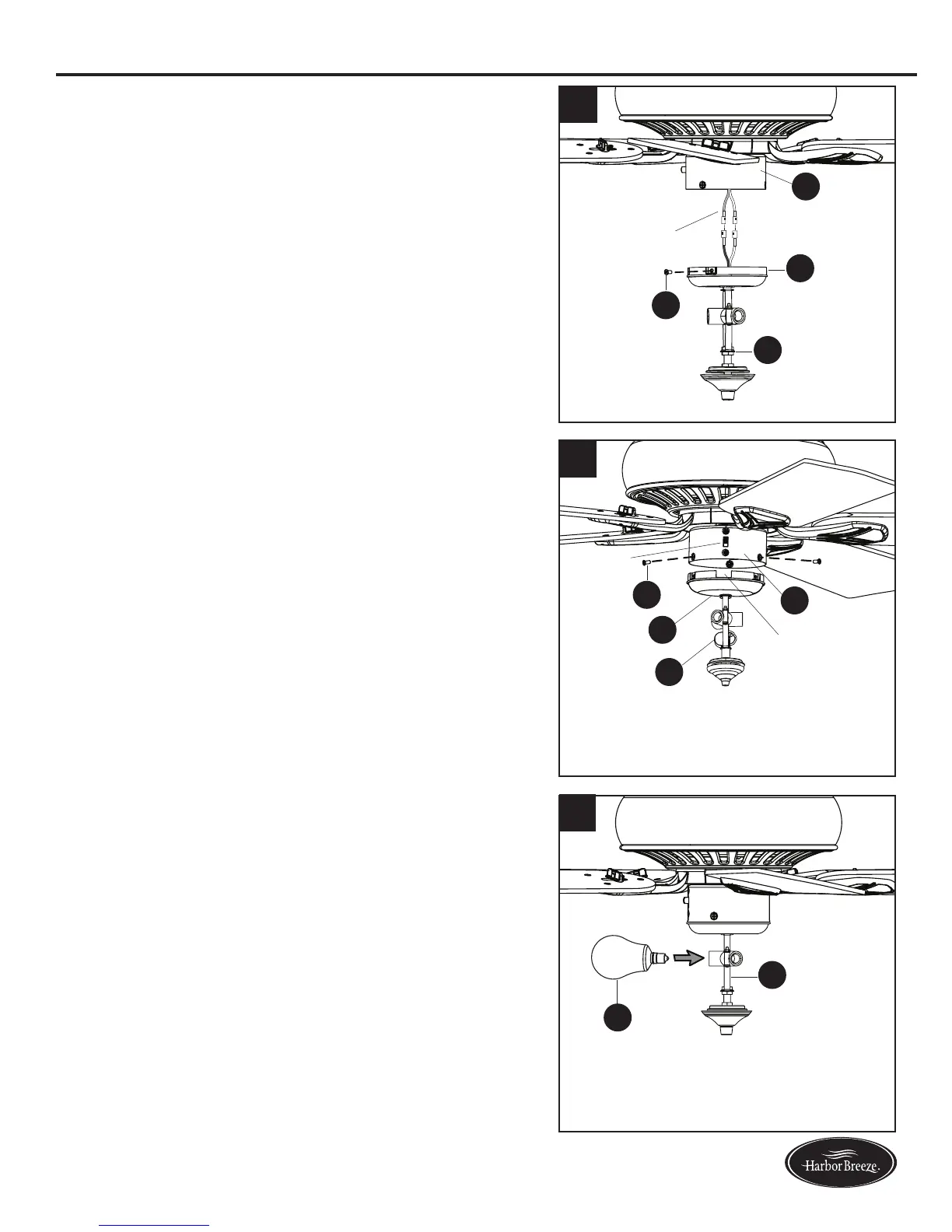
6. To install the light kit (J),rstremoveallthree
switch housing screws (V) from the switch housing
cap (I). Then connect the single-pin connectors from
the switch housing (H) to the single-pin connectors
from the light kit (J) -- blue to black and white to white.
7. Align the notch in the switch housing cap (I) with the
reverse switch on the switch housing (H). Then secure
the light kit (J) to the switch housing (H) using the
previously removed switch housing screws (V).
8. Install the bulbs (Q) into the sockets on the light kit (J).
IMPORTANT: Make sure you allow the bulbs (Q) and
light kit (J) to cool before you replace the bulbs.
6
H
J
I
V
H
J
I
V
7
8
Q
J
Notch
Reverse
Switch
Single-pin
Connector




 To Next Page