16
Lowes.com/harborbreeze
FINAL INSTALLATION
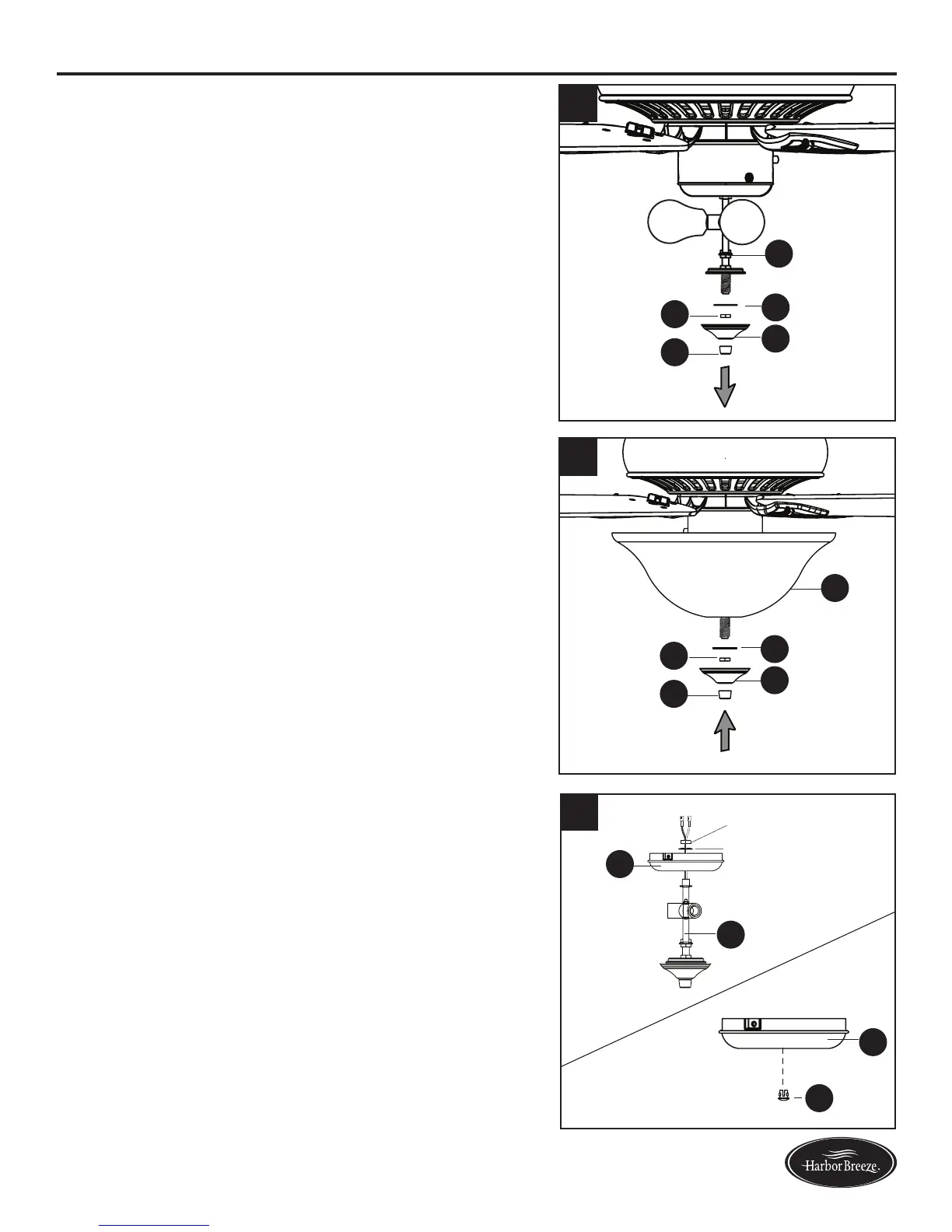
9.Removethepreassemblednial(L),nialcap(K),hex
nut (T) and rubber washer (S) from the light kit (J).
10. Lift the glass bowl (M) onto the threaded rod at the
bottom of the light kit (J). Re-install rubber washer (S)
andsecurewithhexnut(T).Liftthenialcap(K)onto
thethreadedrod,securingwithnial(L).
Proceed to step 13.
11. To install the fan without the light kit (J), remove
the hex nut and lock washer from the rod on the
inside of the switch housing cap (I). Remove light kit
(J) from the switch housing cap (I) and discard, then
install the plug button (AA) into the center hole of the
switch housing cap (I).
12
10
9
S
J
S
M
T
T
K
K
L
L
AA
I
J
I
11
Hex Nut
Washer




 To Next Page